Sarah Townsend's Blog
July 17, 2025
The essential software tools powering my freelance business – and why they’re worth it
I recently wrote about how five simple software swaps saved me £958.16 a year. (It’s here if you missed it.)
In this follow-up, I’m sharing the apps and tools I rely on to make freelance life smoother, smarter and more manageable.
Here are the software tools I rely on every week – and why I think they’re worth it.
TextExpander (£36.84 a year)I send a lot of emails – client onboarding, project updates, quote follow-ups – and TextExpander saves me hours.
It turns simple shortcuts into full emails, links or paragraphs, and helps me stay consistent while speeding up the boring stuff.
(Did you really think I typed Survival Skills for Freelancers 20 times a week? Nope: SSFF, thanks!)
I’ve set up snippets for everything from phone numbers and client names to complete email templates and boilerplate responses. It means I don’t have to remember everything, or waste time creating the basics from scratch.
I’d be lost without it.
If you ever find yourself typing the same thing twice – and let’s be honest, we all do – invest in TextExpander. You’ll thank me later.
Microsoft 365 (£12.10 a month)A lot of freelancers balk at paying for Word and Excel when Google Docs and Sheets are free. For me, Microsoft 365 is worth every penny.
I do most of my client work in Word, use Outlook for email and calendar, and keep track of my income in Excel.
1TB of cloud storage means my work is backed up automatically (no relying on tedious manual backups, which I routinely forgot to do).
My subscription also includes Teams – which replaced Zoom (saving me £129 a year) – and PowerPoint, should I need it.
Canva Pro (£107.88 a year)I’m not a designer, but I do create a lot of visual content – from LinkedIn carousels to webinar slide decks.
Canva makes creating eye-catching, fully branded content quick and easy.
For me, the Pro version earns its keep for the brand kits, folders, stock photos and countless templates when I need inspiration.
And my kids use it for updating their CVs, so… win–win!
TidyCal (£19 lifetime)TidyCal makes it quick and easy for clients to book calls and meetings without the tedium and time-suck of email ping-pong.
It integrates seamlessly with my Outlook calendar (or Google, if you prefer) and I use it for everything from setting up project briefings (complete with personalised reminders) to taking payment for copy coaching and book coaching calls, thanks to the Stripe integration).
I used to pay $144 a year for the same features in Calendly. Now I pay nothing. Nice!
AudioPen (free)Ever find your best ideas come when you’re out walking? Me too.
AudioPen transcribes my rambling voice notes into structured summaries I can actually use.
It’s fast, accurate and freakishly good at turning chaos into clarity. (And yes, this blog started life as a 30-second voicenote!)
I haven’t invested in the pro version of AudioPen yet – but it does come with a shedload of features, so watch this space.
Fathom (free)I’ve always been a copious notetaker, and have the archived notebooks to prove it! The challenge? Reading my own handwriting later!
With Fathom, I never have to take handwritten notes in meetings again. Fathom records and transcribes my video calls, and sends me a summary with key quotes and action points seconds later.
It’s totally free and works seamlessly with Zoom, Teams and Google Meet. If you do any sort of client work or interviews, get on it.
FreeAgent (free with Mettle)Accounting software is rarely fun, but FreeAgent makes the essentials pretty painless.
I use it to create estimates, send invoices and stay on track with my business finances.
It’s included free in the UK with a Mettle bank account (thanks, NatWest) – and I prefer it to Xero by miles.
The takeawayI don’t believe in paying for tools just because everyone else does. But if an app or software tool saves me time, streamlines my processes or makes life easier for my clients, that’s a business investment I’m happy to make.
Got a favourite freelance tool I’ve missed? Tag me on LinkedIn or drop me a DM. I’d love to hear from you!
Want more practical freelance advice, based on 20 years of real-world experience? Check out Survival Skills for Freelancers.
The post The essential software tools powering my freelance business – and why they’re worth it appeared first on Sarah Townsend Editorial.


June 11, 2025
I saved £958.16 a year in my freelance business with 5 simple software swaps. Here’s how I did it
Running a freelance business isn’t cheap – especially when the cost of must-have software stacks up faster than you can say ‘direct debit’.
After 25 years of freelancing, I’ve learned that small changes can make a big difference. So I reviewed the tools I rely on every day, then saved a massive £958.16 with five quick and easy software swaps.
Here’s how I did it.
 Switched from Zoom to Microsoft Teams
You can’t run a freelance business today without video software. For me, that had always meant Zoom. But with briefing calls regularly lasting longer than Zoom’s 40-minute limit, I’d been paying for the platform’s Pro Plan for years.
I’d had a few wobbly experiences with Microsoft Teams, so hadn’t considered switching – until I realised I was already paying for it through my Microsoft 365 subscription.
Much like anything, now that I’m used to Teams, I’m just as comfortable with it. (And I’m especially comfortable with the annual saving!)
Saving: £129 a year
Switched from Xero to FreeAgentSwitching to Xero after years of spreadsheets was painful. I didn’t love the platform – I could never find what I needed – but I’d never thought about trying another provider because I assumed all cloud platforms were the same. Plus, I didn’t fancy another upheaval.
But when my accountant told me I could save £28 a month by opening a Mettle (NatWest) bank account and getting FreeAgent free, I decided to give it a shot.
And you know what? It was a breeze. Three months in, I feel more confident using FreeAgent than I ever did with Xero.
Saving: £336 a year
Switched from Calendly to TidyCalCalendly changed my life. No more email ping-pong – clients could see my availability and book instantly. I even linked to Stripe so that I could collect payment for my paid copy coaching and book coaching calls.
But Calendly was costing me $144 a year. So when a fellow copywriter recommended TidyCal – which offers the same core features for a lifetime cost of just £19 – the switch was a no-brainer.
(Extra win: 10% off via AppSumo.)
Saving: £87.44 this year. £106.44 a year ongoing.
Switched from Otter to FathomI’m a prolific notetaker – and famously bad at reading my own handwriting! I’d been experimenting with Otter.ai to transcribe and record my video calls and somehow got sucked into a paid version of the app.
At $99 a year it wasn’t bad value… but Fathom does the same job free. It integrates neatly with Teams, Zoom and Google Meet, and its summaries – complete with action points – are bang on.
Happy Sarah, happy bottom line.
Saving: £74 a year
Downgraded – then ditched – AdobeI’ve always used InDesign while working on my books – and I’d been paying £26.06 a month for Adobe Creative Cloud as a result. But since The Little Book of Confusables 2 has been published – and the 2025 edition of Survival Skills for Freelancers has gone live – I’ve no longer needed InDesign.
A quick call to Adobe and I downgraded to Acrobat Pro only…
…then discovered the free Adobe Acrobat Reader gave me all the features I needed – so I cancelled my subscription altogether.
Saving: £312.72 a year
The ta-da moment…That’s a grand total of £958.16. Not bad for a few hours’ admin!
Take a look at your software subscriptions: a quick review could save you a small fortune! Got a better app swap? I’d love to hear it. Drop me a DM or tag me on LinkedIn.
(Just remember to cancel those direct debits! Paying twice for two apps that do the same thing.)
Want more practical freelance advice, based on 20 years of real-world experience? Check out Survival Skills for Freelancers.
The post I saved £958.16 a year in my freelance business with 5 simple software swaps. Here’s how I did it appeared first on Sarah Townsend Editorial.
I saved £782.94 a year in my freelance business with 5 simple software swaps. Here’s how I did it
Running a freelance business isn’t cheap – especially when the cost of must-have software stacks up faster than you can say ‘direct debit’.
After 25 years of freelancing, I’ve learned that small changes can make a big difference. So I reviewed the tools I rely on every day, then saved a massive £782.94 with five quick and easy software swaps.
Here’s how I did it.
 Switched from Zoom to Microsoft Teams
You can’t run a freelance business today without video software. For me, that had always meant Zoom. But with briefing calls regularly lasting longer than Zoom’s 40-minute limit, I’d been paying for the platform’s Pro Plan for years.
I’d had a few wobbly experiences with Microsoft Teams, so hadn’t considered switching – until I realised I was already paying for it through my Microsoft 365 subscription.
Much like anything, now that I’m used to Teams, I’m just as comfortable with it. (And I’m especially comfortable with the annual saving!)
Saving: £129 a year
Switched from Xero to FreeAgentSwitching to Xero after years of spreadsheets was painful. I didn’t love the platform – I could never find what I needed – but I’d never thought about trying another provider because I assumed all cloud platforms were the same. Plus, I didn’t fancy another upheaval.
But when my accountant told me I could save £28 a month by opening a Mettle (NatWest) bank account and getting FreeAgent free, I decided to give it a shot.
And you know what? It was a breeze. Three months in, I feel more confident using FreeAgent than I ever did with Xero.
Saving: £336 a year
Switched from Calendly to TidyCalCalendly changed my life. No more email ping-pong – clients could see my availability and book instantly. I even linked to Stripe so that I could collect payment for my paid copy coaching and book coaching calls.
But Calendly was costing me $144 a year. So when a fellow copywriter recommended TidyCal – which offers the same core features for a lifetime cost of just £19 – the switch was a no-brainer.
(Extra win: 10% off via AppSumo.)
Saving: £87.44 this year. £106.44 a year ongoing.
Switched from Otter to FathomI’m a prolific notetaker – and famously bad at reading my own handwriting! I’d been experimenting with Otter.ai to transcribe and record my video calls and somehow got sucked into a paid version of the app.
At $99 a year it wasn’t bad value… but Fathom does the same job free. It integrates neatly with Teams, Zoom and Google Meet, and its summaries – complete with action points – are bang on.
Happy Sarah, happy bottom line.
Saving: £74.14 a year
Downgraded my Adobe packageI was paying £26.06 a month for Adobe Creative Cloud. But now that The Little Book of Confusables 2 is published – and the 2025 edition of Survival Skills for Freelancers is live – I no longer need InDesign.
A quick call to Adobe and I’ve downgraded to Acrobat Pro only. Everything I need for a fraction of the cost.
Saving: £156.36 a year
The ta-da moment…That’s a grand total of £782.94. Not bad for a few hours’ admin!
Take a look at your software subscriptions: a quick review could save you a small fortune! Got a better app swap? I’d love to hear it. Drop me a DM or tag me on LinkedIn.
(Just remember to cancel those direct debits! Paying twice for two apps that do the same thing.)
Want more practical freelance advice, based on 20 years of real-world experience? Check out Survival Skills for Freelancers.
The post I saved £782.94 a year in my freelance business with 5 simple software swaps. Here’s how I did it appeared first on Sarah Townsend Editorial.
February 18, 2025
Thinking of self-publishing a business book? Here’s my story…
My first book, Survival Skills for Freelancers came out in 2020* – conveniently, at a time when the whole world faced the challenges of working from home.
It shares 20 years of freelance advice, plus quotes and case studies from 100 freelancers – and it’s helped entrepreneurs in 28 countries grow in confidence and show self-employment who’s boss.
*A new 2025 edition has just been released with a lower price (£11.95) and advice from 20 more freelancers.
My second and third books – The Little Book of Confusables 1 and 2 – demystify over 1,000 misused words using fun, memorable tips. They’ve been described as “an absolute joy” and “essential for anyone who ever writes anything” (which means pretty much everyone).
The original Little Book of Confusables won three awards, including a gold medal, and The Little Book of Confusables 2 has been shortlisted for a non-fiction award in the 2025 Selfies (keep everything crossed!).
If your books were a sweet treat, what would they be?The Little Book of Confusables 1 and 2 would be pick and mix.
They’re the sort of delicious, fun book you can dip into when you want – whether you need an answer to a language conundrum, a chuckle or an “I did not know that!” moment.
Where did the idea for your books come from?I first had the idea for The Little Book of Confusables back in 2016, when my #confusables tips became popular on social media. I remember meeting up with someone who’d published fiction on Amazon and leaving our chat thinking “absolutely not”. It sounded like a minefield. (I wasn’t far wrong, to be fair!)
Four years after I’d parked the idea of creating The Little Book of Confusables, I shared a heart-on-your-sleeve blog on LinkedIn about surviving and thriving as a freelancer, based on my own experience.
The blog became so popular that I decided it’d make a good foundation for a book.
Survival Skills for Freelancers started with the tagline how to go solo without going loco, which I loved but ended up dropped after the CEO of Mental Health First Aid England – a huge supporter of positive language around mental health – wrote the foreword.
What was your main inspiration to write a book?You know how they say everyone has a book in them? I never felt that way. I write for a living – the last thing I ever wanted to do was spend my spare time writing, too. But the ideas came along and seemed to want to be written, so… who am I to argue?!
Where’s your favourite place to write?Confusables 2 was pretty much entirely written in the lounge bar at my gym (I call it my second office). I have ADHD and find I’m most likely to get into a state of hyperfocus when the conditions are just right. For me, that’s a busy location, surrounded by people, listening to a trance playlist on my noise-cancelling AirPods!
What’s your favourite writing snack?I started 16/8 fasting in July 2023 and it’s pretty much become my lifestyle. I break my fast every working morning with a raw green protein shake, followed by coffee and a homemade protein bar. (What can I say? I’m a creature of habit!)
I’m pretty disciplined and rarely snack now, but when I do, it’s a combination of cheese, crisps and chocolate.
As a copywriter, did you find parts of the book writing process easier or more challenging?I wouldn’t say I found it easier or harder – just different. I love using my own voice when I’m writing, and don’t always get a chance to do that when copywriting for clients.
Did you use professionals in the self-publishing process?I used designers I’d worked with on client projects for my cover design and book layout, and an editor I’ve known for years as my second pair of eyes.
Even though I’m a copywriter and editor myself, it’s next to impossible to spot mistakes in your own work, so it’s a necessary investment.
I uploaded everything to Amazon KDP myself, and invested in a supply of litho-printed copies so I could sell direct.
Most indie authors would agree that the upload process can be glitchy – if not a total pain – but I wouldn’t have been able to support readers in 28 countries without Amazon. For me, it’s paid off.
What was the hardest part of the self-publishing process for you?Getting the timings right was challenging. I expected each stage of the process to take longer than it did in reality.
For example, with Survival Skills for Freelancers, I uploaded the manuscript way too long before the launch date, which meant it missed the boost Amazon naturally gives to new titles.
It still hit bestseller in four categories in the launch week, but may have done even better if I’d got my timings right.
The other thing I found hard, given I have clients and a day job as a copywriter, was the fact that book promotion can be a full-time job if you let it.
I spent way too much time spreading the word about the first book.
Truthfully, I hadn’t thought beyond the launch date: I’d assumed I’d hit publish then go back to the day job, but it didn’t happen. Suddenly I was being asked to guest on podcasts (I’m now close to 90 guest appearances), deliver webinars for professional bodies, be interviewed for publications, and even become a mentor for a freelance programme for women… it was exciting! But I took my eye off the ball and my income plummeted as a result.
What did you enjoy most about the self-publishing process?It has to be launch day! Seeing people’s social posts and photos, and reading reviews is so gratifying. Pure dopamine!
What advice would you give to other writers looking to start the self-publishing journey?Self-publishing is a minefield, and you need to know what you’re doing. Done well, a business book can position you as the go-to expert in your field. Done badly, it’s an expensive waste of time.
If you want to avoid adding to the mountain of mediocre business books out there, do your research! (Reading blogs like this is a great place to start.)
Do you plan to write any more books?There will be other books, for sure! I’ve already started a note on my phone that will become Confusables 3. I may also write a book for neurodivergent freelancers, having had my own diagnosis a couple of years ago and created a successful business around my neurodivergent brain.
I don’t push the ideas, though. They come to me when they’re ready, and I only focus on my books when I have the energy behind them.
My drive to write books that help others and entertain shows in the end result (and the five-star Amazon reviews!).
So far I’ve launched books in 2020, 2022 and 2024. Watch out 2026!
The post Thinking of self-publishing a business book? Here’s my story… appeared first on Sarah Townsend Editorial.
March 11, 2024
DISTINCT vs DISTINCTIVE: simple spelling tips to remember the difference
Here are my simple tips to remember the difference between DISTINCT and DISTINCTIVE.
When to use DISTINCTDISTINCT is an adjective meaning separate, or clearly different from another thing.
You can use DISTINCT in a sentence like this:
“There’s a DISTINCT difference between apples and oranges.”
OR
“The awards cover many DISTINCT categories of filmmaking.”
When to use DISTINCTIVEDISTINCTIVE is an adjective referring to a prominent identifying feature.
You can use DISTINCTIVE in a sentence like this:
“I’d recognise her DISTINCTIVE accent anywhere.”
OR
“Monet’s paintings have a DISTINCTIVE style.”
This sentence shows the difference between DISTINCT and DISTINCTIVE in use:
“The DISTINCTIVE red breast of the robin makes it clearly DISTINCT from other small birds.”
Pro tipTo remember the difference, think about the IVE in DISTINCTIVE. You might say ‘I’VE got DISTINCTIVE green eyes’ (lucky you).
I hope these tips help you remember the difference between DISTINCT and DISTINCTIVE in future!
Get more tips in The Little Book of ConfusablesFun, memorable spelling tips for 600 confusing words, packed into 300+ gorgeous pages: just £11.95.
You’ll wonder how you managed without it!
GOLD award winner: 2023 eLit book awards/Distinguished Favorite: 2023 NYC Big Book Awards.
BUY NOW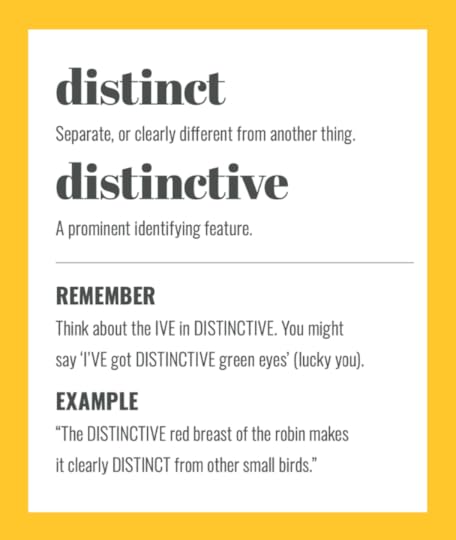
The post DISTINCT vs DISTINCTIVE: simple spelling tips to remember the difference first appeared on Sarah Townsend Editorial.
The post DISTINCT vs DISTINCTIVE: simple spelling tips to remember the difference appeared first on Sarah Townsend Editorial.
March 4, 2024
INCINERATE vs INSINUATE: top tips to help you remember the difference
Here are my simple tips to remember the difference between INCINERATE and INSINUATE.
When to use INCINERATEINCINERATE is a verb describing the process of destroying something in a fire.
You can use INCINERATE in a sentence like this:
“Quick! INCINERATE any incriminating evidence!”
OR
“All of our rubbish gets INCINERATED.”
When to use INSINUATEINSINUATE is a verb meaning to sneakily suggest that something bad is true.
You can use INSINUATE in a sentence like this:
“Are you INSINUATING they had an affair?”
OR
“I’m sorry – I didn’t mean to INSINUATE you cheated on the exam.”
This sentence shows the difference between INCINERATED and INSINUATED in use:
“The police INSINUATED that the criminals had INCINERATED the evidence.”
Pro tipTo remember the difference, remember that toxic waste is burned in an INCINERATOR. The process of burning produces CINders while INSINUATE contains SIN – something that’s often INSINUATED.
I hope these tips help you remember the difference between INCINERATE and INSINUATE in future!
Get more tips in The Little Book of ConfusablesFun, memorable spelling tips for 600 confusing words, packed into 300+ gorgeous pages: just £11.95.
You’ll wonder how you managed without it!
GOLD award winner: 2023 eLit book awards/Distinguished Favorite: 2023 NYC Big Book Awards.
BUY NOW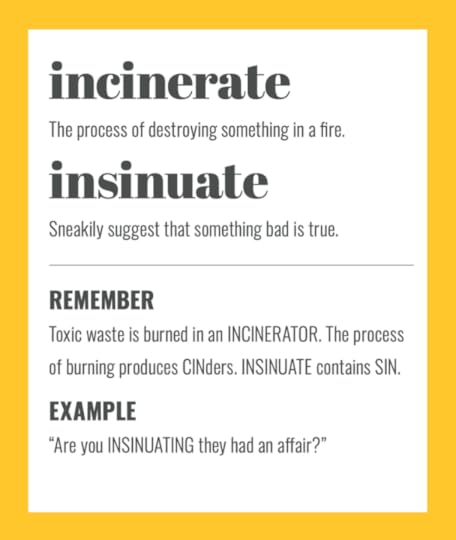
The post INCINERATE vs INSINUATE: top tips to help you remember the difference first appeared on Sarah Townsend Editorial.
The post INCINERATE vs INSINUATE: top tips to help you remember the difference appeared first on Sarah Townsend Editorial.
February 26, 2024
CURB vs KERB: top tips to help you remember the difference
Here are my top tips to learn the difference between CURB and KERB.
When to use CURBCURB means limit or restrain. It’s also the American English spelling of the British English word, KERB – meaning the edge of a pavement (or sidewalk).
You can use CURB in a sentence like this:
“CURB your spending habits before you get into debt!”
OR
“Avoid hitting the CURB when you park!”
When to use KERBKERB is a noun and the American English spelling of the British English word, CURB. It describes the raised edge of a pavement or path.
You can use KERB in a sentence like this:
“Parking on the KERB is bad for your tyres.”
OR
“Learner drivers often hit the KERB.”
Pro tipTo remember the difference, think of the popular American sitcom CURB Your Enthusiasm.
I hope these tips help you remember the difference between CURB and KERB in future!
Get more tips in The Little Book of ConfusablesFun, memorable spelling tips for 600 confusing words, packed into 300+ gorgeous pages: just £11.95.
You’ll wonder how you managed without it!
GOLD award winner: 2023 eLit book awards/Distinguished Favorite: 2023 NYC Big Book Awards.
BUY NOW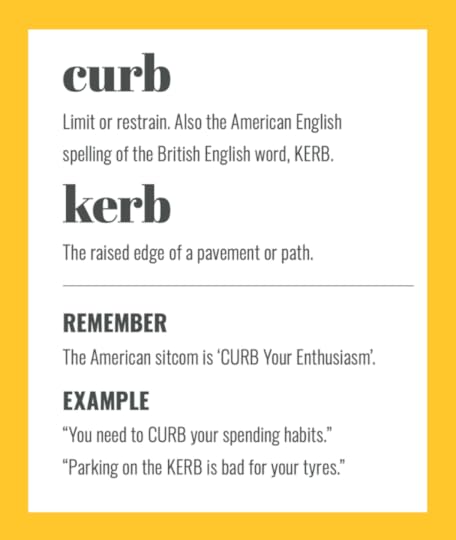
The post CURB vs KERB: top tips to help you remember the difference first appeared on Sarah Townsend Editorial.
The post CURB vs KERB: top tips to help you remember the difference appeared first on Sarah Townsend Editorial.
February 19, 2024
EMACIATED vs EMANCIPATED vs EMASCULATED: simple tips to remember the difference
Here are some simple tips to remember the difference between EMACIATED, EMANCIPATED, and EMASCULATED.
When to use EMACIATEDEMACIATED is an adjective that means thin and frail because of a lack of nutrition.
You can use EMACIATED in a sentence like this:
“The remaining survivors were EMACIATED.”
OR
“The stray cat was EMACIATED when we rescued it.”
When to use EMANCIPATEDEMANCIPATED is an adjective that means being free.
You can use EMANCIPATED in a sentence like this:
“She EMANCIPATED herself from her parents’ care aged 15.”
OR
“The slaves were EMANCIPATED at the end of the 19th century.”
When to use EMASCULATEDEMASCULATED is an adjective meaning made weaker or less effective, or deprived of masculinity.
You can use EMASCULATED in a sentence like this:
“The committed was EMASCULATED by local politics.”
OR
“While he’d never admit it, he felt EMASCULATED by her success.”
Pro TipTo remember the difference between these confusing words, think of the similarity between EMASCULATE and MASCULine – and the fact that a freed MAN is EMANCIPATED.
I hope these tips help you remember the difference between EMACIATED, EMANCIPATED and EMASCULATED in future!
Get more tips in The Little Book of ConfusablesFun, memorable spelling tips for 600 confusing words, packed into 300+ gorgeous pages: just £11.95.
You’ll wonder how you managed without it!
GOLD award winner: 2023 eLit book awards/Distinguished Favorite: 2023 NYC Big Book Awards.
BUY NOW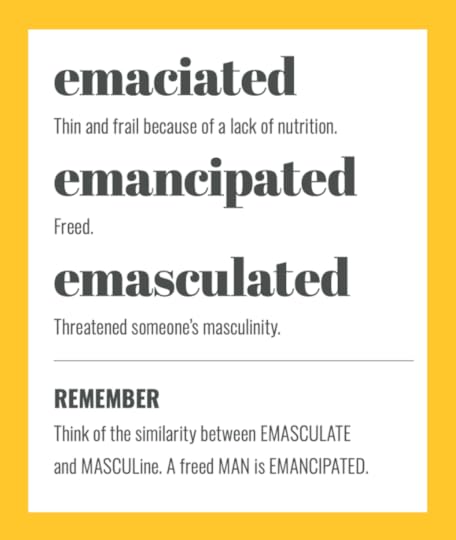
The post EMACIATED vs EMANCIPATED vs EMASCULATED: simple tips to remember the difference first appeared on Sarah Townsend Editorial.
The post EMACIATED vs EMANCIPATED vs EMASCULATED: simple tips to remember the difference appeared first on Sarah Townsend Editorial.
February 12, 2024
EMIGRATE vs IMMIGRATE: simple spelling tips to remember the difference
Here are my top tips to remember the difference between EMIGRATE and IMMIGRATE.
When to use EMIGRATEEMIGRATE is a verb that means to leave a country to live in another.
You can use EMIGRATE in a sentence like this:
“Lots of people EMIGRATE to Spain when they retire.”
OR
“My parents want to EMIGRATE to somewhere warmer.”
When to use IMMIGRATEIMMIGRATE is a verb that means to come to another country to live. It means the opposite of EMIGRATE.
You can use IMMIGRATE in a sentence like this:
“Lots of people IMMIGRATE to Europe for the weather.”
OR
“I’ll need to IMMIGRATE to Canada for the new role.”
This sentence shows the difference between EMIGRATE and IMMIGRATE in use:
“My grandpa EMIGRATED from Ireland in the 1920s and IMMIGRATED to America to find work.”
Get more tips in The Little Book of ConfusablesFun, memorable spelling tips for 600 confusing words, packed into 300+ gorgeous pages: just £11.95.
You’ll wonder how you managed without it!
GOLD award winner: 2023 eLit book awards/Distinguished Favorite: 2023 NYC Big Book Awards.
BUY NOW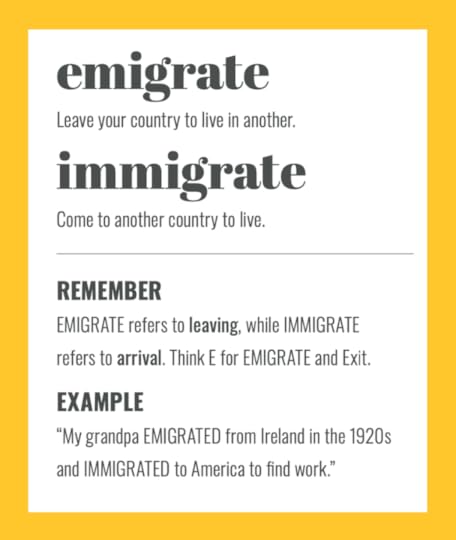
The post EMIGRATE vs IMMIGRATE: simple spelling tips to remember the difference first appeared on Sarah Townsend Editorial.
The post EMIGRATE vs IMMIGRATE: simple spelling tips to remember the difference appeared first on Sarah Townsend Editorial.
February 5, 2024
FATHER vs FARTHER vs FURTHER: top tips to help you remember the difference
Here are my top tips to remember the difference between FATHER, FARTHER, and FURTHER.
When to use FATHERFATHER is a noun that refers to the male parent.
You can use FATHER in a sentence like this:
“My FATHER was a huge inspiration to me.”
OR
“I can’t believe I’m going to become a FATHER!”
When to use FARTHERFARTHER is a comparative adverb that describes the concept of being more distant, physically.
You can use FARTHER in a sentence like this:
“The festival stage is FARTHER away this year.”
OR
“The boat sailed FARTHER and FARTHER away.”
When to use FURTHERRemember that ‘How FAR?’ is linked to ‘How much FARTHER?’.
FURTHER is another word for more distant – but this time, figuratively speaking. In some contexts, it can also mean more.
You can use FURTHER in a sentence like this:
“You couldn’t be FURTHER from the truth.”
OR
“FURTHER research is needed.”
This sentence shows the difference between FARTHER and FURTHER in use:
A restaurant might be closed ‘until FURTHER notice’ – and you may need to travel FARTHER to find a decent meal!
I hope these tips help you remember the difference between FATHER, FARTHER and FURTHER in future!
Get more tips in The Little Book of ConfusablesFun, memorable spelling tips for 600 confusing words, packed into 300+ gorgeous pages: just £11.95.
You’ll wonder how you managed without it!
GOLD award winner: 2023 eLit book awards/Distinguished Favorite: 2023 NYC Big Book Awards.
BUY NOW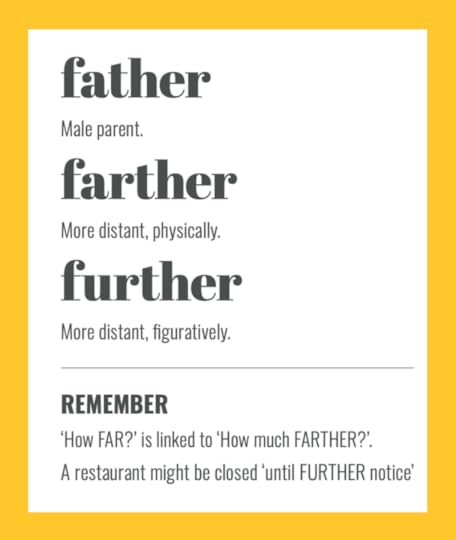
The post FATHER vs FARTHER vs FURTHER: top tips to help you remember the difference first appeared on Sarah Townsend Editorial.
The post FATHER vs FARTHER vs FURTHER: top tips to help you remember the difference appeared first on Sarah Townsend Editorial.