
Goodreads Librarians Group discussion

This topic is about
Conundrum
Book & Author Page Issues
>
Need Help with Book Issues: Series and Goodreads 'Editions'
date newest »
newest »
 Thanks to whomever Librarian set us up properly as a series.
The problem with 'editions' remains. While I can likely manage to set up the additional 'editions' to correspond to Kindle and B&N, I am at a loss how or what to 'combine.'
Is there a Librarian here who can help with this?
 I fixed up the editions, everything should be good to go now.
Thanks, Vicky. Looks very good.
I fixed up the editions, everything should be good to go now.
Thanks, Vicky. Looks very good.Two questions though. One, why are the two 'editions' of the epub? Shouldn't there be just one?
What does combining them do? Does that defeat the purpose of having the buy buttons work by having separate 'editions'? I'm not sure what I am seeing in the Combine interface. There is only the option, apparently, of 'combining' all four 'editions,' not for instance, just combining the duplicated epub editions.
Suggestions?
 If you don't see isbn/asin info when looking at editions, click "expand details" and you'll see not two exact same ebook editions.
I think you are seeing what you call two "epub" editions ( goodreads considers epub a download file type versus an edition or format) because there is [1] an ebook ( epub. ) with isbn 9780985389741 and [2] a nook edition (Barnes and Noble proprietary "pubit" file type that arguably is based on an epub file type/technology licensed thru Adobe AVERT program ) with bnid (correctly in isbn13 field) of 2940015842708.
Take away bnid 2940015842708 ebook edition and the Barnes and Noble purchase link will not find the nook edition (the epub/ebook isbn 9780985389741 won't work to find your book when used to search Barnes and Noble site).
Some members search books on goodreads site by isbn field so always good to have editions of every isbn/asin in which book was/is available.
 _Anonym wrote: "Thanks, Vicky. Looks very good.
Two questions though. One, why are the two 'editions' of the epub? Shouldn't there be just one?"
Nope - as Debbie says, each one has a valid SBN (whether ISBN13 or BNID) and so has a separate record. This would also be the case if it was available from another source which provides their own Standardised Number. (Yes, it can be irritating, but necessary evil)
"What does combining them do? Does that defeat the purpose of having the buy buttons work by having separate 'editions'?"
Combining adds all the EDITION records to one TITLE record. This is VERY necessary otherwise you couldn't just 'flip' from one format to another. As noted above, the two ebook editions are part of the same title, even though they constitute separate editions.
If a screenshot of edition info helps: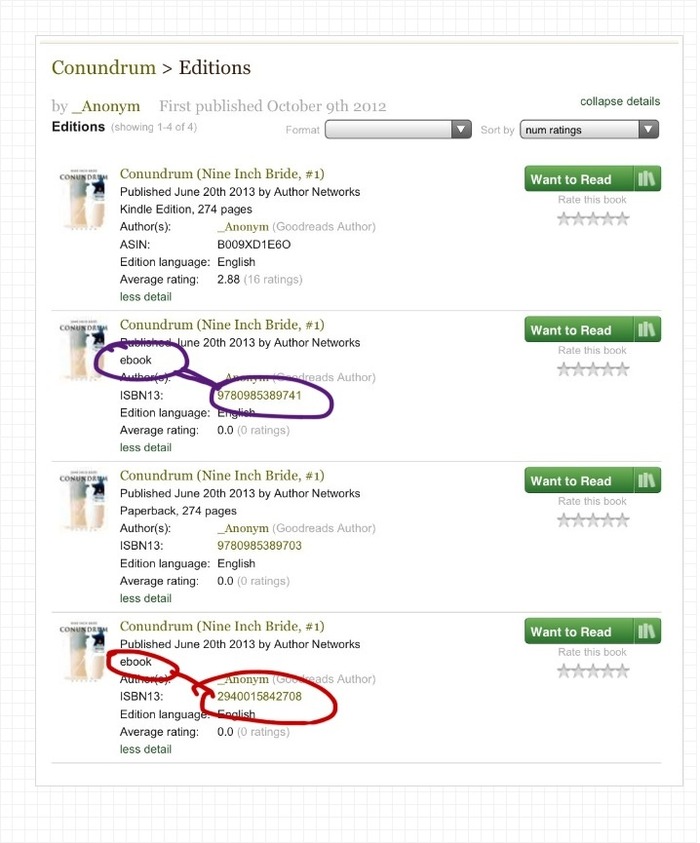 If there had been a duplicate ebook edition, those editions could be merged (meaning no ratings, shelvings or reviews lost) by a librarian.
 From author standpoint--standard purchase links need the isbn/asin info correct in order to work.
From a member standpoint--Goodreads tries to be extremely careful to not mess with a valid edition a member has shelved, rated, etc.--some members shelve whatever shows up in search results or on author pages; but, some are very picky to shelve exact edition wanted. If nook edition was removed or merged, a member wanting to shelve would add back later anyway. That's allowed. Members would not be able to add several nook editions with exact same 294 number in isbn field; system does prohibit multiple editions of same isbn.
It may also be helpful to distinguish what we refer to as a combine and what we refer to as a merge.When two books are identical (by ISBN/ASIN/BNID) we merge them. To do this, one edition is deleted. The reviews from the deleted edition are merged into the other edition so nothing is lost, but the extra edition is deleted.
When two books are different editions of another (an ebook and a Paperback) they are combined. Combining is just a way to group editions of the same work into one group. This allows users to see what other formats a book may be available in and shares among the editions so that users can get more insight into the book without having to look at each edition separately. Your books are currently appropriately combined.
Thank you all very much.


"I actually don't see the series parentheses grayed out as a clickable link when I am on your book page and the series does not show on your author page so I am positive that the series has not been set up so that goodreads members can see it.
What I suggest you need to tell librarians is that you need the book/work set up to have "Conundrum (Nine Inch Bride, #1)" as the title and to make it the first book in the series 'Nine Inch Bride.' "
[ME: Yes, if it's not properly set up as a series, that needs to be done. It seems to me the Book -named Conundrum- not the Series -named Nine Inch Bride- should be in parentheses though. This is Amazon's convention for parentheses? more on this below.]
"- 'Preview edition' is not a valid goodreads edition and those need to be merged to the real editions ('merge' means no reviews/ratings/shelvings will be lost)
- Paperback with isbn 9780985389703 is correct (from createspace so is on amazon.com)
- Ebook with isbn 9780985389741 is correct (in use at kobo, smashwords, google play, etc.)
- Kindle edition with asin B009XD1E6O needs to be added
- Ebook with bnid 2940015842708 needs to be added (nook edition)"
Once all the editions are set up correctly, the edition appropriate book links will just work without your having to do anything."
[ME: That's really all I am after, to get set up as a series (book two will be out in the fall) and to get the book's buy links working on Goodreads.
I can live with Amazon and GR's (mistaken I believe) use of parentheses for the Series name instead of the Book name. (FYI, the reasons this seems mistaken are 1) hierarchy, both in logic and in promotional values; 2) most covers, like ours, put the series name first; 3) putting a numerical value for the book's place in the series after the name of the series, separated by a comma, is a false appositive, i.e., bad grammar; 4) the author should decide what goes in the parentheses, or whether they are used at all.)
Can a Librarian here please help me out with the series and editions issues? ;- ] Thanks.
--Stranger in a Strange Land