
David Estes Fans and YA Book Lovers Unite! discussion
General
>
Book blogging advice for beginners
date newest »
newest »
message 1:
by
Rose (BooksByRose)
(new)
Nov 26, 2014 09:05PM
 I'm looking to begin my own book blog sometime next year and would like advice on beginning a blog, setting up a website, how to go about this, etc. I don't have any date set in stone but just wanted some advice! Thanks :)
reply
|
flag
 Mod
Mod
 Well I'd say to start it using Blogger (blogspot) since it's really easy to use! Creating a Bloglovin' account and connecting your blog to it will get you more followers - as well as adding the GFC followers and follow by email widgets to your sidebar. For starting off, you can make a simple but nice banner here on this site: glowtxt.com and then change it later for a better one. Make sure you fix up the background, font/font size/color so it's readable and nice. On the sidebar(s) you add your currently reading, favorite books, favorite quotes, etc widgets (which can be found when you go to edit your goodreads profile, there's a tab for widgets) to make the blog look nicer.
 Posting too much in one day gets really messy, so one (or two) post per day should be the most. And make sure to follow/comment on others blogs (joining the group Blogger Lift on goodreads helps too) :)
Hope this helps, looking forward to your blog! :)
Thank you so much @Cari! I'm hoping to wrangle my friend @Jenny to help me get it started since she has her own blog!
 As a warning, be sure to use photos you own, or know the owner of and have permission to use. May blogs will do 'casting' and post pictures of boys and such, and usually you won't get into trouble. However, it has happened where someone used a photo that wasn't theirs, even make sure to credit the source, and they still got a cease and desist letter along with a hefty fine. Bookcovers and such are never going to be a problem, because you are helping an author, even pictures of authors will never be a problem. Not to scare you or anything like that, but I just want to make sure you are forewarned about laws that can affect you.
 Mod
Thanks @David! I just need the courage to start it now!
Mod
Thanks @David! I just need the courage to start it now!
 Mod
Mod
Darryl is actually working on building me another site. I don't know if it will be operational or not, its almost like a fun toy or project for him to play with. We'll see how it goes ;)
I also suggest Blogger to get started. You already have a Google + account you can use, or you can create a new one with your blogger name if you don't want to use your real name (I suggest this!)
Go to blogger.com After you set up your google + There is an option at the top, New blog.
It will ask you for a title (use your blog name) your web address (again use your blog name if you can) and then pick a basic template.
After you have that set up, to make changes to page, you click the down menu button and click "Layout"
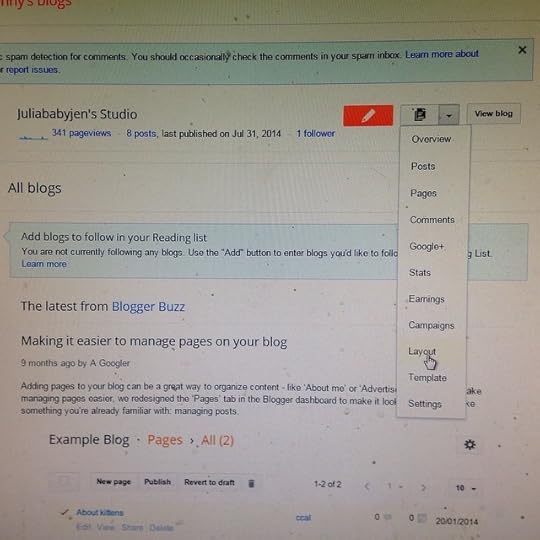
After that, your screen will look like this
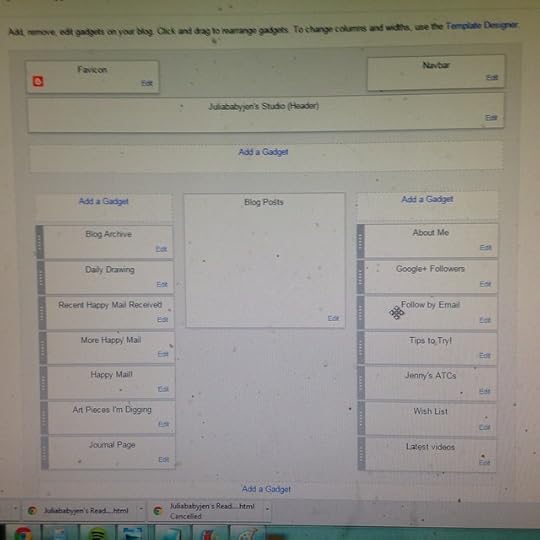
Yours may look different based on your template. From here you add "gadgets" to your page. You can click on "add a gadget" in your free areas, and it will give you a multitude of options to post. Play around with them a bit to see what you like.
On the sidebar, you'll have other options--you can look at all your posts, comments, etc. If you want to ever change your template, click this. This is where you can "design" your blog to your own specifications. Its really easy!
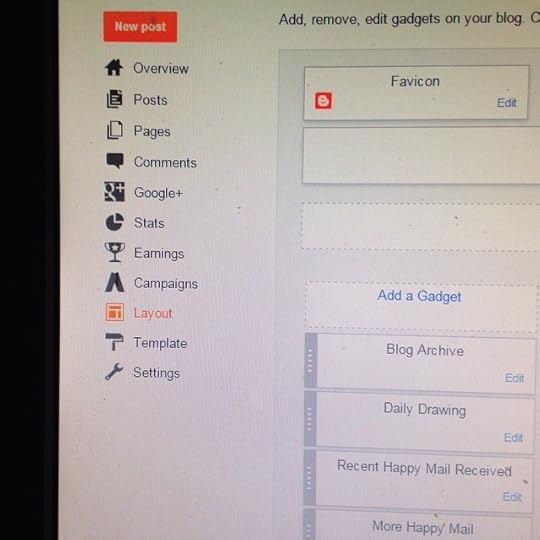
This is what your screen looks like at this point. You can now change your template if you want. To give your blog an orginal look, click "Customize"
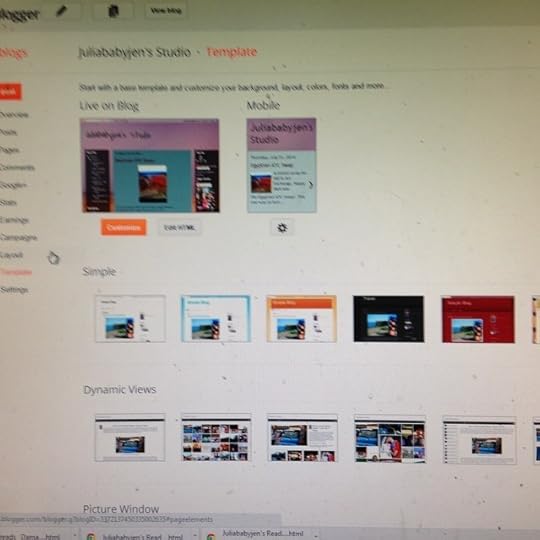
Now you'll get this:
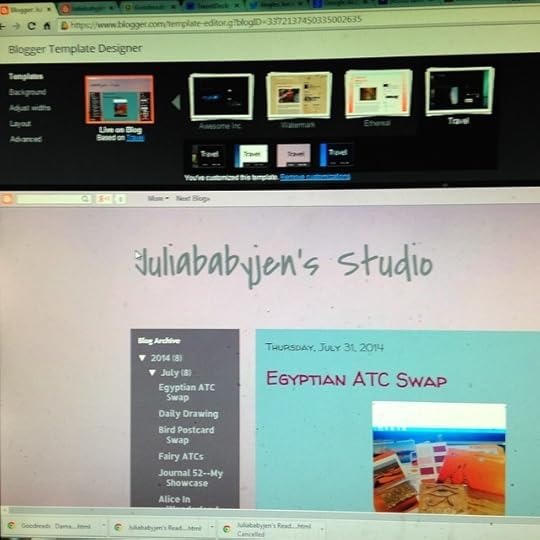
Play around with each of the items on the left hand side, you can pick a new template, adjust your widths of you columns, etc. To have even more fun, click ADVANCED
Now you'll get this:
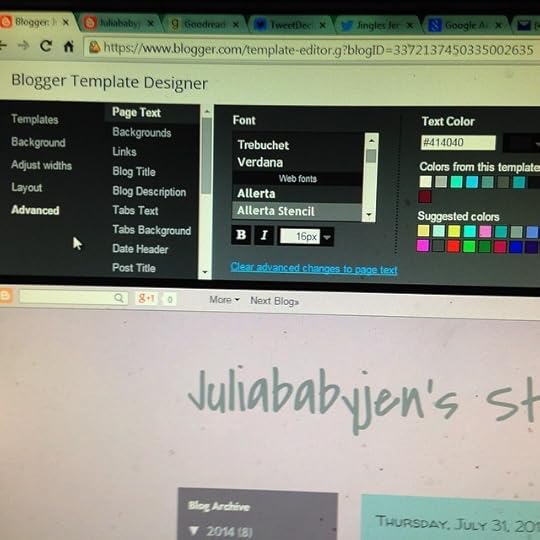
This is where you can go through every part of your blog to change the font, the color, the backgrounds...everything. Its really fun to play with. This one you'll just have to play around with, and don't get too frustrated. You can preview everything before you save it too.
That will get you going on the technical. That right there will probably take you a long time to get it exactly like you want it, it took me months of playing around and learning blogger tips. A good way to get an idea of what you want is to just look at other people's blogs, and see what you like and what you don't.
Mod
I also recommend writing a policy too. If you're willing to be contacted about reviewing books, how they should specifically contact you, what in turn you will provide them (reviews, etc) and the time frame they can expect such reviews. Also if there's any book you don't want (childrens, adult, erotica, etc) list that here as well. I recommend having an email specifically for blogging purposes. I'd suggest gmail with your google + account.
For posts: I recommend posting a "welcome" type of post to get started, maybe tell a little about yourself and your fave books maybe.
After that, I'd start with mostly reviews. Decide from the get go how you want to format them on your posts, so they are consistent on your blog. It looks more professional. Every blogger does them a little different.
To build up your audience, I recommend joining in Memes. They usually post once a week, they are fun, and then you link your post with everyone else's, and that's how people start reading you!
My faves are "What Are You Reading Monday?" "Top Ten Tuesday" "Waiting for Wednesday" "Stacking the Shelves"
Google any of these to find the hosting blog, then make sure you read their instructions before joining in and posting, there are rules.
That's enough to get your started. Reading blogs is important, especially when first starting out. It will give you ideas, and the more you comment on other peoples blogs and follow them, the more followers and readers you will have.
Let me know if you have any specific questions! Good luck Rose!
Mod
When you are in Blogger, underneath "layout" on the left side is "settings"
The most important of these "posts and comments"
Here you can set up how many posts will show on your homepage, how you want the comments section for your posts to look, etc. The big thing is "captcha" This is under "show word verification?"
If you click "YES" everytime someone leaves a comment, they have to verify they are human by putting in those little numbers. I used to do this, until I figured out that a lot of people get messed up by these, and will not comment at all if it pops up.
You can still moderate all comments on your own, by going into the comments section. If something is spam, you can mark it as such to remove it.
I have found that I don't get much spam. Maybe one comment a month, if that! So its easy to moderate. Its up to you, but I suggest trying to leave the word verification off at first. If you get lots of spam, you can always turn it on later.
 I don't use my personal blog much, but I do a lot of "blogging" on my DeviantART journals, including about books, so just be yourself, be unafraid to give an unbiased opinion. Hate a book? List all your points and let out the rage, no one likes it, tough toenails for them. Don't be afraid, to be yourself, or put out what you REALLY think.
If you think a book was such drivel that you'd wanna throw it on the ground, jump up and down on it, kick it into a puddle and then run it over before throwing it into a demolition derby?
...Say it! Warn the rest of us!
But also be fair... Just have your own flair, if you hate a book, say it how you would, no one likes a fake.
Mod
Thanks so very much @Jenny!!!! I will be contacting you to help me when I'm ready to get started!

