Jen Roberts's Blog
June 9, 2026
Google AI Educator Series: Free AI Lessons for Teachers
 At this time last week I was at Google, enjoying a lovely meal on the patio of Charlie's cafe with educator colleagues from all over the country. We were there for a two day convening to learn more about the
Google AI Educator Series
, or GES as they call it. Full disclosure, Google paid for my travel to the event. Which is remarkable in that for the 15+ years I've been involved in Google events, the teacher academies, energizers, and champion summits, Google has never once paid for any of my travel expenses before. That alone told me this would be something different.
At this time last week I was at Google, enjoying a lovely meal on the patio of Charlie's cafe with educator colleagues from all over the country. We were there for a two day convening to learn more about the
Google AI Educator Series
, or GES as they call it. Full disclosure, Google paid for my travel to the event. Which is remarkable in that for the 15+ years I've been involved in Google events, the teacher academies, energizers, and champion summits, Google has never once paid for any of my travel expenses before. That alone told me this would be something different. So what is GES? Quite simply, it is a collection of short lessons on AI literacy, focusing on Google Gemini of course, that teachers can do independently or as part of a professional learning event. Each lesson comes with a quiz and a badge for those who demonstrate their understanding of the teaching concepts in the lesson.
Someone once told me that the eloquence of an idea is reflected by the small number of words necessary for it to blossom in the mind of others. So here it is, lessons, quizzes, badges. That's GES.
So why did we need two days about it? Why did Google invest in bringing all of us, (plus two other cohorts, higher ed folks and district leaders) all the way to Mountain View? I can't tell you for sure what those other groups did, but the K-12 educator leaders spent our time learning about the modules, developing plans to provide professional learning, and exploring what we can do now with Google Gemini.
 My personal plan is to offer lunch time sessions to my colleagues over the course of the school year. Twice a month on Tech Tuesday we can meet in my classroom at lunch to eat together and develop our educational technology chops. One of those days we will do one of the GES lessons and earn the badge and the other Tuesday we will look at a different tool or strategy. Normally, I would avoid giving myself extra lunch time duties, especially something I might have to prep for. But, with the GES lessons already created for me, the prep is very low. They are useable as is, or I can make a copy of the slides and modify them.
 Something else I appreciate about the GES is that they are not really a series, despite the name. Each lesson stands on its own and that means I can pick and choose the lessons my colleagues need or want. We could even make that choice together.
Topics offered so far are:
Introduction to Gemini for EducationIntroduction to Google NotebookLMIntroduction to Vibe Coding with GeminiAdapted (level) Materials to Meet Student Needs (PK-2)Create Scaffolds to Support Reading Comprehension (3-5)Create a Lesson Plan and Supporting Materials (6-8)Remixing to Gain Deeper Insights (3-5)Design Assessments that Capture Student Thinking (6-8)Build Student Inquiry Skills (9-12)Design Problem-Solving that Encourages Critical Thinking (9-12)Evaluate Resources and Claims (PK-2)Turning Benchmark Data into Instructional StrategiesBuild Just-In-Time CoachingDraft Parent CommunicationsIf you have been asking yourself how AI can help you teach better, or wondering if Gemini can do any better than those other chatbots, then you need to check out what's in the Google AI Educator Series .

November 15, 2025
Using Brisk Boost for Reading: Formative Assessment That Actually Helps Students Learn
If there ever was a post that belonged perfectly on this blog, it is this one about Brisk Boost for Reading.
You may know the Chrome Extension Brisk as a great way to give feedback, create materials, or inspect a text to authenticate it. (It also works with Microsoft Edge now too.) If you don't have the Brisk extension I highly recommend it for all those reasons.
This post though, is about Brisk Boost. It's the option with the red backpack 🎒when you click the Brisk icon on a doc or website.
What Brisk Boost Does for Reading
Starting with a reading on a Google Doc or a website, Brisk Boost creates learning objectives about that reading. You can edit these learning objectives and even delete a few if it feels like too much. Then you create the boost and share the link with students. When students click the link, they get the reading material, and an interactive chat that will guide them toward the learning objectives with questions that adapt to the learner. The teacher gets a dashboard where you can see the progress each student is making toward the learning objectives and even view the conversation.
How I use Brisk Boost for Reading Comprehension
I'm finding my best practice is to use Brisk Boost in tutor mode as a formative assessment after students already have some experience with the text. On one day we will read it, do some annotations, have some discussion, probably even write about it —my general old school teaching methods. The next day I'll ask students to respond to the same article in a Brisk Boost. This gives them another way to engage with, and process the material, and gives me a way to quickly see which students do and do not understand the learning objectives.
 Text on the left, chatbot on the right
Why I Like It
Having students re-read and respond in the boost is better than a quiz about the reading, because it shows me who might be struggling and helps those struggling students at the same time. If I gave a quiz the results only show me who I need to support better the next day—while the rest of the class moves on, or works on a side project. But, by using the boost, all students develop a deeper understanding of the text at the same time. I can use the dashboard to see who needs support in real time, and the chatbot is also providing support to help the student examine the text and work toward understanding and analysis. The dashboard even suggests insights about the class as a whole.
 Teacher Dashboard for Brisk Boost
Why My Students Like It
Honestly, I did not think my students would like this. Previous classes had not responded well to other chatbot tools, so I was surprised when they stayed engaged with it. They like the immediate feedback as the circles for each learning objective change colors, yellow to show they are making progress, and blue to show they have met that objective. They like that the chatbot adjusts to their needs, responds to their questions, and supports with specific guidance like, "Look closely at paragraph two." When we do station rotations, I often include a Brisk Boost activity as a station. In reflections about stations my students consistently say the Boost activity was the most helpful for their learning. Students have options to change the language and also have the chatbot speak to them with the audio buttons.
Some Tips About Brisk Boost for Reading
⌛️ Keep readings in Brisk Boost short, 1-2 pages, and even shorter when you first start. (I haven't tried using it for poetry yet, but I think that would probably be very interesting.) The Boost could even be an excerpt of a longer work students are familiar with.
📖 Have students read the text in another format first. It could be a Google Doc, a Formative, or even paper. Give them some time to interact with and process the text in ways that are normal for your classroom.
☘️ Keep objectives reasonable. Brisk creates great learning objectives and is responsive to my prompting when I want to create a Boost that focuses on specific aspects of a text. But it often creates five objectives, which results in a longer session for students as they try to answer in response to all those objectives. From the five objectives Boost generates I often pick my favorite three, or even two depending on the text and my students needs.
🏁 Have students finish during the class period. I'm using the free version of Brisk for these activities, which means students are not "signed in" to Brisk and it will not remember them or their answers if they close the tab. I actually like the limited availability, do-it-now-urgency, this adds to the task
✏️ Boost offers many kinds of activity choices. I almost always use the Tutor option.
🎥 This seven minute video from Brisk will walk you through the process of setting up a Brisk Boost activity, but it really is pretty simple if you just want to get started on your own.
👉 Start by installing the Brisk Chrome extension if you don't have it already.
I'd love to hear how you're using Brisk Boost and how it works for you and your students. Share your Brisk Boost experience in the comments below.
Disclosures: This is not a paid post. I don't do sponsored posts. I write this blog out of a genuine desire to help teachers and share what works in my classroom. I am part of a community of educators that give feedback to Brisk and, on occasion they have gifted me swag and iced tea in exchange for my feedback. Using my Brisk links above will gift you a month of premium access, and may someday earn me some more swag. But again, I wrote this for you, not for a t-shirt.
Pervious Posts that include Brisk:
Preserving Authenticity in Student Writing in the Age of Generative AI
September 20, 2025
I Let AI Redesign My Canvas Pages (And You Should Too)
My latest favorite way of using AI in my classroom is to vastly improve the look of my Canvas course pages and assignments.

I've tried making my Canvas pages better by adding color and images ever since I first started using it in 2020. I've attended webinars about how to make small tweaks to HTML to add borders to my images, or turn horizontal lines into dotted horizontal lines. And, of course, emojis help.
Then, one day earlier this year, I was frustrated with how much trouble students were having with the directions for an assignment. Admittedly, the directions were overly wordy, and I was about to take my own frequent advice and ask an AI to revise the directions for clarity. Then I wondered what would happen if I asked the AI to revise the directions AND the HTML. The results produced a much more readable page, with clearer directions, and a clean design. I was hooked.
Now, I frequently ask Claude.ai to revise the HTML of my Canvas pages before my students see them. The example above is from the first time I tried this. The AI converted a wall of text into an easy to read page, and used design elements like boxes, emojis, and colors to create clarity about expectations.
John Hattie found that teacher clarity has an effect size of .75, (that's a lot) and clear directions seems like it would fall into the teacher clarity category. I often suggest to teachers that asking AI to revise their directions for clarity is an important step in any assignment design process. But, if you are using Canvas, Schoology, or any other LMS that allows you to access the raw HTML of your pages, then asking AI to revise HTML is a clear winner.

How to improve HTML with AI:
I use Claude.ai for this. I've tried some others, but I keep coming back to Claude.
It helps to duplicate the Canvas page you want to improve before you start improving it. That way you have a back up copy.
I find it is best to start with an existing Canvas page. If you need to create the page/assignment first then do that, and fill it in with your directions for your students.
Then, copy the HTML from the Canvas page you have and paste it into Claude, with some specifications about what you want to improve, what colors you want it to have (or not have) etc. To get the HTML from Canvas, edit the page you are working on, and then look for the </> button under the edit window. That will toggle the window to HTML view and you can use Ctrl+A and the Ctrl+C to capture that HTML.

Your first request will fail. It will look good in the Claude Artifact, but the styles won't copy over to Canvas. Even if you explicitly tell it you are using Canvas in your first prompt, it will still fail.
So, as soon as Claude generates the first version, I just immediately tell it again that this is for Canvas. (I've stopped even trying to move the first iteration to Canvas.) Then it will immediately apologize, specify why it failed, and generate a new batch of HTML that will work in Canvas.
If you don't like the style you get, ask for changes. I routinely ask it to cut sections, relocate parts, combine things, change font sizes, and change colors. I sometimes get results that are very square. Asking it to create softer more rounded edges works well for me.
Once I have a thread with Claude that is reliably producing HTML with styles that I like, I will keep using that thread to revise additional pages.
Pages I revise with AI often get a little longer. Design elements and white space can take up more room on the page, so there is a bit more scrolling. I find the trade off to be worth it.
The time it takes me to do this is usually minimal, under 5 minutes per page, but sometimes it can take longer if I'm not getting what I need. And, of course it will likely take you longer the first few times you try it.
Remember, you can still edit that page once you have pasted in the improved HTML. I often go back in and edit some text, change font sizes, add another emoji here or there, and change text colors for improved contrast.
Also, note that I find Claude.ai so useful that I am paying $20 a month for it. If you are using the free version, you may hit usage limits before you have exactly what you want from the HTML.
It's worth it:
For a small investment of my time I find I can create better looking, easier to follow, pages of directions for my students. Even at five minutes a page though, this can add up to an hour to my weekly work, so I save HTML revisions for things that are heavy on directions, and that students might need to work on independently, like when I have a substitute.
Also, for kicks, I tried asking Claude to revise the HTML of this blog post and it built a page full of colorful bubbles. That might have worked well on Canvas, but not here. I pointed that out and the next try was better, but not as good as the formatting I can get from blogger, so this post remains unenhanced by AI.
Let me know if you try revising HTML with an AI assistant. I'd love to know how it worked out for you.
July 9, 2025
Converting the text in an image to a Google Doc with a lot of help from AI
 The photo, circa 2018?Years ago, in a different classroom, I had a glorious long whiteboard. It stretched for nearly the full length of one side wall of my classroom. One of my favorite things to use it for was listing sentence frames my 9th graders could use to help them craft body paragraphs of an essay. To take a picture of it I had to use the pano option on my phone, but I am so glad I took that picture.
 Fast forward to this past spring when my teaching partner suggested we revive the comparative analysis uint we used to do. I knew I would need these sentence frames again, but my current classroom (while beautiful) has only an eight foot whiteboard—not long enough to recreate this helpful scaffold for my current students.
I decided a digital document could suffice and also be available to students outside the classroom through our LMS. Arguably an improvement. But, it would mean accurately retyping these sentence frames into a table of a Google Doc. Not something I was excited to spend time on.
Can AI help with this?
I wondered if Claude.ai could do it for me. I was pretty sure it could probably extract the text, even with the distortion of the panoramic photo, but I also wanted to pivot the text so that the yellow banner at the top was a column on the left side with the sentence frames in a column on the right side. This would be a better orientation for a document.
The prompt I used with the picture attached:

Even though I suggested Claude ask me more questions about the task, it didn't need to and just produced the result.
 What Claude.ai did from my photoNote that the result is in 'markdown,' a kind of text language that uses symbols to specify formatting.
 Enable MarkdownI've met lots of folks who are frustrated that when the copy/paste results from AI it comes out with lots of extra ## and other symbols—meaning time wasted cleaning up the text.
For a Google doc there is an easy way to fix this issue. Got to Tools/preferences and then check the box that says "Enable Markdown." Then choose "paste from markdown" in the edit menu. Control+V should also work.
Do we need AI for this?
Converting hand written material to typed text is not new. Optical character recognition has been a thing for years now, but I've never found a truly smooth work fro for it. Also, in this case, the pivot was critical to making the text work well on a doc.
I haven't ever seen a tool for converting handwritten charts to text in any of the widely available teacher-facing AI tool boxes. So, I'm guessing this isn't a high demand use case, but it sure saved me a lot of time, and made the material quickly available to my students.
I make a lot of charts in my classroom. I archive photos of them on my Classroom Charts blog, so that I can add them to lessons easily. Now I'm thinking I'll leverage AI to convert more of them to text that will be more accessible to screen readers, easier for students to copy/paste from (when I want to let them do that) and easier to share as Google docs.
Could I do that by retyping and formatting them myself—yes, of course. Have I ever done it—no. But with AI assistance to recreate the charts quickly, I will likely digitize more in the fall.
PS AI did not write any of this post—I just love love the em dash.
April 1, 2025
Learn with Me: Upcoming Workshops & Conferences for Educators
Looking to expand your knowledge on writing instruction, AI in education, and innovative teaching strategies? Here are some fantastic upcoming opportunities to learn with me!
Future Ready Nebraska Conference.png)
📅 June 2-3, 2025
🕘 Time: 8:00-3:30 CDT
📍 Online & In-Person (if you happen to be in Nebraska)
💰 FREE
🔗 Register: nefutureready.com
Join me at the Future Ready Nebraska Conference, where I’ll be speaking on AI and writing. This conference is packed with experts discussing AI’s role in education, offering both online and in-person participation.
ERWC Literacy Conference

📅 June 23, 2025
🕘 8:00 AM - 3:00 PM
📍 Long Beach Marriott
💰 FREE
🔗 Register: https://app.smartsheet.com/b/form/5158473eee4a4ff98c64d2879329223f
📝 Theme: "Leaning into Liminality: A Return to Language, Wonder, and Inspiration"
The Center for the Advancement of Reading and Writing (CAR/W) team at the California State University Office of the Chancellor invites you to join us for the 2025 ERWC Literacy Conference. The ERWC Literacy Conference is open to all educators interested in language, literacy, and learning.
AI in the Writing Classroom - San Marcos Writing Project

📅 June 25-27, 2025
🕘 9:00 AM - 1:30 PM
📍 CSUSM Campus
💰 $60
🔗 Register: edushare.ing/smwpAI25
🔗 Payment: edushare.ing/csusmAIpayment
This three-day symposium with myself and Erika Wanczuk explores how AI can support writing instruction. Learn practical applications, discuss best practices, and collaborate with educators on integrating AI into writing classrooms.
Write to Joy: K-12 Writing Conference 2025

📅 October 11, 2025 (Previously scheduled for 6/14)
🕘 8:30 AM - 4:30 PM
📍 OCDE Kalmus Drive | Building D, Costa Mesa, CA
💰 $150 (Pre-Service Teachers: $50)
🔗 Register: https://ocde.k12oms.org/1288-251230
Write to Joy is more than a conference—it’s a celebration of writing! I’ll be sharing insights on literacy and AI in education alongside an incredible lineup of educators. Don’t miss this opportunity to dive into engaging discussions and hands-on workshops.
If you are attending any of these please say hello. 👋
March 16, 2025
Grouping Students: Cast a Wider Net with Grouper.school for Better Classroom Collaboration
Creating effective student groups has always been a challenge. Ten+ years ago I created a spreadsheet to help me group my students based on my observational and academic data, so that I could quickly create both heterogeneous and homogeneous groups. I've learned a few things from over a decade of regularly using flexible student groups.
Reel Results:
First, students don't like this. Changing seats is out of their depth. Talking to new people feels like swimming upstream. Working on a task with a new person makes them crabby. This does not deter me because I have seen the magic happen. Year after year my students report that even though they didn't like being in new groups, or working with new partners frequently, over time it helped them get to know many more of their classmates. Years ago a student told me, "In my other classes I only know a few people, but in this class I feel like I know everyone because you make us move a lot."
Second, being able to group and regroup students quickly is critical. I'm not going to bother with groups if it takes me too long to create them. I need to be able to enter fresh data, or work with existing data quickly to get the combinations I need.
Third, it is critical that students can quickly catch on to where they need to go when they enter the room, while also obscuring their access to the data that created these groups. I don't want my students to know whether their groups are homogeneous or heterogeneous. Most of the time they assume the groups are random and I let them believe that.
A Better Fish in the Sea
Move over spreadsheet. Now there is Grouper.school. Ten years ago I looked for a solution that would help me group my students and did not find anything that would do what I needed. Then, just a few months ago, the fine folks at Grouper.school reached out to tell me about their new tool. I was instantly hooked. (Sorry, there will likely be more fishy puns ahead.)
Grouper.school lets you sync with Google Classroom, enter your students manually, or upload a CSV file. You can enter any attributes you like about your students and then use multiple attributes at a time to create groups. Once you have your groups created, click the display button and show students how they are grouped for that day. You can even set specific "do not group with" options for specific students.
I tried for years to convince teachers that spreadsheets aren't sharks (I warned you), but I understand that the mechanics of sorting and formulas can make some feel like they are floundering. With Grouper.school you don't need spreadsheet skills. It has a simple functional interface. It's easy to adjust groups if a student is absent, and you can even save groupings for reuse later.
Need to cast a net over students falling behind on a piece of process writing, created a targeted group. Want to create schools of kids who share a common interest, survey them and add an attribute for that. Need to get big fish and small fish in the same pond, heterogeneous groups are just a few clicks away.
Let's Tackle Some Tips:
First a screen shot of the groupings page.

Above I have a demo class and I've got them in six homogeneous groups based on their fall reading score. I can tell this is a homogeneous grouping because the arrows in the blue box next to Fall Lexile are pointing towards each other. Just click the blue box next to the attribute to toggle between heterogeneous and homogeneous groups for that attribute.
When you are ready to show groups to students, you probably will not want to show them this page. Instead click the blue circle on the upper right that has a monitor icon. That will give you a display page that only shows the cute avatars and student names. My display page also shows icons for the timer and picker. Those are tools the team is still developing, so if you don't see them on your page yet, just be patient.

The group names are suggested by Grouper.School, but you can edit them. In fact, the editing tool is intuitive enough that if you start to enter colors it will rename all the other groups to different colors. It tries to guess what your naming theme is, so that you don't have to type all the group names.
Teachers have bigger fish to fry than spending their prep period making groups. A few minutes spent learning to fish with Grouper.school will make grouping easier all year long.
Here is a short video I made about how it works:
As you've noticed, I'm a Grouper.school fan, but this is not a paid post. I did get to do some advisory phone calls with their team and they paid me for my time and wisdom, but this blog post is all about me just wanting to help you. I hope you'll check out Grouper.school for yourself and the fish in your sea.
December 17, 2024
Advice about AI to Pre-Service Teachers
 In October I had the privilege of speaking to a group of pre-service teachers in their first semester of credential preparation. I met their instructor while she was the university supervisor for my previous student teacher. She wanted me to tell her students about AI in education. We only had 90 minutes together, so after our class meeting she invited them to share additional questions. Some of those questions resulted in these answers.
 1. What AI tools are you using in your teaching this semester?
Currently, I am using a lot of Magic School, especially their student room feature that lets me give my students access to instant AI feedback. I also use Writable, which has AI assisted grading and feedback. For general writing tasks I like Claude.ai for generating ideas. All tools now have some level of AI integration. Quizizz, Formative, Newsela, have all added AI supports. And a new one on my favorites list is The Writing Pathway.
2. What tools have you used in the past that you do not use now?
I hesitate to name tools I no longer use, partly because I don't want anyone to assume that my not using a tool is some kind of un-endorsement. There are certainly tools I've tried that I didn't find that useful, or thought they were not yet fully developed enough. Often I circle back to those tools again in 6-12 months and find they have gotten better, or added a feature I find helpful now. There are, of course, tools that have just gone away, Flipgrid being one of the most recent examples of that, but tools come and go all the time.
3. Would it be safe to assign assignments involving AI to high school students?
Making sure students are learning to use AI in a safe way is really important. To do that you want to make sure that you are choosing tools that are COPPA and FERPA compliant, and, especially as a new teacher, vetted by your district. That means not asking students under 18 to use ChatGPT or another online chatbot that requires them to create an account. MagicSchool, Brisk Boost, and SchoolAI all offer chatbot options that are student safe. Adobe Express has cool projects students can do with AI image generation. But again, check with your own instructional technology department first. Then, yes, ask students to work with AI to produce a result and then reflect on the process. Ask them to get advice from AI about a project they are planning. Suggest they ask an AI for feedback. Make the AI one of their team members. You'll find lots of powerful and transformative ways to add AI into your learning flow.
4. As a potential assignment, could an instructor have students debate the ethics of AI?
Absolutely, and there are lots of directions to take that.
5. Would having students try to compare the difference between doing homework with or without AI be an effective way for students to learn about the pros and cons of using AI?
Maybe, it might depend on what the homework assignment was and how you're asking them to reflect on it. If I were going to try something like this I think I would make it an in class experiment. Give the same task to each half of the class and allow one half to use an AI tool. If I had to guess, I would say that the class will see the AI as very pro, and struggle to find any cons about using the AI to help them. Be prepared for that possibility.
6. Do you think that AI will take over teachers’ jobs in the future?
I think AI will do a lot to help teachers and it may help us serve larger numbers of students. We already have a teacher shortage, and that's not going to change anytime soon. I don't think AI will take teacher's jobs, but I do think AI will be part of the solution to fill the gap when we can't find enough teachers. Education changes really slowly. It's part of the tradition of our culture, and families like to carry on traditions. Plus humans are still social creatures and school is a social place. We have a huge investment in the infrastructure of schools, more so even than the infrastructure of work. Post pandemic many white collar jobs are still being done remotely, lots of office space sits empty, but schools are mostly back at full capacity.
7. How often should educators use AI grading software? Does it create a disconnect between teachers and their students when educators overuse AI?
You could ask, how often should educators use multiple choice tests? Did scantron machines create a disconnect between teachers and students? They probably did, but I don't recall anyone ever asking that question. AI grading for writing is really a polarizing topic, but I'm pretty sure the folks most worried about it have never actually tried it. I wrote about AI grading here. AI assisted grading is not a black box. It still requires a teacher to evaluate the student work, approve the scores, edit the feedback, and make the final decisions. There is still plenty of student work I grade without AI, but I try to use AI whenever I can because it means my students get their scores and feedback sooner. The relationships I build with my students come from our conversations in class or in the hallway, the laughter we share, the problems we tackle together, the experiences we have while learning. Going home, reading 70+ analytical paragraphs and pointing out places they could be stronger is not contributing to my relationships with my students.
8. Should AI grading be used exclusively or in addition to hand grading as a self-checking system?
I'm not sure there is a way to use AI grading exclusively, at least not in my world. Remember all AI grading tools still require input and approval from the teacher. Also, only one system available to me currently has AI assisted grading, Writable. I also grade things in Canvas, through Google Forms, and Google Assignments. I grade group answer sessions where students collaborate on Wipebooks. If I wanted to I could grade answers from Peardeck, Formative and Newsela. There is usually more than one way student work makes it to my eyeballs, and many of those sources of data do not have an AI grading component. Never let an AI grade a student's work without looking at that work yourself and verifying the score is accurate. Also, always be clear to students that you are using an AI assisted grading tool. Invite them to speak with you if they ever have a concern about a grade.
The rest of their questions were about AI detectors and those questions inspired this article I wrote for Edutopia. What ELA Teachers Should Know About AI Detectors.
December 8, 2024
Can AI Assist You With Grading? Probably
 Ideogram: A synthwave-inspired illustration depicting
 an AI and a teacher collaboratively grading papers.
Teachers are adding AI tools to their classroom workflow and lots of educational technology companies are offering products that help with daily teacher tasks like preparing materials and designing lessons. But, can an AI grade student writing? And if it can, should teachers consider using an AI grading assistant?
To the first question, yes, AI can grade student writing. There are already tools like Cograder built specifically to grade student work. Other tools like Writable have added AI scoring and feedback to their offerings. Individual teachers have found that, with the right prompt, chatbots like ChatGPT and Claude can grade student writing and provide feedback.
Are these scores and feedback accurate though? In many cases, yes. They are at least as accurate as a range of human teachers scores would be. A 2023 study using ChatGPT 3.5 (Steiss) found that, while experienced teachers gave better quality feedback on student writing, the AI was actually more accurate for criteria based scoring than the teachers in the study. If you are working with a well developed rubric and clear criteria, an AI grading assistant is likely to be more accurate and consistent than the teacher. Also, worth remembering here that the latest large language models are only going to take this further.
So, if AI can accurately grade written student work, the next question is, should teachers consider using AI for scoring and feedback? This will be an individual decision for each educator, and some will be guided by the rules of their institution, but it is worth at least considering the multitude of benefits for students and teachers that come from using some AI assisted grading and AI generated feedback. Even if the feedback is slightly lower quality than an experienced teacher, there is a net benefit to giving all students access to AI feedback while they wait their turn for a writing conference or more detailed commentary from their teacher. I previously wrote about some ways of giving AI feedback for Edutopia, and I wrote about the impact of AI feedback during writing time for my 9th graders.
Before we go further into the ethics of teachers using AI to grade student work, a bit about how all these tools work. AI assisted grading tools always require the supervision of a teacher. No score gets to a student without first being approved by the educator. When I use Writable to score student writing, I must review and approve every score. This gives me an opportunity to revise the score if I need to, revise the feedback if I need to, and then approve the score. Cograder and others are built with the same kind of process. The AI assigns a draft score with draft feedback. The teacher must review the student work and approve the score. The teacher is still the final arbiter of the score and remains responsible for the quality of the feedback.
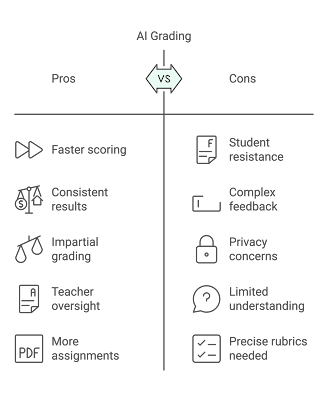 Graphic Created with Napkin.ai
What does this really mean for teachers and their students? It means students get scores and feedback faster. Review and approve is still a time consuming process, but it is usually much faster than read, score, and write feedback. It means I experience less decision fatigue. I get to read the student work with an eye toward instruction rather than evaluation. It means I sometimes have to examine my biases about my highest and lowest performing students. The AI tool does not know their names or past performance. It is purely scoring the work. And it means students get more detailed feedback, specifically tied to the rubric. The AI tools are always more elaborate and specific than I would have taken the time to write.
When I use AI assisted grading tools my 140+ students get their work returned much faster, thus they revise and resubmit as needed at a point much closer in time to the original assignment. By accelerating this feedback loop I have been able to have my students engage with more scored writing activities.
One unexpected result of AI assisted grading has been the impact on my relationship with students. One might think that with AI in the mix my writing instruction would become less personal, but the opposite is happening. When my students know that their score is at least partly determined by AI, they are less likely to take it personally. Their low grade was based on the quality of their writing, not any personal bias they perceive from the teacher. I become the ally who can help them write better, find better evidence, explain their reasoning in more detail. I get to move from critic to coach and I have found that to be helpful.
Some have said that teachers should not use AI to grade if students can't use AI to write. This is a false equivalency. Students are learners. Teachers are responsible for helping them learn. If an AI tool for scoring and feedback can help my students improve their writing faster then I should be using that. I'm seeing growth for my students as writers and I have no plans to halt an effective practice because others want to make this a conversation about morality.
Of course there are concerns about AI bias. Large language models have well documented cases of gender and racial biases. This is part of why all scores require a teacher review, but let's not pretend that teachers themselves are free of bias. A recent long term study by the University of Michigan looked at 30,000 grading records and found that students with last names that came later in the alphabet were statistically more likely to receive lower grades and less helpful feedback. Grading comes with decision fatigue, and sometimes boredom if the assignments are similar. It can be frustrating to see similar mistakes repeated by different students. When it takes multiple days to grade an assignment, the teacher may approach it a little differently each time. The amount and quality of feedback students get is likely to decline as well. The AI grader doesn't get tired though. It does not have favorite students and least favorite students. It just scores the work.
Student privacy is also a concern. Never provide any AI tool with identifying student information like names, student ID numbers etc. I work confidently with the AI grading assistant in Writable because I know my district is paying for the service and therefore the legal department has been involved with that contract. Free tools do not have those guardrails though, and we must be protective of our students, as well as compliant with legal requirements at federal and state levels.
AI assisted grading has been a net good for my students because they get their scores faster and with more detailed feedback. I'm not going to lie, it has also been good for my work/life balance. I still get to read their writing, but I get to step back from the agony of having to decide on, and then justify, a score. My students are writing more, revising more, and growing in their confidence as writers.
Works Cited
Steiss, Jacob, et al. “Comparing the quality of human and CHATGPT feedback on students’ writing.” Learning and Instruction, vol. 91, 7 Sept. 2023, https://doi.org/10.35542/osf.io/ty3em.
Pei, Jiaxin. 30 Million Canvas Grading Records Reveal Widespread Sequential Bias and System-Induced Surname Initial Disparity. Apr. 2024, https://conference2023.eaamo.org/pape.... Accessed June 2024.
November 13, 2024
What Happens When Students Have Access to Instant AI Feedback?

I teach English to 9th graders, which means I frequently ask them to write things. Right now we are working on a narrative unit and I often ask them to write stories related to our readings.
Recently, we have watched the famous TED talk about the danger of a single story, and read a great essay on the same topic, and then I asked students to write about a time when they had a single story about a person or place, or a time when someone else had a single story about them.
Nothing revolutionary here, just a pretty typical classroom writing exercise, except that I also gave them access to immediate AI feedback through Magic School.
What happened:
Some students started writing, some went to the idea generator in the Magic Student room I gave them, and then started writing. So, as usual, the first ten minutes of writing time was pretty productive and on task.
 Initial AI FeeedbackThen we hit the usual wall. You know the wall. The moment when one student declares, "I'm done," in that too loud way that starts a trend of others being done even though none of them are really done, haven't really written about their story in detail, and have left a lot out. Every classroom teacher knows that a student who is done (or thinks they are done) early, creates challenges for classroom management. Every student who is "done" early probably needs to do much more with their writing.
Usually, in these moments, I come over, skim what they wrote, and ask a question like, "Can you write more about how you felt in this moment of the story?" or "Write more about what these people were saying to each other here." It's generic advice that generally sends the student back into their text for another pass. Today, I sometimes did that, but more often I said, "Have you tried getting AI feedback yet?" This worked especially well if I was busy with a student who needed more support. For context I have 36 students in this 9th grade class.
And then something amazing happened; most students started to use the AI feedback tool. When they felt done, or stuck, or not sure what to write next, they would paste their writing into the AI and it would suggest some things to try, often very similar to what I would have suggested. The students took this advice and went back into their drafts. They were revising without my direct intervention. What might have become a patchwork of students still trying to write while other students were "done" became a space where everyone spent the whole period working on improving their writing.
 The last round of advice
It's early. The novelty of AI feedback may wear off, but the general desire for a higher grade will likely endure. Most students recognize that the AI feedback will help their scores. I'm hopeful that the internal motivation to write a good story that authentically shares their experience will grow.
The screen shots I've included here are from some of the feedback one student got. She submitted her writing to the AI tool five separate times in one class period. In 20 minutes she got five rounds of feedback. Her story went from 147 words to 415 words, while improving the structure, detail and character development of her narrative. Not all of the feedback is correct. One bad piece of advice was: "Turns out" should be "Turns out" (Yes, those are the same thing.) The AI gave her enough useful and specific feedback to keep her working on positive improvements, without telling her exactly what to write. Here is some advice she got in the third round: Sensory Details: While you've added more context, you could still include a few sensory details. For instance, describe the sound of laughter in PE class or the atmosphere of the lunch area.
The AI Feedback Tool:
If you haven't used Magic School before, you need to check it out. They have dozens of AI tools that support teachers. To use it with students, I launch Magic Student, pick the tools I want to include, customize them and launch the room. I give my students the link and they can 'enter' the room and use the tools, no login required. Setting up a Magic Student room is quick. See the 30 second gif below. (I cut some of the page loading time, but setting up a room just takes a few minutes.)

We still need human feedback:
Lets's not make the mistake of letting AI feedback replace human feedback. My students will still engage in writing groups, have writing conferences with me, and get my written comments on their docs. Human feedback still catches things AI can't. Human creativity still provides suggestions AI does not, especially with regard to structure and plot.
I am very encouraged though, by what a well crafted AI feedback tool can do for students who aren't sure what their next writing moves could be, who struggle with revision, or who just need some encouragement to add more details, or include more dialog.
July 18, 2024
Digital Alchemy: Transforming Images with Adobe Express
It's been a fabulous three days at the Adobe Innovator Summit, a chance to connect and reconnect in person with many educators that have and will continue to inspire me.

The focus was very much on Adobe Express for Education, a product from Adobe that is free to K-12 educators and students. I won't say free forever because forever is a very long time and we've all seen other tools that promise that and then...poof, but it is free now with a promise to continue to be free.
I've used Adobe Express a lot in my classroom, but this week I (finally) developed a better understanding and appreciation for a great tool in there called, generative fill.
Generative Fill lets you select an area of an image and then use a text to image generator to change that part of the image. The picture on the right is a good example.
There is a famous room at Adobe where the furniture is attached to the ceiling. It is all white. You can step inside and have your picture taken. When you flip the picture it looks like you have defied gravity in some way. I got to do that today. Below is the original image from my visit to the upside down room.
 All the colorful parts of the picture above were added with generative fill. One part at a time, I selected an area of the image and then described what I wanted to see there instead. Sometimes the AI could not give me what I asked for. It took some trail and error. I never could get it to actually put a head on the snake on the floor, and my request for a fish tank resulted in a very large fish floating in air. I asked it to color the bookshelf, but it would only color the books, and some of the edges around my feet look like a bad photoshop. Despite these minor flubs, the tech still helped me transform a white room into a room of color and whimsey. I especially like the hole at the floor level and the hanging plant.
 How will I use this with students? I don't know exactly yet, but I love that it's an option. A lesson about magical realism seems like a good possibility. There are certainly critical literacy lessons to be taught about how easily images can be manipulated.
 How it Works: Here is a quick screencast to show you how easy this is to do. Select your imageClick the generative fill toolDraw the area you want to replace with generative fillType a description of what you would like to see. Click generate. If the first result is not what you were hoping for there are usually a few other choices. In this case I liked the third option best for the window. Try it out: If you have not played with Adobe Express, I encourage you to try it out. Much of what we learned this week is not yet public knowledge, but I can tell you I am VERY excited for what is coming for our back to school season. Generative Fill is available now. Use it to add some amazing sea life to your summer beach photos, put a waterfall in your classroom, or just add some color to a monochromatic space. I am @TheJenRoberts on Instagram if you want to tag me to share your amazing creations.