Trisha Gee's Blog
April 9, 2026
There are only opportunities
When I worked at Ford as a shiny new graduate in the early noughties, they told me "don't bring me problems, bring me solutions". They also said, never phrase anything as a "problem" but as an "opportunity". The cynical senior who worked on our team told me it was because Ford had been sued too many times and that we should never document known problems because it would end up in court. An important learning point for 21-year-old me.
Anyway. I was laid off last week, so what a marvelous "opportunity". It's kinda complicated to explain how I feel about this, because I'm writing this in public and, like Ford, I don't really want to document "problems". However, it has somewhat shaken my confidence (they don't love me any more, waaah). Having said that, my job at Gradle had pivoted away from what I love doing (developer advocacy), and although that gave me a great "opportunity" to learn new things, being well outside my comfort zone did contribute to my burnout.
However, one of the reasons I didn't leave earlier and of my own volition (apart from the fact that it's nice, necessary even, to have an income when you have kids and you're moving house) is because I'm not really sure what I want to be doing next. On the one hand, going back to a classic developer advocacy role would be very comfortable, possibly even relaxing, and I think will help me rediscover the joy of writing, talking to developers, and staying up to date with technology. On the other hand, I've been toying with the idea of going independent for at least 7 years. Perhaps it's time. That's a very scary thought, because I want to provide financial stability for my family, and having a lumpy income from a mix of consulting, training, speaking engagements and paid content could send me into a panic. On the other other hand (how many hands do you have, woman?), I want more flexibility, and I want to be able to talk about the things that interest me without having to work out how to tie it into a product or company narrative.
And on top of all of that, I'm trying hard not to panic about the huge changes in our industry right now, and trying not to worry about how relevant my experience is, or how I'm supposed to make enough money until I retire. I have friends who are ready to retire like, now-ish, and I am panicking about how to retire in 15 years or if anyone will even pay me for the next 15 years.
So, yeah. I guess I wanted to write all this down because:
I want to get some of my own thoughts straightI want to be open about how these life events can affect peopleI want to drop some ideas out there about what I want to work on, in case anyone reading this is interested in hiring or contracting me for anything.Oh, also it was a long-winded introduction to "hey I updated my personal website, finally, take a look!!". Thank you to Claude, I couldn't have done it without you. Hopefully I'll write a blog post about that at some point.
Caveat: The main pages are all updated but individual blogs and talk pages have not all been checked. If you see any major problems, by all means let me know.
The post There are only opportunities appeared first on Trisha Gee.


February 12, 2026
Hello burnout my old friend…
I am struggling.
There. I said it.
Yes, I'm middle-aged. Yes, I have kids. Yes, I have an aging parent who has health issues. Yes, I'm building a house. (shhhhhh: yes I'm perimenopausal).
But it's not just that (just! Ha!).
I want to help people. I LIKE helping people. I like learning. I like trying new things. And I feel compelled to add new skills to my CV/resume.
Which is to say.... hello burnout. Again. Sigh.
So I'm taking break. Again (but the money Trisha, what about the money? Don't your family depend on you? (Don't think about it! Denial is a strategy that totally works)).
Gradle have been understanding, kind, and supportive, and have granted me some leave so I can get my shit together rest and recharge.
Burnout is a complex beast. It could easily be triggered by all the (non-negligible) non-work stuff I have going on. It might also be a sign that I'm not investing my energies in things that fulfil me. Or I might just have too much to deal with. Regardless of the root cause, I'm going to take a couple of months or so to:
restrechargethinkfeelfinish the fuc blo stu dream houseHopefully, that will give me a little space and time to remember who I am, realise what I want, and give me that tiny mote of inspiration to direct me.
Support welcome. Particularly if you want to tell me what I'm good at, how I've inspired you, or where you think my talents will work best.
The post Hello burnout my old friend… appeared first on Trisha Gee.
February 20, 2025
IDE tips to save you from disaster
I'm working on creating a training course for IntelliJ IDEA (I've been working on it for a while now, I don't really want to talk to much about it because I'm not sure when I'll actually deliver it). Anyway, as I was thinking through Features You Really Need To Know, I realised that it's not really about code completion and code generation, it's about those features that will get you out of a big, deep hole that you've dug yourself into.
So, I put together my top five features that have saved my bacon, and recorded a video for the Continuous Delivery channel. I have asked around and these features should work for all JetBrains IDEs, not just IntelliJ IDEA.
As usual, I have included the transcript below so you can skim it and skip to the bits that interest you.
TranscriptWe all make mistakes. You could argue that computers help us make mistakes much faster and more regularly. I want to show you some features from IntelliJ IDEA which have helped me personally recover from some of these mistakes. More importantly, they've stopped me wanting to destroy my computer in frustration.
Hello and welcome to the Continuous Delivery channel. I'm Trisha Gee. The very first keyboard shortcut that I taught my eldest child when I was showing her how to use the computer is Ctrl+Z. I did not teach her Ctrl+C or Ctrl+V until after I had taught her Ctrl+Z. In the various pieces of software she was using, she would sometimes need to get back to a known good state, and knowing the shortcut for undo helped her a lot.
I hope most people watching this video already know about Ctrl+Z. If you don't, please start using it as soon as possible! In this video, I'm going to show you some more advanced features of IntelliJ IDEA, which can act as a sort of advanced undo, or allow us to get to some known good state after things have gone terribly, terribly wrong.
I have five tips I want to cover:
Local history, for getting lost changes or lost files back.Using the debugger to go back in time.Clipboard history, which is personally one of my favourite features of IntelliJ IDEA and I wish all software had it.Reverting our settings when we've made changes which are not working for us.And finally, I'm going to show you an all round, helpful, "fix this for me please" shortcut.1. Local HistoryThere was one feature in particular I wanted to show you which inspired this whole video. Then I asked social media, "which are the features that you use the most to save you from uncomfortable situations with IntelliJ IDEA?". This feature, Local History, was by far the most quoted feature.
I know that you're all using version control, you do small commits, you make small numbers of changes, that you are in control of the situation as you make changes to the code. And I know that local history is not something you're necessarily going to rely on because you're using a more structured version control system for that. However, I know there are times when standard version control is not enough. Either you've accidentally made a whole bunch of changes, which you might not realize you got carried away with, or you accidentally switched branches or did something else where you trashed your entire local changes. This is what local history is for.
Trisha Tip: the video here shows a live demo of me using the feature
To get to local history, I usually use Find Action (⇧⌘A | Ctrl+Shift+A) because that's my favorite keyboard shortcut for finding something if I don't know the keyboard shortcut. You can also use Search Everywhere (⇧⇧ | Shift+Shift), and then you can type local history. You want to select "show local history" for this. This will show you the local history for the file that you were just changing. It shows small incremental changes. All of these changes have been made since the last version control commit. So these aren't version control commits.
IntelliJ IDEA was making a note of all the individual changes that I was making as I went along. It even includes things like refactoring. So I can revert to any one of these, I might want to go right back to the beginning, but probably I'll use version control for that. I might click on a specific change and revert to before this point.
Another very helpful feature of local history is the ability to add labels to it. So if my code is in a place where I want to make a comment about it, like "this code does not work", I can go to file -> local history -> put label, and I can type "does not work". Then it will add like a bookmark at this point in the history. So I know that this is not the code that I want. Or I could have typed "it works right now". We can use these labels to tag the history as we go through it.
Where local history has been really helpful for me in the past is being able to retrieve files that I've deleted that I did not mean to delete. I usually do that by looking at local history on the project window.
You can right click on a folder in the project window and select "local history". You can see this file was deleted. I can see where it is and what the path is. If I revert that change, I've got that file back.
2. Reset FrameLet's talk about the debugger. IntelliJ IDEA's debugger is ridiculously powerful, and even people who use it regularly don't use 5% of the features. I'm not going to go into the details of all these esoteric debugger features. I'm just going to show you one thing which you did not know existed, which is going to save your bacon when you're debugging an application.
Trisha Tip: the video here shows a live demo of me using the feature
So let's run the debugger. And usually when you're debugging something, you'll hit the breakpoint a few times. You'll just skip over that as you do. Maybe what you might do is step over, and then as you're stepping over it, you're like, "Oh no, I really, I wanted to step into that line!". What you often end up doing is just restarting the whole debugging context.
But you don't need to. Look for this tiny little icon here, called Reset Frame. The method I'm in was called by this method. If you reset the frame, it takes you back in time to this method call from before you skipped over the breakpoint. So you can run it back to the start of the breakpoint, and then you can step into your line like you wanted to.
That's my top tip for helping with the debugger. You can look for this little tiny reset frame icon.
3. Clipboard HistoryMy next tip is less about recovering from mistakes, and more about the ability to reuse things that you thought were lost.
This is about clipboard history. IntelliJ IDEA records a history of all the things you've ever copied or cut in the past, not just the last thing that's on the clipboard. So you can use (⇧⌘V | Ctrl+Shift+V), and it shows you everything that you've copied in this session of IntelliJ IDEA. It doesn't take stuff from outside: from the operating system or from other applications.
It does show you everything that you've used inside IntelliJ IDEA. So if a few copies ago, you happened to copy the version of Gradle and you need that now, you can just scroll down to that or press the number next to it to paste that specific thing from your clipboard history.
4. Reset SettingsNow I want to talk about when you change some settings and the IDE is not behaving the way that you expect it to. Let me show you a few tips for undoing some changes.
Trisha Tip: the video here shows a live demo of me using the feature
Firstly, when you open up your settings window, you'll find the things that you've changed. For example this is in the inspections settings. The settings that are different to the defaults are in blue. Any changes that I do make, if I decide that I don't want to keep them, obviously I can press cancel, or I can click on the revert link at the top of the screen. This reverts the changes that are specifically on this page of the settings. Perhaps I might want to keep some of the changes I've made on one screen of the settings but reset others on a different screen.
Something else that's useful is using the arrow buttons at the top to go backwards and forwards through the changes that we've made.
One more thing around settings. Let's say that we can't just go back and revert one thing or cancel the changes we just made. We might want to reset all of the changes across the board. We've clearly done something very wrong. Then we're going to go to file -> manage IDE settings -> restore default settings. Although first you might want to backup and sync, but after that you want to restore default settings.
I quite often do this anyway, especially because over time the defaults in IntelliJ IDEA change and sometimes I want to try out whatever the most recent set of defaults are in case they're more sensible. If you have a highly customized IntelliJ IDEA, you might not want to do this!
5. Fix this!Finally, I want to show you a keyboard shortcut I hope that you all know if you're using IntelliJ IDEA. But what I'm going to show you is perhaps even more places to use it. So the keyboard shortcut is (⌥⏎ | Alt+Enter), which I expect you probably use a lot already.
For example, if you see grey like this, you press (⌥⏎ | Alt+Enter) and it tells you, you can delete that, nothing's using it. If you see a warning Then you can use (⌥⏎ | Alt+Enter) to get it to fix the code for you. It's a really helpful shortcut just to try and get IntelliJ Idea to reshape the code the way that you want it, or at least maybe try and fix some errors or warnings that you're seeing.
What's probably most interesting, I think, for (⌥⏎ | Alt+Enter) is that you can use it even when there isn't an error. So in this example, we have completely fine working code. We have no grey things here. We have no yellow warnings. We have no squiggly underlines, but we can still press (⌥⏎ | Alt+Enter) here and get options on how to change the code.
(⌥⏎ | Alt+Enter) is my magic fix all keyboard shortcut for if I'm looking at some code, I'm not really sure what's wrong, it might be an error or it might just look weird, then I might want to use (⌥⏎ | Alt+Enter) just to say, what can I do with this code here?
I find that when I've dug myself into a deep and nasty hole, IntelliJ IDEA can help me climb out of it. It's not just these five features that I've shown you today. When I asked social media for people's favorite features for getting them out of trouble, I got loads of different suggestions.
So play with these features that I've shown you, but also have a quick look around YouTube or social media for other examples of helpful features.
If you want more tips on how to successfully use IntelliJ IDEA, buy my book!
The post IDE tips to save you from disaster appeared first on Trisha Gee.
January 23, 2025
Staying Relevant in the Tech Industry
My latest video for the Continuous Delivery YouTube channel is about staying up to date in tech. For the last couple of years, all anyone can talk about is AI, and it can make you feel like you're becoming irrelevant if you're not learning or using AI. Don't worry, this is a feeling that is pretty much constant in tech, and is not specifically related to the hype around AI. So I dusted off an old talk, which was based on an older blog post, about how to stay up to date in technology, and condensed it to a twelve-minute YouTube video (transcript below, if you prefer to read). Enjoy.
T-Shirt from Qwertee (it's "Women's Multi-spider", and in the thumbnail I'm wearing "Women's Don't Panic"). DISCOUNT CODE: ContinuousDelivery.
See also: this great discussion I had with my team about how they learn new things.
TranscriptThe technology industry moves fast and there's a lot of pressure to stay up to date. It can be fun to learn new things. In fact, it's one of the reasons why a lot of developers do this job in the first place. However, it can be very overwhelming. How can we realistically stay up to date with the all new things we need to know? How can we remain relevant in the ever-changing landscape of tech?
Right now the industry, in fact the whole world, is going mad for AI. AI will make you more productive. AI will speed you up. AI will enable your application to do things it couldn't before. And, of course, AI is coming for your job. It's hard not to feel irrelevant if you're not using AI or developing AI applications.
If you're not using it at work, you may be wondering if it's time to learn something about AI. But you're probably also thinking you need to learn about the latest version of the frameworks or languages you're using, or maybe re architecting that legacy application to use microservices, or working to improve the continuous delivery approach of your organization.
There are so many things to learn, and it can induce a sense of panic, particularly if we're just starting out on our careers, or looking to level up or pivot in our roles.
So step one: stop. Take a breath. It's okay. In this video, I'm going to show you how to figure out which skills or technologies you need to learn or improve and some resources and techniques for learning those skills or technologies.
Before I go into that, I want to take a moment to thank our sponsors. Equal Experts, TransFICC, Tuple, Honeycomb, and RadStudio.
Equal Experts is a consultancy that’s built on applying the ideas that we talk about here to build great software.
TransFICC is a financial technology company that applies advanced CI techniques to deliver low latency routing technology.
Tuple builds software that helps people pair program remotely.
Honeycomb helps engineering teams understand their production systems through observability.
RadStudio is an IDE for creating multi-platform high performance applications.
These products and services are well aligned with what we care about on this channel. Take a look at the links in the description below.
Now, before you go running off and finding a new technology or technique to learn, I want you to take a step back and think, why?
Why do I want to learn this? Why do I want to learn new things? Is it driven by outside influences, like my job or social media? Or is it something that's interesting or important to me?
It is good to learn things that can help the organization you work for or your team you work in. But remember, the skills you learn are your skills that you will carry with you into the future.
So when you think about what to invest time in, consider why you want to learn this technology or skill, and how it will serve you now and in the future.
When I'm thinking about learning something new, there may be a number of reasons why I want to do that:
I might want to have fun. I like coding. I like learning new things. I'm going to have fun with it.I might want to learn it because I want to be considered some sort of expert in my job or in the industry.I might want to learn it because I want a new job and I want to go somewhere where I need these new skills.Or I might want to learn it because I don't want to be left behind.These first three reasons are kind of joy based, and this fourth one is fear-based - the fear of being outdated or irrelevant.
The good news is, when we're learning something for ourselves, we have a lot of choice. We can basically pick whatever we want to learn. A new language, a new framework? A new way of working, or a new paradigm? A new tool to write, build or deploy code?
How do we find these shiny new things and learn more about them?
You're watching YouTube, so you're already on the right path of finding things to learn. There are lots of other places too, like social media, magazine sites, newsletters, Substack, podcasts, user groups, conferences.
Finding things to learn is not a problem. What you really need to figure out is how important are these tools or techniques how much impact are they going to have on you or your career.
When I gave this presentation back in 2019, the big buzzwords were containerized, reactive, serverless, microservice, blockchain, big data, machine learning.
That's six years ago now and surprisingly pretty much all of these buzzwords are still relevant.
Now, not everything that's trendy will survive. 15 or 20 years ago, the buzzwords were things like Prince2, Scrum, Subversion, Flash, AWT, and Test Driven Development.
Nowadays, "everyone's" doing agile. Subversion is not a thing, everyone is using Git. Flash died, and was replaced by HTML5 and JavaScript which was replaced by 100, 000 million JavaScript frameworks for doing reactive front ends.
TDD is still a thing, of course, but it's still not really mainstream, although Dave Farley and I would argue it should be. It's also gone through various phases of being in and out of fashion over the last 20 years.
The point is that not everything that's trendy or commonly used will stick around. You could invest loads of time learning something because everyone's talking about, only to find you'll never use those skills. For example, back in around 1999, I was an intern at Ford Motor company where they were investigating using Swing instead of AWT for their dealership-facing software. I was learning Java, but hadn't used this Swing thing. So when I went back to university to finish my degree, I spent my free time working on migrating an old Turbo Pascal application I had written for my Dad to use Java and Swing. I was so proud of this, and it took me a bunch of time. However, when I went back to Ford for my next internship, only a year after the last one, they had already moved completely away from applets and Java UIs to using JSPs and Servlets. Swing had become almost immediately irrelevant, and I never used it in my professional career.
In 2025, what we're talking about is AI. I mean, i guess there must be other hot topics out there, AI is almost the only thing people are talking about. But what does it mean for us? Are we talking about using it, like using chat GPT? Or as developers, should we be writing AI systems, and utilizing AI in our applications?
What are the different types of AI and what are they used for? What's RAG? What are agents? How do I use these things and why are they important to me or my team?
This is where you need to do your research and have a look at when you see a buzzword, what does it mean? What is it used for? Why is it helpful? When is it not helpful?
Once you've successfully identified which kinds of technologies, trends, or buzzwords you want to investigate, you need to figure out an approach to learn more about these things. There are loads of resources for learning something new. You've got YouTube, blogs & tutorials, online courses, books, open source projects on GitHub, User Groups and conferences, and so on.
Different people have different ways of learning. So when I have mentioned these different approaches, you don't have to use them all! Try two or three different ones, especially if you're just starting your journey in software engineering. And also, as we get older, we might find that our learning style has evolved and changed, or that newer approaches to learning are out there.
So, pick some combination of these things which suits you. Maybe you want a high level overview, in which case perhaps watching a presentation from a conference or usergroup, live or on YouTube, is the right thing for you. I like to read blogs and articles because I can skim them very quickly and search for keywords or jump to the place I need. But being forced to read a whole bunch of texts and not necessarily see something working is not always the most effective way for everyone to learn. Or maybe you really only learn when you're DOING, in which case perhaps a tutorial or where you can actually implement something yourself is a good way to learn.
If you choose to implement something as a pet project, these days not only do you have the amazing resource of Stack Overflow to help you, you can of course use AI, for example, ChatGPT or JetBrains AI Assistant to get started with a new technology or a new project.
It can point you in the right direction, or generate you a bit of code. You can even ask it where you're going wrong when things are not doing what you expect them to do or ask it to explain code samples to you.
I really like user groups as a way to level up. I know that user groups require you to actually leave your house or office and speak to human beings, but user groups are a really good way to have Conversations about the sorts of things that you want to learn and ask questions.
When you can find someone who's doing the same sort of thing that you want to do, you can ask an individual, a real human being, about the pros and cons of that particular thing. You can also take the temperature of your local community: What are people working on? What are they enjoying? What are they not enjoying? What do their companies do? Who is hiring and what are they hiring for?
What's important about understanding your learning style is that you don't have to stick to any one way of learning. It might depend on the day, it might depend on your mood, it might depend on the thing that you're learning.
It's important not to beat yourself up if something's not working for you, if it's not sticking in your head, or if you feel like you're not getting it. It might be today is not the day. It might be this learning material is not the right thing for you. It might be that this particular topic is not currently well explained.
New, shiny, up-and-coming things generally don't have great tutorials and generally don't have a lot of information about the mental model you need in order to work with it. So, don't beat yourself up if things aren't going well as you're trying to learn something new.
Here are my tips for learning something new:
Don't necessarily jump straight in and start writing code. This might not be the right thing. You might want to have a high level view of what this thing is before you decide whether you're actually going to invest any time in it.Figure out what your learning style is, and be prepared to use different types of resources to get the idea to stick in your headYou don't have to learn everything. Just because everyone's talking about Docker, for example, doesn't mean you have to learn Docker. I use that as an example because for years everyone was talking about Docker and I felt bad not understanding what it was for or how to use it. But there came a time when I needed to understand it, and at that point, the tutorials were significantly better and it was easier for me to pick it up quickly.Learn enough to figure out if you want to invest time learning more on this topic. For example, I tried to create a demo on using Kotlin Multiplatform and React Native. After a little while struggling with my demo, I realised I don't understand enough about any of these technologies. I have not used React Native, and I've not used Kotlin enough to understand what is coming from the language and what's from a framework. So using a combination of technologies that I didn't understand well was not the right solution for the particular problem I was trying to solve. So, learn enough to figure out if you want to learn more.And it's okay to put it to one side if it's not working for you. There are plenty of other things to learn instead! There's so much to learn, you should be picking things to learn because you want to that thing.Most importantly, Don't Panic. The industry is constantly changing. Yes, it can be overwhelming, but the fact that it's impossible to learn everything all of the time is a good thing.
Focus on things that you want to learn for yourself, either because they're fun, because they'll benefit you now, or because you think they'll be helpful in the future, but don't get tied up on that.
Thanks for watching. Thanks also to our Patrons, who support this channel and get loads of goodies from being part of our Patreon community. If you're interested in being part of the community, check out the links in the description below.
The post Staying Relevant in the Tech Industry appeared first on Trisha Gee.
December 2, 2024
Getting Started with Presenting
It's currently 2024, and I was looking for some "Getting Started with DevRel" content from my blog. All my posts are in a GitHub repo/IntelliJ IDEA Project first, and then ported into WordPress at some point. Searching my IntelliJ project I found this post, which apparently I wrote in 2020 and never published! What's more confusing is that it's based off something I wrote in 2014, so it was written 10 years ago and then I failed to publish it twice.
So, with that in mind I'm going to publish it as-is and hope that there are some useful bits and pieces in there for someone. Better than having it stuck in my drafts folder forever.
Welcome to 2020, all over again...I have loads of advice for aspiring speakers, which is lucky because I get asked about how to get started (or how I got started) all the time. I found an email I sent to someone absolutely years ago (2014) and thought it useful enough to dust off and post. It's interesting to see my mindset back then because now I've largely forgotten what it was like in the early days.
The timing is not great, since in these Coronavirus times no-one's going to or presenting at conferences, but I firmly believe that with all these virtual events and conferences there's a much lower barrier to entry to speaking, and that now is exactly the right time to start presenting if it's something you've ever had on your wish list.
"I was hoping I could get some advice off you as I'm starting to look at ways to get out and speak a little bit more at events. Would you have some insights from how you started?"
I started speaking at the London Java Community (LJC), I did a lightning talk there, and I did another longer talk (although after I had presented at a couple of conferences). I'd had a bit of training on this before as I'd been on graduate training programmes and stuff when I worked at Ford, and I was used to presenting and demo-ing in front of management there.
I was really lucky because in 2011 I was at JavaOne receiving the LMAX award for the Disruptor, and Martin Thompson (my boss's boss) was already presenting there. So he invited me to co-present with him (see picture above). I did not do an awesome job in this presentation, but now I had "JavaOne speaker" on my CV, it was easier to get into other conferences.
I got to speak at JAX London just a few weeks later, because Martijn Verburg, my friend and mentor from the LJC, was track host for Java and knew that Mike Barker and I were going to present on a topic that was interesting to the audience (the Disruptor); I was on a panel at Devoxx the following month, because I was pushed in front of the Devoxx organiser while I was at JavaOne and pitched him my idea for a panel on diversity (a topic that interests him). After this, I was submitting CFPs to conferences who didn't know who I was, but because I had JavaOne, Devoxx and JAX London on my CV, and because there was interest in the topic (the Disruptor) I got in to OSCON, Strangeloop, QCon London (actually Martin Thompson got me the QCon London gig, once again proving that sponsors are more important than mentors).
By then, I'd made enough of a name for myself that I started getting invited to conferences. But I'm still cheeky, and I ask for invites to those I want to go to1. I really wanted to go to Australia, so I e-mailed the organisers of YOW, who I'd met at previous conferences, and asked if they'd have me. This really terrified me, cos they could say no. But they loved the idea and I got a spot. I don't think they would have asked me that first time, but they were really happy to have me once I put myself out there.
This is something I've learnt, something that's not natural to me - ask. They can only say no. That's fine. I've been on the organising side of conferences, and it's hard to say no to people, and it's almost never because someone's rubbish, horrible, or a bad person - it's because you ran out of space or time, because the topic doesn't fit, because you can't afford to pay their expenses. So if people say no to me, I don't take it personally.
As a beginner the very best thing you can have is videos of you presenting. I've done speaker selection for DevoxxUK and QCon London, and the first thing I do with someone I don't know is look to see if they're any good. If they're a good speaker, that's usually an easy choice. If they're an inexperienced speaker, but the topic is interesting, or the speaker makes it easy to understand, there's a good chance they'll be selected. We know people have to practice presenting and not everyone's great straight away, and we know we need new blood and new speakers.
Getting videos of yourself is fairly easy in London - present at LJC sessions and insist they're at Skillsmatter, where they video all the recordings2. Then when you submit a CFP, put a link to this video somewhere in the CFP, even if they haven't asked for references. If this makes you uncomfortable, because you're not happy with the videos of you talking, a short YouTube video showing you as a person speaking to the camera, or a screencast of you talking through something, can work as well.
2020 Update: Yes what a fun year this is. Anyway, the London Java Community is now, more than ever, actively looking to encourage new speakers. Sign up to give a lightning talk, sign up to their aspiring speakers group. If you're not in London / not on a friendly timezone, try finding another user group which offers something similar that works for you.
In answer to some specific questions:
Did people start asking you to talk at events?
Not at the beginning. I think Strangeloop was the first one that invited me, that was after I'd done 5 or so presentations in the 12 months leading up to it (so probably 9 months before they asked me). I think I get asked more than your average presenter because conference organisers are really keen to get technical women speakers, and there aren't many of us. All experienced speakers I know get invited to present at lots of different conferences.
Did you actively look for events to speak at?
Yes. I asked Ben Evans and Martijn for the best events to speak at. I looked for the biggest Java conferences. I asked other speakers which were the "best" conferences (i.e. those that are most fun for speakers). I looked for conferences in cities I wanted to visit. At LMAX, I looked for events that we should be presenting at as a business, so lots of financial markets/tech events. At MongoDB, I'm currently working on a way to figure out which conferences we should be targeting (2020 Update: I never did work it out. I'm still trying to work it out at JetBrains.).
Did you approach people or just submit talks in the hope people got back to you?
Both. This year (2014, remember?), although I will present at a number of conferences because I was invited, I submitted CFPs for OSCON, Devoxx, NoSQL Matters, JavaOne. Because of my work with QCon London (I've been on the programme committee a few times) and because I've presented a number of times at QCon and GOTO, I get invited to a load of GOTO conferences. I'm invited to a number of JUG-run conferences (like GeeCon Poland and JavaZone) because I'm part of the Java User Group community. I also see invitations to these conferences through the JUG leaders mailing list and Java Champions list - the JUG leaders list I got access to by being more involved with the LJC (and then starting the Sevilla user group with Isra) and I became a Java champion through the user group work, conference speaking and blogging I do.
So, in summary:
Get videoedJump straight in to conference presenting if you can. I wasn't ready for my big break but I'm glad I took it and ran with it.In the early days, you'll probably have to submit a lot of CFPs and maybe you'll get rejected for a bunch. This is OK. I get talks rejected all the timeIf there's a conference you really want to go to, find out who runs it and ask them personally (or get a proxy like Martijn to ask for you). Make sure you make it clear what benefit you will bring to the conference - for me, my first pitch was to Devoxx, and it was that I wanted to run a panel on diversity that was the opposite of what we normally see - why we shouldn't target women. Pique their interest.Writing a CFP/abstract is a skill. I'd been writing my blog for a while and pitching ideas inside large companies, so I had a feel for how to do this, although I don't always get it right. Having seen other submissions I realise it's not easy. Remember to make it clear why people should attend your talk and why the conference should care about inflicting it on its paying attendees.That was a crap-load longer than I expected. True to the original statement, I still have a LOT more info to share, but frankly that's plenty to get started with. It's not well structured and there's a lot of info, and you don't need all of it. But I hope it helps.
1This was true in 2014 but is no longer true. Now (well, before lockdown) I had simply too many conferences to attend, and I have two small kids I've been reducing my travel for years. Although I was this close to asking for another invite to YOW for 2020, when in fact they emailed me to invite me first!
2Hmm yes well, a) coronavirus and b) skillsmatter shut down. But the underlying point remains: use a User Group and get videoed.
2020 AddendumLet me leave you with my own most recent Lightning Talk, presented (once again) at the London Java Community: "Three Tips for Giving Presentations".
Possibly slightly more interesting than the talk is the 30 minutes of Q&A at the end, fielded by me, Steve Poole from IBM and others.
The post Getting Started with Presenting appeared first on Trisha Gee.
November 22, 2024
Reading Code Is Hard, and tips to improve
This week's video for Dave Farley's Continuous Delivery YouTube channel is me ranting about why reading code sucks, and offering some advice on how to improve.
"Every programmer occasionally, when nobody’s home, turns off the lights, pours a glass of scotch, puts on some light German electronica, and opens up a file on their computer. They read over the lines, and weep at their beauty…."
https://www.stilldrinking.org/programming-sucks
The original idea for this video is from my presentation Reading Code Is Harder Than Writing It, which I only got to present twice. I feel like I never quite got the hang of what I was trying to say in the talk, but honestly that's normal for any presentation I've given less than three times.
When you take a 50-minute presentation and condense it down to a sub-15-minute video, you have to think hard about what the key points are:
Generative AI == Reading More CodeDevelopers Hate Reading CodeTip 1: Navigate the Code, Don't Write CodeTip 2: Make NotesTip 3: Draw PicturesTip 4: Annotate the CodeTip 5: Ask QuestionsTip 6: Use TestsTip 7: Tidy as you LearnFinal Tip: Remove Your EgoHere's the video. The transcript is underneath, if you prefer written content.
Special fact just for my blog readers: I'm wearing this Vampire top because I recorded this on Halloween. I've worn this top almost every Halloween since the late 90s/early 00s, and I love it.
Ask a developer what they do, and they'll say they write code. Actually, we spend way more time reading code and trying to understand it. But we hate reading code! Especially badly written code, by which I mean other people's code, or code I wrote ages ago (like last week).
Yet with the rise of AI, we're reading more code than ever. More code that we didn't write, more code that we might not understand. What can we do to get better at reading code? What can we do to perhaps hate it a little less?
The rise of generative AI as a productivity tool is supposed to be a good thing, but I can't help thinking that it takes away the fun part of being a developer, writing code, and leaves us with the much less fun part, reading code. We've traditionally always read code more than written it, but we don't talk much about the skill of reading code. We talk about writing readable code, but not about learning how to read that code, no matter how readable it's supposed to be. When we teach coding, we focus on teaching someone how to write new code, we don't teach someone how to understand existing code, or how to find the correct place to make changes or to write new code.
Developers hate reading codeWe hate reading code often because we don't understand it. Perhaps because another person wrote it, or because our past selves might as well have been another person.
We hate reading code because we're judging it as we read it. We know a better way of doing it. We wouldn't have done it that way. This applies to whether the code is written by someone else or written by us.
We hate reading code because it's boring. It's not like reading a novel. It's not a story. It doesn't give you dopamine like writing code, where you're creating something and it works and the tests pass and we can see something happening! It doesn't feel like you're doing anything when you're reading code. It doesn't feel like you're being productive.
And we hate reading code because we don't practice it. We do it all the time, but we don't use [deliberate practice]. We don't intentionally get better at reading code, the same way that we intentionally get better at writing code or refactoring it.
PracticeIt reminds me of this quote:
"My fingers", said Elizabeth, "do not move over this instrument in the masterly manner which I see so many women's do. They have not the same force or rapidity and do not produce the same expression. But then I have always supposed it to be my own fault because I will not take the trouble of practicing".
We won't get better at something unless we practice it. We don't really take the skill of reading code very seriously. We certainly don't take it as seriously as the skill of writing code. However, since we read code so much more often than we write code, we should be taking reading code very seriously as a skill.
We should be practicing it. We should be getting better at it.
1. Navigate the Code, Don't Write the codeWhen we're trying to understand what the code does, when we are trying to find the bug, when we are trying to identify where to put the new feature, we should be navigating around the code to have a look at what shape it is; which bits of the code are calling which other bits of the code; and how it all fits together.
I'm going to show you some tips in my IDE which help me to navigate through the code. You'll see as we do this that we don't read code in the same way we would read a novel. We don't read it from the top of the page to the bottom of the page. We read it more like we read the internet, using hyperlinks to skip through and find the relevant information.
To see the tips in action, watch the video. Here I've listed some of the shortcuts:
(⇧⇧ | Shift+Shift) to open the Search Everywhere dialog(⌘B | Ctrl+B) to Navigate to Declaration(⌘⌥B | Ctrl+Alt+B) to Navigate to Implementation(⌥F7 | Alt+F7) to Find usages(⇧⌘T | Ctrl+Shift+T) to Navigate to Test(⌘[ | Ctrl+Alt+Left Arrow) to go back a step(⌘] | Ctrl+Alt+Right Arrow) to go forward a step(⌘L | Ctrl+G) to go to a specific line number(⌥⌘T | Ctrl+Alt+T) to surround with a custom folding block(⌘. | Ctrl+.) to fold or unfold a code block(⌥␣ | Ctrl+Shift+I) to display Quick Definition(F1 | Ctrl+Q) to display Quick Documentation(⌃⌥Q | Ctrl+Alt+Q) to toggle the rendered view for documentation comments(⌘E | Ctrl+E) to open the Recent Files dialog(⇧⌘E | Shift+Ctrl+E) to open the Recent Locations dialog2. Make NotesMy second tip, which goes hand in hand with navigating the code, is make notes. It's all well and good navigating through the code, finding out what calls what, where the calls come in, where the data flows to, which bits are important, if we don't somehow make a note of that so we can remember it in future. Make notes about what's going on.
There are multiple ways you can do this. I, for example, do like to use a physical piece of paper, a physical notebook to make notes. I have a specific style of making notes which works for me. The limitation of using this is it only really works if you're going to take it everywhere you work, or if you always work in the same physical place.
I also like to make notes with OneNote because the notes are synced across all my laptops and my phone. You could also be using Evernote, Google Drive, or saving things in Dropbox, anything that will sync your notes across multiple computers.
If you're fortunate enough to have a whiteboard, you can make notes on a whiteboard. This is particularly helpful if you want to do diagrams, which I'll come to in a minute. My notes are often in list form, that's what works for me. but some people prefer mind-maps, doodles, or unstructured notes that work for them.
3. Draw PicturesPictures are a really important way for us to understand stuff. These pictures do not have to be official UML diagrams. You don't have to use a diagramming piece of software. You don't have to follow the principles of well known diagramming techniques (although if you want to, take a look at Simon Brown's C4 model)
You just need to draw something which makes sense to you. Often, if we write down notes and do drawings, those two different ways of codifying the information can help create a mental model which sticks in our head. You can draw these pictures anywhere you want. You can be drawing them on paper, on a whiteboard, on some sort of note taking application, which is easier if you have a stylus.
I often prefer to have the notes separate from the code. I quite like the physicality of having a piece of paper and a pencil which is separate from the machine that I'm actually writing the notes with. I don't really know why that is, but that's, that's a preference for me.
4. Annotate the CodeSo far I've suggested notes and diagrams away from the code. However, you might want to keep the notes with the code itself. Annotate the code. You might want to use comments. You might want to rename methods to make it clear what those methods do. I'll mention refactoring again a bit later on. You might want to use a feature called code folding, which is something I've been using in IntelliJ IDEA.
It's quite a useful way to hide away distracting parts of the code, but annotate it with something to remind us what it does. We could even use it to effectively comment a specific section of code, the bonus here is that it clearly marks the beginning and end of the commented code. You can also use it to group together related methods so you, and other readers, have a clearer idea of the theme of the methods.
A short and shameless plug, if you are interested in any of the IDE tips that I'm covering in this video, I've got a whole section in my book Getting to Know IntelliJ IDEA about how to use IntelliJ IDEA to better understand code.
5. Ask QuestionsMy next tip might sound obvious, but I don't think our industry has been great at encouraging this practice. Ask questions. We don't like to look stupid. We don't like to look like we don't know the answers. However, we can't possibly know everything about the code or about the history of the code or about exactly who uses it and how.
If we don't understand something, we don't have to bang our head against it. There might be someone in our team who can answer our questions. If you're fortunate enough to pair program while you're understanding a piece of code, obviously you and your pair can ask each other questions, can bounce things off each other.
It's more likely, particularly if you're working remotely, that you're going to need to ask questions asynchronously over Slack or email or a shared Google Doc or whatever. But you should feel free to ask questions. And if your company culture is not one which encourages asking questions, try changing that culture. If you're senior in the team, you should set the culture by asking questions, especially the obvious, or sometimes stupid, questions. If one of the most experienced team members is comfortable asking questions, it shows everyone else this is acceptable and expected.
6. Use TestsHere's a tip that regular viewers of the channel probably expected much earlier in the video: use tests. Use tests to find out what the code should be doing. I am, of course, assuming that there are automated tests in your code base, and I really hope, for your sake, that there are. Find the tests. In IntelliJ IDEA, you can use the keyboard shortcut Command Shift and T to go to the test for a specific class. It will also be pretty smart about finding tests which look like they're vaguely related to the class that you're trying to test.
Once you navigate to that test, you can have a look at what that test is doing.
Hopefully, it has a useful method name which tells you the expected behavior of the code.
Hopefully, the test is readable so that you can see things like what needs to bein place in order for that method to work.
Hopefully, the test will give you some clues as to what the method does and hopefully, why.
One way to understand the code may be to break those tests. So the tests go green. That's great. How can you make them fail? Have a bit of a play with changing the test code or the production code to see how to make those tests fail. That should prove or disprove any theories you have around how the code works.
Whether you have existing tests or not, you can write new tests for the code to check any hypotheses you have about how it works. If you think that the place order method will reject orders that have particular values, write a test to prove or disprove that hypothesis.
As developers, we do like to write code. So if you must write code while you're trying to read it, writing new tests is quite a good way to be writing and reading at the same time.
7. Tidy as you LearnGiven that we do like to write code, there are some other ways we can write code that will help us to understand the code we're reading. I'm reading Kent Beck's Tidy First and there are a lot of tips there about how we can make the code that we're looking at just that little bit better as we understand it more.
This will leave it in a slightly better state than it was when we found it. We can rename methods so it's clearer what they do. We can move related methods closer to each other so that you can keep them in your brain at the same time. We can extract small helper methods and give them useful names. We can do tiny things like add blank lines to more clearly group related lines of code.
Remove Your EgoI want to leave you with my final tip for reading code: We have to remove our ego when we read code.
When we read code we are often, consciously or unconsciously, judging it. Perhaps because reading code triggers the part of our brains that has been trained to perform code reviews, or perhaps because our brains are racing ahead to thinking about how to change it.
We are judging it, and we're often judging ourselves at the same time.
For example:
Urgh, this code is worse than something I could have written. I hate it.Oh my goodness, this code is so much better than mine, why can't I write code like this?Ugh, this code that I wrote is awful. I must be a terrible programmer.We are constantly judging the code and, directly or indirectly, judging ourselves. No wonder we hate reading code.
If we're reading a book, we don't think "I wouldn't have written the book this way, I hate it". We might enjoy the book precisely because it was written in a way that we couldn't. Because it's unexpected and surprising.
Perhaps we could take a little bit of joy in reading someone else's code. Perhaps we could take something out of it like, "Oh, I never thought of doing it that way". Instead of "Ugh! Why didn't the author do it my way?"
When we're reading code, we should sit back and enjoy the ride. We're going to learn something from it. We might learn something from the code itself, or we might learn something about ourselves.
Most importantly, don't judge the code. Don't judge yourself. That will just make you miserable.
The post Reading Code Is Hard, and tips to improve appeared first on Trisha Gee.
October 18, 2024
Flaky Fashion
During the last four weeks, I've been to a few conferences. Sick of wearing the same t-shirts and jeans, I've been experimenting with different outfits. By far the most successful t-shirt (yes, I know, I said I was sick of wearing t-shirts) was a new one I designed for the Develocity Developer Advocates showing our disdain for intermittently-failing tests.
Gradle might get around to making these, but fear not! You do not need to wait. You can have your own made, just like I did. Here, we're modelling two different types from the same source.
The men's is a "vintage black", which means it's a somewhat faded black. Both Brian and Baruch are wearing a large:
The women's is a loose-fit, scoop neck. It's pretty long too, I have to wear mine tucked in or it looks like a nightshirt! It's a lovely soft cotton, and it's a nice change from a "unisex" (i.e. "looks good on no-one") fit. I'm wearing a medium, and it comes up pretty big:
I ordered these from this site because I needed a US-based site that would deliver a women's fit within a week to a US-address. I'm REALLY happy with the result and would use them again, but they don't deliver outside of North America, unfortunately.
If you want your own flaky tests t-shirt (or other custom goods), feel free to use the images I created for this t-shirt on any t-shirt printing site:
White font with transparent background, designed for dark materialsBlack font with transparent background, designed for light materialsI've used Zazzle and Cafepress in the past, but there are loads of sites that do it. Not many do a great women's-fit though, so take care with that.
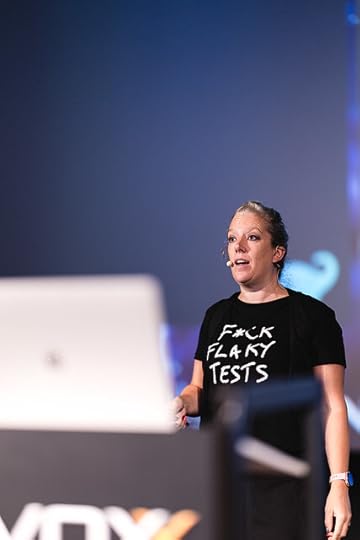
If you like some of my other t-shirts, I've also shopped at Redbubble, ManWhoHasItAll and Qwertee.
I wish I'd had this t-shirt when I recorded this video about how much I hate flaky tests.
The post Flaky Fashion appeared first on Trisha Gee.
August 29, 2024
Trisha’s Events, Autumn 2024
Today I'm experimenting with something new. Given how much I'm working with videos these days, I thought I'd do a short video about the conferences and events I'll be at between now and the end of 2024.
If you're more of a reading person than a watching person, here's the TL;DW:
19 September - XConf Europe, Barcelona. Keynote: Are your tests slowing you down? (Discount Code: XConfTrisha20)24-25 September - DPE Summit, San Francisco2-4 October - GOTO Copenhagen. Developer Productivity with IntelliJ IDEA; 97 Things Every Java Programmer Should Know.7-11 October - Devoxx Belgium: Productivity is Messing Around and Having Fun; Developer Productivity Engineering: What's in it for me?.14-16 November - TRGCON24, Madrid: Developer Advocacy: What, Why and How?4-13 December - YOW, Melbourne, Brisbane, Sydney: Developer Productivity with IntelliJ IDEA (Discount Code: gee-15)Remember, you can check out my Upcoming Events at any time.
The post Trisha’s Events, Autumn 2024 appeared first on Trisha Gee.
June 14, 2024
In which we discover the audience really matters
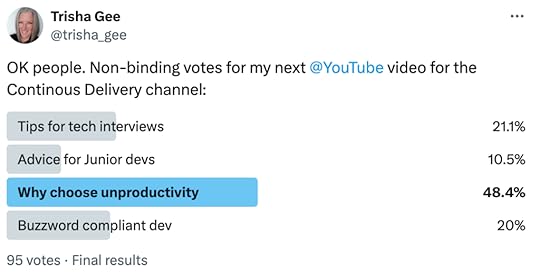
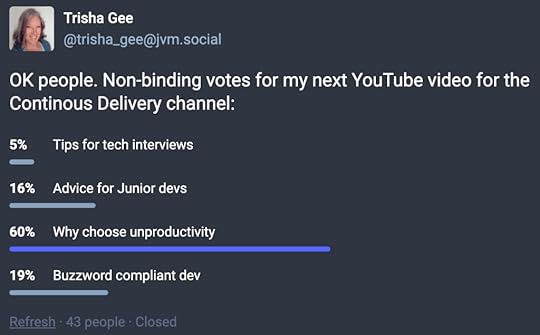
I ran a poll asking my followers which content to produce for Dave's Continuous Delivery YouTube channel. I found it interesting, but I guess not all that surprising, that the results depend upon who you ask.
This is Twitter (no I will not call it by its new name, actually I want to call it what my youngest does, which is "Baby Bird Twitter"):
This is Mastodon: same winner, different distribution of votes for the other options:
And this is LinkedIn:
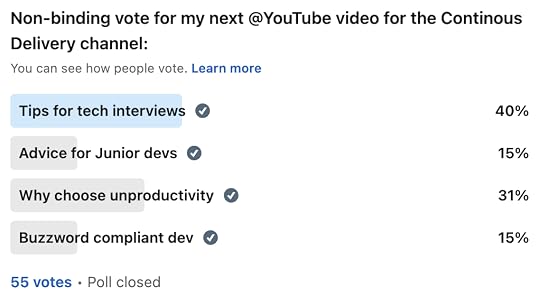
(Hahahahahaha I have literally only just noticed that I spelt "Continuous" wrong!!)
I mean, I guess I'm not super-surprised that LinkedIn readers are more interested in career-advice-type topics, but I found it interesting all the same.
I also find it interesting that "Advice for Juniors" didn't do better, but I guess many of my followers are not junior devs, and are more interested in content relevant to themselves rather than considering what might be useful to others.
Despite all this, I might actually do the "Buzzword Compliant" one anyway! I've already given this as a presentation, and it might be fun as a 7 min tongue-in-cheek video.
The post In which we discover the audience really matters appeared first on Trisha Gee.
June 7, 2024
Flaky tests are poisoning your productivity
I freaking HATE flaky tests.
The first time I worked in an environment that had real Continuous Integration with Actual Automated Tests that Actually Ran, it was like... freedom. We literally got the green light that our new code was working as expected, and that any changes we made hadn't broken anything. And refactoring... before then, I don't think I had ever really refactored anything. Even a simple rename was fraught with danger, you never knew if reflection or some sort of odd log-file parsing was dependent upon specific class or method names. With a comprehensive suite of unit, acceptance and performance tests, we had this blissful safety net that would tell us "Everything Is OK" after we'd done simple or extensive refactoring.
Except.
The tests were never all green at the same time. All the tests went green regularly throughout the day. But the information radiator always had at least one build segment that was red, because some test somewhere had failed.
While it was to be expected that tests would sometimes fail, especially the acceptance tests (they took too long to run all of them locally before committing), to have every commit cause at least one failure every time? This can't be right.
Welcome to the world of Flaky Tests.
Integration tests, particularly UI tests, are very prone to intermittently failing due to some sort of time-out or resource contention. I found this the hard way. I spent the next four years helping to identify flaky tests, fixing the ones I understood, and encouraging people smarter than me to figure out what was happening with the ones I couldn't. I mean, I did Actual Development too, lots of it, but my goal was to get that Information Radiator green.
15 year later and I'm still fighting the battle, only now I'm hoping to help you with your flaky test journey. In my experience, this journey looks a bit like:
We don't have no stinking flaky testsOh, we do? Let's find them and fix themWe should write tests that are less likely to be flakyIf you've made it as far as Step 3, well done!! In my experience, very few organisations make it that far.
If you are on this journey and you need some encouragement for yourself, your colleagues or your management, there may be something helpful in this video I did for Dave Farley's Continuous Delivery YouTube Channel. Transcript below.
Other stuff I've created on this topic:
Why fix your flaky testsHow to use Develocity to identify your flaky testsHow to fix your flaky testsPresentation: Are your tests slowing you down?TranscriptAre your tests lying to you? When they go red, when they fail, are they really failing? Or when you rerun them, do they go green? Flaky tests are the bane of my existence. And I'm going to talk about why that is and what you can do about your flaky tests.
So, flaky tests. Flaky tests, intermittent tests, non-deterministic tests. They're all different names for the same thing. A test that, under the same circumstances, sometimes passes and sometimes fails.
I find flaky tests so frustrating. We spend all this time, effort, and energy writing automated acceptance tests, and then time and money running them, only for them to, you know, sometimes pass and sometimes fail. They don't tell us the information that we need. They don't tell us, does it work? Yeah, I mean, sometimes.
That's not helpful. Why are flaky tests so bad? Well, they erode our trust in the test. Not only in the flaky tests, because we learn perhaps this one's flaky, and we don't really pay attention to it. And that's bad enough because. It's failing. There might actually be something wrong, or it might fail for a different reason, like something's broken and we ignore it because it's flaky.
But it's not just about the flaky tests that we're ignoring. We start to ignore all of our tests. Well, this build just has some flaky tests and sometimes it just goes red. And we start to ignore all these tests that we've put so much time and effort into writing. But worse than that, it has a bad impact on team morale.
We start to think, well, these tests don't really matter. And maybe quality doesn't really matter. And maybe the work I'm doing doesn't really matter. Like, what am I doing here? None of this makes any difference. And that's bad for us as a team. So what can we do?
The first thing we need to do is we need to find the intermittently failing tests.
I've spoken to engineers about the failures in their test suite, and asked them, do you have intermittently failing tests? And the answer is... we don't know. Sometimes as engineers we understand "Oh, I see this test fail quite a lot. It seems to sometimes pass and fail". We get a feeling for which ones are intermittently failing, but we don't have a list of them.
So the first thing to do is identify your flaky tests. We could do this the hard way, manually. You could have a look at every single failing test, rerun them, and if they pass, make a list of flaky tests versus actually failing tests. This is something I used to do in my day job years ago. Or we can do it the smarter way, which is what my colleagues did for me in that job, and automate this.
One thing you can use is you can use the automatic retries functionality of the build tool. For example, Maven and Gradle both support the ability to retry failed tests for a set number of times. And therefore, if you run it, say, three times, and it passes once and fails twice, that's a flaky test.
You can also write your own tool (or buy a tool) which will look at your various different builds and look at the tests across the different builds. It can figure out: if a test ran under the same circumstances on different builds, but sometimes passed and sometimes failed, it's probably a flaky test. This is a kind of "cross build" flaky test detection.
The next step is stop poisoning your tests. Take these flaky tests and move them out of your standard test suite. Either run them on a different build, a different agent, a different something, or just leave them there. Or you can write an annotation to temporarily disable the test. We wrote an @IgnoreUntil tag, which we would put on a flaky test with a date to start re-running the tests. So for the next two weeks, or whatever, you wouldn't run that test, giving you time to fix that test. If the test wasn't fixed in two weeks time, it would pop back up and start failing again. That's one way to sort of temporarily quarantine your tests.
I would argue sometimes for deleting the tests. If you're ignoring the result, if you don't understand what it's doing when it fails, that test isn't doing anything. You should probably delete it. Maybe instead you can make a note of the test title, a note of what you think it's doing, delete it, and schedule the time to write a new one, perhaps. Maybe deleting code isn't all it's cracked up to be. But it's not giving you any value, get that test out of there.
Now, a very important step. Fix your flaky tests. I mean, if you didn't delete them! But fix your flaky tests. It's not enough to just put them over here and start ignoring them. You also have to actively fix them. These tests were written for a reason. Somebody thought that these things needed to be checked. Figure out what it is that the test is doing.
Figure out the root cause of the problem with the intermittently failing test and fix that. I'm not going to go into the details of the root causes of intermittently failing tests. Dave's already done an excellent video on that in this particular channel, so go ahead and have a look at that.
What I do want to talk about is when to fix them. Now, ideally, as soon as possible, but that's not always possible given the working on other things. But there are several ways to make sure that you do spend time fixing intermittently failing tests, not just do them "later". Like we address tech debt "later".
Something you could do, for example, is create a card with the names of the tests you want to actually fix, put it in the backlog so that it gets done as part of your normal work. Something else you can do is schedule a fixed amount of time every couple of weeks, every month, to work on intermittently failing tests.
There's an advantage of having the whole team swarm on intermittently failing tests, because you may find there are some root causes common across all the tests, and if the whole team is working on it, you might be able to identify those root causes. Something else you could do, which is less than ideal, is slot in some time for working on intermittently failing tests when you're waiting for other stuff. Waiting for some long batch process, waiting for someone to get back to you, waiting in between two meetings. Maybe you might want to spend an hour or so diving into the possible cause of your test intermittency.
"But Trisha", I hear you say, "some tests are just inherently flaky". Yes, it's true. We can't control a whole environment. There are some types of tests, ones which are waiting for external services, or ones which require a database to come up, or ones which have a complicated set of dependencies to manage, which just don't always respond in time for us to complete the test.
That is the reality of the situation. What we want to do with those tests which are inherently flaky by their very nature is to put them somewhere else, run them somewhere else, and know that these are definitely flaky tests. We don't have them in our normal test suite poisoning the results of the test suite.
However, just because some types of tests are inherently flaky doesn't mean that we can accept that all of our tests are inherently flaky. And it doesn't mean that we can write all of our tests so that they use dependencies which will introduce flakiness. Not every test needs to be an end-to-end test. Not every test needs to be a UI test. Not every test needs test containers to start up databases or whatever. Many of the things we are testing in some of these bigger tests can be separated out into a smaller, more reliable, more controllable tests. So that's what we should be aiming for. Yes, some tests will be intermittent, a small number of them, and they should be run elsewhere. But in our key tests, we should be able to use stubs, test harnesses, something else to create a framework for stability to get consistent results for the tests that are most important to us.
I accept there is a reality where there are organizations and teams where they have a lot of end-to-end tests. A lot of their tests are big and complicated, and they are inherently unreliable. And these teams might be listening to me thinking, I don't have time to rewrite all of my tests so they're faster and more reliable.
It's true, you have other stuff to do. But I do think you should be investing time in making your big, clumsy, unreliable tests smaller, faster and reliable. Where would you rather invest your time? Do you want to be spending your time debugging flaky tests every time you break something that's nothing to do with you? Do you want to be investing your time re-running tests and waiting for a result only to find out, oh, it's nothing to do with the thing that you did? Or do you want to invest your time making these tests faster and more reliable so that you don't worry about them anymore?
Ask yourself, is it worthwhile having a test suite which lies to you? Or are you going to invest time finding flaky tests and scheduling time to fix those flaky tests?
The post Flaky tests are poisoning your productivity appeared first on Trisha Gee.