
Carol Rainbow's Blog
April 19, 2017
Experimenting with Loom
This looks such a useful resource for teachers. I made a very short video, posted it straight to Facebook, now I am going to try the embed code:
This works from a plugin in Chrome, no messing with editors etc., the video is stored in the cloud, I think I can download it - trying that next...
All in all, so far, it looks really good!
This works from a plugin in Chrome, no messing with editors etc., the video is stored in the cloud, I think I can download it - trying that next...
All in all, so far, it looks really good!


July 7, 2016
Photospheres 2 - trying indoors
I have been studying photospheres to see how people are using them!
What I would like to achieve is to make conversation or story starters.
One image which I saw, and it looked really good, was inside a workshop which gave me a whole new set of ideas.
I thought that if I could do that I would add in all sorts of artefacts to create different scenes.
I tried a 360 photo in my office - there is lot in here that could be used to start a discussion, books, photos, ornaments, two dogs, technology, all sorts. My office is far too small, the image was totally jumbled, I think each shot overwrote what went before.
I moved into our largest room, the living room, this is quite a big room. The first three tries were dreadful, bits of coffee table, books, chairs all got jumbled up. I moved the coffee table over to the patio windows so it was not in the middle of the room and got a reasonable, though far from perfect 360 photograph. I had set up just a few props to see if it was possible, the teddies in the chair, a photo, open wooden box, flowers - most of which are no use as they are not clear.
I think it needs to be a big classroom, school hall or similar to be able to set up an indoor story starter. Outdoors it is easy to makes 360 photos but detail can't easily be seen so anything that a teacher wants to inspire discussion or story writing would need to be near the photographer and fairly large.
What I would like to achieve is to make conversation or story starters.
One image which I saw, and it looked really good, was inside a workshop which gave me a whole new set of ideas.
I thought that if I could do that I would add in all sorts of artefacts to create different scenes.
I tried a 360 photo in my office - there is lot in here that could be used to start a discussion, books, photos, ornaments, two dogs, technology, all sorts. My office is far too small, the image was totally jumbled, I think each shot overwrote what went before.
I moved into our largest room, the living room, this is quite a big room. The first three tries were dreadful, bits of coffee table, books, chairs all got jumbled up. I moved the coffee table over to the patio windows so it was not in the middle of the room and got a reasonable, though far from perfect 360 photograph. I had set up just a few props to see if it was possible, the teddies in the chair, a photo, open wooden box, flowers - most of which are no use as they are not clear.
I think it needs to be a big classroom, school hall or similar to be able to set up an indoor story starter. Outdoors it is easy to makes 360 photos but detail can't easily be seen so anything that a teacher wants to inspire discussion or story writing would need to be near the photographer and fairly large.
July 5, 2016
Photospheres, how to make and embed them
The Google Street View app (IOS and Android) offers the opportunity to make photospheres: 360 degree panoramic images with the photographer in the very centre of the image and totally unseen. I have spent the week playing with it and finding out what I can do with it. This is by no means complete but a good start for anyone wishing to start creating photospheres!
To make a 360 degree image:
Download the Google Street View app
Open it on your phone or mobile device
Click on the Yellow Dot and choose to open the camera.
Line up the yellow dot with the circle on screen and it automatically takes a photograph when in line. Move right and line up the dots, follow round a complete circle, this takes about 10 images
Move the camera up or down and follow the dots again. There are four levels of yellow dots to follow and take images. (NB if your phone does not have a gyroscope you will only be able to go round in a circle around you and not complete the 360 recording.)
Once you have completed all of the images needed touch the tick and the app starts stitching the images together to create the 360 degree image. This stage takes a few minutes.
Soon after you complete it it will be available to Publish. The app automatically records where the image has been taken, and that position is where the image will be recorded in Google Maps once it is published. At this point it is available to the public.
Publishing it puts it into two places:
it will be in your photos in the 360 folder. From there you can upload it to Facebook where it will appear as a 360 degree image.it will be on Google maps, but I found it fairly difficult to find! In Google Maps click on the double arrow in the bottom right corner to open images. Click on the little peg man to open the next menu which shows photospheres marked by tiny blue circles. Find the one which you wantAn example of finding your photospheres: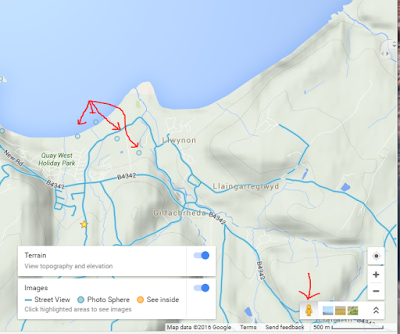
To embed a 360 Degree image in a blog or web page
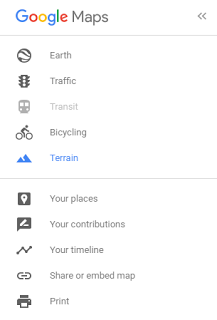 Choose Share or Embed from the Google Maps left side navigation menu (see image left) and copy the embed code. NB you will need to access the source code of your blog, forum posting or web page to be able to paste the embed code into.

In Blogger this is clicking on the html side of the page tabs.
In many blogs look for the greater than followed by the less than
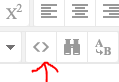 symbols to be able to embed code.
You may need to alter the size - mine is bigger than many spaces will allow! I have changed the dimensions given (400 x 600) making it 100% so hopefully it will show accurately on a mobile device but this may have to be changed yet - this is all new to me!
Tips:
Don't try to take a 360 in bright sunshine - the photographer casts a shadow and it is hard to look up into the sun to take that particular image!Straight lines are not brilliant, tall buildings, tree trunks and fences don't line up well in the stitched up image.Try to keep on the spot, concentrate on the feet.Watch out for moving pets, if they appear in an overlapping image but not in the one being overlapped you seem to get an extra bit of images added in - thus putting all of it out of line.When you think you have finished taking photos, check that the whole outside of the recording circle is complete! This morning I took photos, got to the end and realised there was still a small gap in the white edging. I retraced my 360 path and found two missed circles, the very first image I took had black spaces that I did not understand but now I realised I missed two shots!
First ideas about what we could do with it in education:use it for description work - what can you see, smell, feel, hear... speaking or writinguse it as a story starter, put items on the photo to inspire story telling (See tomorrow's blog for a story starter, it is all planned!use it as a conversation starter, where is it, have you been there, where was your last holiday....Finally for the moment - it works really well with Google cardboard for a totally immersive experience.
To make a 360 degree image:
Download the Google Street View app
Open it on your phone or mobile device
Click on the Yellow Dot and choose to open the camera.
Line up the yellow dot with the circle on screen and it automatically takes a photograph when in line. Move right and line up the dots, follow round a complete circle, this takes about 10 images
Move the camera up or down and follow the dots again. There are four levels of yellow dots to follow and take images. (NB if your phone does not have a gyroscope you will only be able to go round in a circle around you and not complete the 360 recording.)
Once you have completed all of the images needed touch the tick and the app starts stitching the images together to create the 360 degree image. This stage takes a few minutes.
Soon after you complete it it will be available to Publish. The app automatically records where the image has been taken, and that position is where the image will be recorded in Google Maps once it is published. At this point it is available to the public.
Publishing it puts it into two places:
it will be in your photos in the 360 folder. From there you can upload it to Facebook where it will appear as a 360 degree image.it will be on Google maps, but I found it fairly difficult to find! In Google Maps click on the double arrow in the bottom right corner to open images. Click on the little peg man to open the next menu which shows photospheres marked by tiny blue circles. Find the one which you wantAn example of finding your photospheres:

To embed a 360 Degree image in a blog or web page
 Choose Share or Embed from the Google Maps left side navigation menu (see image left) and copy the embed code. NB you will need to access the source code of your blog, forum posting or web page to be able to paste the embed code into.
In Blogger this is clicking on the html side of the page tabs.
In many blogs look for the greater than followed by the less than
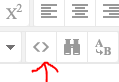 symbols to be able to embed code.
You may need to alter the size - mine is bigger than many spaces will allow! I have changed the dimensions given (400 x 600) making it 100% so hopefully it will show accurately on a mobile device but this may have to be changed yet - this is all new to me!
Tips:
Don't try to take a 360 in bright sunshine - the photographer casts a shadow and it is hard to look up into the sun to take that particular image!Straight lines are not brilliant, tall buildings, tree trunks and fences don't line up well in the stitched up image.Try to keep on the spot, concentrate on the feet.Watch out for moving pets, if they appear in an overlapping image but not in the one being overlapped you seem to get an extra bit of images added in - thus putting all of it out of line.When you think you have finished taking photos, check that the whole outside of the recording circle is complete! This morning I took photos, got to the end and realised there was still a small gap in the white edging. I retraced my 360 path and found two missed circles, the very first image I took had black spaces that I did not understand but now I realised I missed two shots!

First ideas about what we could do with it in education:use it for description work - what can you see, smell, feel, hear... speaking or writinguse it as a story starter, put items on the photo to inspire story telling (See tomorrow's blog for a story starter, it is all planned!use it as a conversation starter, where is it, have you been there, where was your last holiday....Finally for the moment - it works really well with Google cardboard for a totally immersive experience.
January 24, 2016
Starting to make videos for flipping the classroom
I am going to do a series of very short posts leading people new to making videos for the flipped classroom gently through the process!
Many of us will already have several devices capable or recording video and sound, it is a matter of deciding which is the best quality for your purpose.
This first post is simply to find the resources that you can use and try them out.
Do you have a smart phone with video taking resources? Experiment with it. You may need a holder but before you spend any money try filming yourself just for one minute by holding it and taking a selfie video. Listen to it carefully, is your voice loud enough? Clear enough? Look at it, is your image clear, good enough for someone to watch two or three minutes of you talking on a regular basis?
Before you decide on using your phone what else do you have? Flip cameras, small hand held camcorders and many digital cameras have the capacity to take digital video. Try them! Will they pick up your audio?
Do you have a laptop with a built in web cam? Try it and watch and listen!
Do you have a headset with a mic? Plug that into your laptop, does that help? It should block out most of the background sound in your surroundings.
Do you have a desktop with a web cam? Again it will be much better with a headset and mic rather than using its own mic which will be further away from you and so quieter as well as picking up all the background sound around you.
Do you have a tablet capable or recording video and sound? Does it have its own tiny headset as the iPad does? If so prop that up and record yourself again with an eye and ear for quality of sound and picture.
Do you have an external mic that you can plug in and have hear you? If so try it out and again listen to the quality! I have a very good quality mic but a small web cam - they will not record synchronously! The video lags behind the audio - much more infuriating that slightly poorer quality sound.
So - first things first! Try everything out that you already have a find the best combination to use.
Web sites that may helpHow to use a digital Camera from Jisc
A Google search for phone tripods
Information on choosing a headset
Many of us will already have several devices capable or recording video and sound, it is a matter of deciding which is the best quality for your purpose.
This first post is simply to find the resources that you can use and try them out.
Do you have a smart phone with video taking resources? Experiment with it. You may need a holder but before you spend any money try filming yourself just for one minute by holding it and taking a selfie video. Listen to it carefully, is your voice loud enough? Clear enough? Look at it, is your image clear, good enough for someone to watch two or three minutes of you talking on a regular basis?
Before you decide on using your phone what else do you have? Flip cameras, small hand held camcorders and many digital cameras have the capacity to take digital video. Try them! Will they pick up your audio?
Do you have a laptop with a built in web cam? Try it and watch and listen!
Do you have a headset with a mic? Plug that into your laptop, does that help? It should block out most of the background sound in your surroundings.
Do you have a desktop with a web cam? Again it will be much better with a headset and mic rather than using its own mic which will be further away from you and so quieter as well as picking up all the background sound around you.
Do you have a tablet capable or recording video and sound? Does it have its own tiny headset as the iPad does? If so prop that up and record yourself again with an eye and ear for quality of sound and picture.
Do you have an external mic that you can plug in and have hear you? If so try it out and again listen to the quality! I have a very good quality mic but a small web cam - they will not record synchronously! The video lags behind the audio - much more infuriating that slightly poorer quality sound.
So - first things first! Try everything out that you already have a find the best combination to use.
Web sites that may helpHow to use a digital Camera from Jisc
A Google search for phone tripods
Information on choosing a headset

June 21, 2015
January 17, 2015
Learning Minecraft 1
The first session as part of EVO 2015 was 16 Jan 2015. Thanks To Filip and Kalios who got me started!
My intro - I live in Wales, have been a teacher for far too many years. Love making machinima and would like to make some in Minecraft - once I have learned how to manage the game itself. I tried it a few months ago but never got very far - just kept getting killed!
My intro - I live in Wales, have been a teacher for far too many years. Love making machinima and would like to make some in Minecraft - once I have learned how to manage the game itself. I tried it a few months ago but never got very far - just kept getting killed!
April 11, 2014
Ebbe Altber's keynote speech at the Virtual World’s Best Practice in Education
I just listened to Ebbe Altber's keynote speech at the Virtual World’s Best Practice in Education. Ebbe is the new CEO of Lindenlab. The best news is that he wants to make the metaverse easier for all - consumers and creators! This speech was good news to us all!
He told us he was there to start the dialog, to figure out where to go from here. He has looked at branding and TOS and integration... “I am working with legal counsel to figure out how to make it more obvious or very obvious that creators own content” and Second Life are not wishing to lock it in but to make it easy to move to OpenSim. “We have a breadth of content creators for many purposes. This is unique to SL. We should support everybody.There is still so much to do to make the metaverse so much easier for all consumers and creators, even with all of the work that we are doing it is still too hard for many users. Nobody else has an environment this open and where users take it where they want to take it.”
Future Technology Most of the responses here are verbatim but not in speech marks in case there is something not perfectly accurate!
We are developing core tech, including Oculus. There is already a beta versionAs the hardware develops, we will be next to it, we want you not to be looking at the world but being in it.With Oculus we have worked focused on viewing experience, not yet the user interface.The keyboard disappears; we want to explore how to make changes in how you interact with the world. With a full time liaison, you can think up a million things we COULD do but we need to prioritize. You won't all agree on what is top priority. It takes a lot of resources and time to engage in that conversation and that is a cost. Many are not up to speed on the topic, are biased, or are not experienced. It can add a lot of cost to involve everyone in design, we want to be more transparent, we want feedback, to learn from you, to correct things, we learn from watching what you do.”
Someone asked about the bad press and if it was possible to improve that status. Ebbe said that SL got overhyped too early, some was self-inflicted, and maybe there was a hope that tens of millions would use it.There came a backlash, it became bad or negative, that is unfortunate, there is a lot of good stuff happening here, not seen outside. We want to correct this. The market is starting to embrace virtual reality.
Could the linden dollar spread outside Second Life? Ebbe replied we would love to do that but it is a massive undertaking.“I spoke earlier of compliance, to do compliance on a scale that bankers are comfortable with, we are fortunate to be so far along, nobody else is this far, we want to make safer high volume transactions. We are talking about that, we have done all the compliance work to be in line with state and federal regulations.”
Are there any current projects you can share that will make the viewer easier to use and more intuitive?One effort was not received well, to simplify it. I don't know why yet. Ultimately, in order for SL to grow, it has to become easier to use. It takes too much time to engage and immerse people and make them functional… we can't go mass market as we are today.
Following up, are there any plans in improving transparency with 3rd party viewer - innovations may come fasterWe do a decent job of collaborating with open source, Oz Linden interfaces with third party players.That community adds value to provide other viewers optimum for other audiences.WE can't do everything for all, those with disabilities, those on other platformsWe need those communities to help us.I think we have a good relationship with the open source community.It is a double edged sword, some open source developers took advantage and did nasty things.
What tech from HiFi be used in SL?Ebbe- I hope it will create many advances many can benefit from to move virtual worlds and virtual reality forward. The more new hardware and interfaces, it moves us all forward. Philip and I know each other well, some of us will visit them in a couple of weeks to see demoshow we can help each other, it is early stages - I am transparent with Philip, we have assets that are valuable to them, and I hope we can collaborate.I am interested in the work they are doing with bringing emotion into your avatar experience, see the expressions on a face, what emotions can be expressed visually, they are working in that area.I want to be sure we provide that level of emotional capability to our avatarsWe are aware that latency increases and impacts performance, further away from America you have increased latency and reduced sense of functionality , we are testing what aspects cause these issues, we have to create a lower latency tech, we need to push less data over the pipe.
You had mentioned that you were looking to allow people to export their content/ Will there be an export flag that will help?Nothing we are doing technically prevents export. Many get their content out.Maybe it is third party solutions, we are not preventing. Are we making it simple enough from our viewer?Maybe we need to make that more streamlined, we are not preventing it, but we don't want it to be easy for others to rip people off.I have to look at that. It's a permission issue?Ebbe should there be permissions to allow export?I need to understand it better. If you own it you can take it. Ownership is a complex issue for us to reduce copybotting and stealing.We don't want to be inflexible, permissions, monitoring tools, preventing fraud, we want to protect you and your creations.In the foreseeable future we will be working on the main grid without restricting what people can do, once we solve it so adults can use it, then we can go to attract other audiences, other special cases but no teen grid in the near term, I would love to do it, but it is priorities.We need to make SL more welcoming, If ease of use and quality and tech more flexible, we may arrive at a place where it would not be cumbersome to offer to more dedicated special audiences, but this is not a top priority.As people start to be inworld, with their relevant projects, they will see how their work can improve.I hope more Lindens will come inworld to interact with users so that can be a more normal comfortable thing. If we do special meetings, what topics, who would facilitate? How do we make sure something actionable comes out of it? If there are interest groups, like an ed group, that wants to have a more regular check in, we can see which Linden would like to participate. As in RL every hobby and interest group, there are only a few Lindens, how can we engage, that is a challenge. I am happy to spend some of my time learning but how to do it fairly and efficiently?We have to do what will have the most benefit for the most peopleNone of this would exist without all we have done together.If the community has things to do, if they want to invite us to participate, today you will find more people who can and are willing to participate.We are all ears we want to figure out how to engage with all of you.Unless we do something technical, nothing will change. If we have conversations, that won't be enough to create change.My dream is to make this something a huge number of people can enjoy and contribute to, this is just the beginning, there is more to come.Facebook buying Oculus is excellent. They see the future we have all been working onOnLive third party using our open source technology will make a viewer for the tabletWe do have conversations; we collaborate with all 3rd party teamsThey improved their pricing model.You can reach out to individual Lindens if you think they are interested.Ebbe - like an interest group catalogue to know meeting times and formats. I know Torley. I understand his role. He can go inworld and hang out as much as he feels he has the time to do so.We are here. We are willing to listen and dialog. We want to talk about the future. The doors are open again.We want to know how to make you successful.That's it. I'm here. I'm happy to talk with all of you.
I want to learn and listen. I want to make you successful.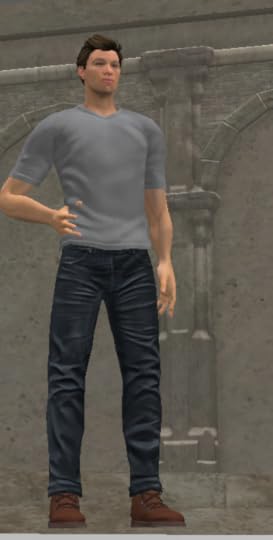
He told us he was there to start the dialog, to figure out where to go from here. He has looked at branding and TOS and integration... “I am working with legal counsel to figure out how to make it more obvious or very obvious that creators own content” and Second Life are not wishing to lock it in but to make it easy to move to OpenSim. “We have a breadth of content creators for many purposes. This is unique to SL. We should support everybody.There is still so much to do to make the metaverse so much easier for all consumers and creators, even with all of the work that we are doing it is still too hard for many users. Nobody else has an environment this open and where users take it where they want to take it.”
Future Technology Most of the responses here are verbatim but not in speech marks in case there is something not perfectly accurate!
We are developing core tech, including Oculus. There is already a beta versionAs the hardware develops, we will be next to it, we want you not to be looking at the world but being in it.With Oculus we have worked focused on viewing experience, not yet the user interface.The keyboard disappears; we want to explore how to make changes in how you interact with the world. With a full time liaison, you can think up a million things we COULD do but we need to prioritize. You won't all agree on what is top priority. It takes a lot of resources and time to engage in that conversation and that is a cost. Many are not up to speed on the topic, are biased, or are not experienced. It can add a lot of cost to involve everyone in design, we want to be more transparent, we want feedback, to learn from you, to correct things, we learn from watching what you do.”
Someone asked about the bad press and if it was possible to improve that status. Ebbe said that SL got overhyped too early, some was self-inflicted, and maybe there was a hope that tens of millions would use it.There came a backlash, it became bad or negative, that is unfortunate, there is a lot of good stuff happening here, not seen outside. We want to correct this. The market is starting to embrace virtual reality.
Could the linden dollar spread outside Second Life? Ebbe replied we would love to do that but it is a massive undertaking.“I spoke earlier of compliance, to do compliance on a scale that bankers are comfortable with, we are fortunate to be so far along, nobody else is this far, we want to make safer high volume transactions. We are talking about that, we have done all the compliance work to be in line with state and federal regulations.”
Are there any current projects you can share that will make the viewer easier to use and more intuitive?One effort was not received well, to simplify it. I don't know why yet. Ultimately, in order for SL to grow, it has to become easier to use. It takes too much time to engage and immerse people and make them functional… we can't go mass market as we are today.
Following up, are there any plans in improving transparency with 3rd party viewer - innovations may come fasterWe do a decent job of collaborating with open source, Oz Linden interfaces with third party players.That community adds value to provide other viewers optimum for other audiences.WE can't do everything for all, those with disabilities, those on other platformsWe need those communities to help us.I think we have a good relationship with the open source community.It is a double edged sword, some open source developers took advantage and did nasty things.
What tech from HiFi be used in SL?Ebbe- I hope it will create many advances many can benefit from to move virtual worlds and virtual reality forward. The more new hardware and interfaces, it moves us all forward. Philip and I know each other well, some of us will visit them in a couple of weeks to see demoshow we can help each other, it is early stages - I am transparent with Philip, we have assets that are valuable to them, and I hope we can collaborate.I am interested in the work they are doing with bringing emotion into your avatar experience, see the expressions on a face, what emotions can be expressed visually, they are working in that area.I want to be sure we provide that level of emotional capability to our avatarsWe are aware that latency increases and impacts performance, further away from America you have increased latency and reduced sense of functionality , we are testing what aspects cause these issues, we have to create a lower latency tech, we need to push less data over the pipe.
You had mentioned that you were looking to allow people to export their content/ Will there be an export flag that will help?Nothing we are doing technically prevents export. Many get their content out.Maybe it is third party solutions, we are not preventing. Are we making it simple enough from our viewer?Maybe we need to make that more streamlined, we are not preventing it, but we don't want it to be easy for others to rip people off.I have to look at that. It's a permission issue?Ebbe should there be permissions to allow export?I need to understand it better. If you own it you can take it. Ownership is a complex issue for us to reduce copybotting and stealing.We don't want to be inflexible, permissions, monitoring tools, preventing fraud, we want to protect you and your creations.In the foreseeable future we will be working on the main grid without restricting what people can do, once we solve it so adults can use it, then we can go to attract other audiences, other special cases but no teen grid in the near term, I would love to do it, but it is priorities.We need to make SL more welcoming, If ease of use and quality and tech more flexible, we may arrive at a place where it would not be cumbersome to offer to more dedicated special audiences, but this is not a top priority.As people start to be inworld, with their relevant projects, they will see how their work can improve.I hope more Lindens will come inworld to interact with users so that can be a more normal comfortable thing. If we do special meetings, what topics, who would facilitate? How do we make sure something actionable comes out of it? If there are interest groups, like an ed group, that wants to have a more regular check in, we can see which Linden would like to participate. As in RL every hobby and interest group, there are only a few Lindens, how can we engage, that is a challenge. I am happy to spend some of my time learning but how to do it fairly and efficiently?We have to do what will have the most benefit for the most peopleNone of this would exist without all we have done together.If the community has things to do, if they want to invite us to participate, today you will find more people who can and are willing to participate.We are all ears we want to figure out how to engage with all of you.Unless we do something technical, nothing will change. If we have conversations, that won't be enough to create change.My dream is to make this something a huge number of people can enjoy and contribute to, this is just the beginning, there is more to come.Facebook buying Oculus is excellent. They see the future we have all been working onOnLive third party using our open source technology will make a viewer for the tabletWe do have conversations; we collaborate with all 3rd party teamsThey improved their pricing model.You can reach out to individual Lindens if you think they are interested.Ebbe - like an interest group catalogue to know meeting times and formats. I know Torley. I understand his role. He can go inworld and hang out as much as he feels he has the time to do so.We are here. We are willing to listen and dialog. We want to talk about the future. The doors are open again.We want to know how to make you successful.That's it. I'm here. I'm happy to talk with all of you.
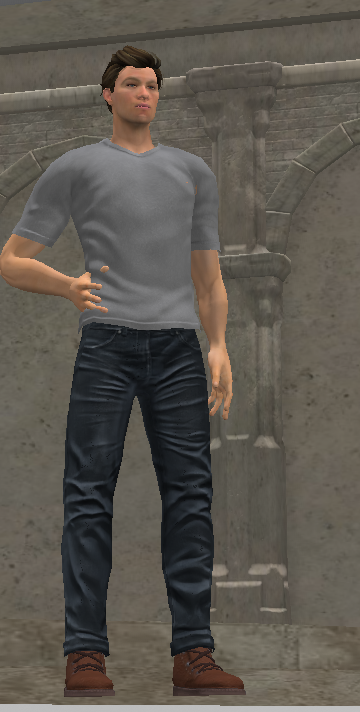
I want to learn and listen. I want to make you successful.
Carol Rainbow's Blog

- Carol Rainbow's profile
- 1 follower
Carol Rainbow isn't a Goodreads Author
(yet),
but they
do have a blog,
so here are some recent posts imported from
their feed.

