
Leah Moore's Blog
April 24, 2026
After Curfew: some thoughts on the first Haunted Book Club live (in-person) event
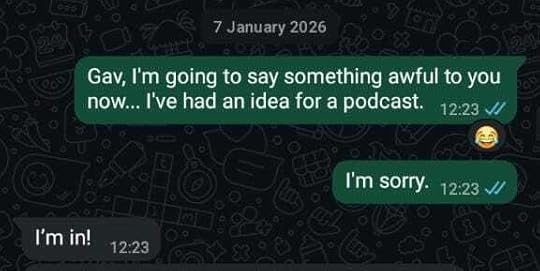
Since February 2026, my good friend – the multi-talented, highly acclaimed storyteller Gav Cross – and I have been doing a podcast together. It was my idea. I had it in January, and I tried to take it back, but it was already too late.
The podcast is called Haunted Book Club, and the premise is simple. It’s a book club centred around short Ghost Stories and creepy tales, where members don’t even have to do the reading. We (well, Gav) will do the reading for you. You can listen to his version of our chosen story one week, then join us live on Substack to discuss that story the next. The stories and conversations are then magically beamed out to wherever you get your podcasts from, for you to enjoy at your leisure. You can even suggest stories you’d like us to cover in the future.
So far, there are ten episodes of Haunted Book Club out there. We’ve covered stories by Charles Dickens, E F Benson, E. Nesbit, Edgar Allan Poe, and Edith Wharton so far. We plan to keep going. Don’t try to stop us.

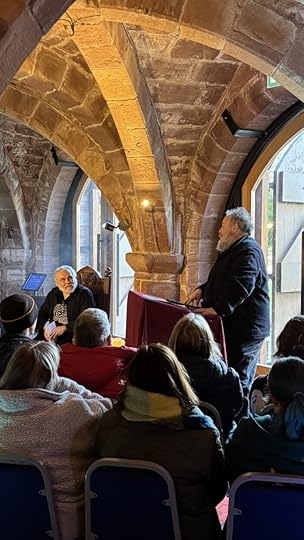
On Saturday, the 18th of April, we did our first-ever live in-person version of Haunted Book Club. It took place at the incredible Norton Priory. By special permission of the estate of Lucy M. Boston, we had the pleasure of reading and discussing her short story Curfew with our audience.

If you have never read Curfew yourself, then I can highly recommend the Swan River Press collection Curfew & Other Eerie Tales. The only other book the story has ever been published in, The House of Nightmare and Other Eerie Tales, isn’t too hard to find second-hand either.
I won’t spoil the story for you (not least because it is, genuinely, a really good one), but I will tell you a few things about it and its setting.
Norton Priory is a historic site in Norton, Runcorn, Cheshire, England, comprising the remains of an Augustinian abbey complex dating from the 12th to 16th centuries, and an 18th-century country house.
![“The empty stone coffins of forgotten Abbots [...] solid blocks of local stone hollowed to the austerest outline of the human body with a round resting place for the head” photo by Ned Cross](https://i.gr-assets.com/images/S/compressed.photo.goodreads.com/hostedimages/1777045156i/37732652._SY540_.jpg)
Norton Abbey was closed in 1536, as part of the dissolution of the monasteries. Nine years later, the surviving structures, together with the manor of Norton, were purchased by Sir Richard Brooke, who built a Tudor house on the site, incorporating part of the abbey. In the 18th century a Georgian house replaced the Tudor one. The Brooke family eventually left the manor house in 1921, and it was partially demolished in 1928. In 1966 the site was given in trust for the use of the general public.
The site was opened to the public as a visitor attraction in the 1970s. The 42-acre site, run by an independent charitable trust, includes a museum, the excavated abbey ruins, and the surrounding garden and woodland. In 1984, the walled garden was redesigned and opened to the public. The museum was extended and revamped in 2016.
Lucy Maria Wood, born in Southport in 1892, married Harold Boston in 1917. Together, the newlyweds moved to Norton Lodge, in Runcorn, in the grounds of today’s Norton Priory Museum. The crumbling Abbey Manor, which features in Curfew, is based on Norton Manor, and the farmhouse belonging to Aunt Catherine and Uncle Tom in the story is a version of Norton Lodge. The characters of Aunt Catherine and Uncle Tom are, supposedly, based on Harold and Lucy themselves.

My earliest introduction to Boston’s work was the 1986 BBC television adaptation of The Children of Green Knowe, which was as compelling as it was terrifying. In The Children of Green Knowe, a gigantic statue of Saint Christopher comes to life. That statue – the real one, carved in the 14th century, and over eleven feet tall – still stands at Norton. Clearly, it made an impression on Lucy when she lived there.
“The empty stone coffins of forgotten Abbots […] solid blocks of local stone hollowed to the austerest outline of the human body with a round resting place for the head” mentioned in Curfew are very much still in evidence at Norton.
The setting of a ruined, forgotten Abbey and its surroundings might have seemed fantastical and perhaps overly Gothic to many readers, but it was a reality for Lucy, Harold, and their son, Peter, when they lived at Norton Lodge. Peter Boston, by the way, grew up to be an architect and an artist who illustrated his mother’s Green Knowe books, amongst others.
Norton was, therefore, the perfect setting for our Curfew special, and we had a brilliant time chatting with the book clubbers about the story.




View this post on Instagram
The next Haunted Book Club live (in-person) event will take place at the incredible Portico Library in Manchester.

On Thursday, the 14th of May, we’ll be reading and discussing Elisabeth Gaskell’s The Old Nurse’s Tale. Tickets are available now, and we hope to see you there.
The post After Curfew: some thoughts on the first Haunted Book Club live (in-person) event first appeared on moorereppion.

April 22, 2026
Review: KiiBOOM Phantom98 Lite keyboard – clear edition
Hang on, have KiiBOOM mistakenly sent me the same keyboard twice? Didn’t I already review the Phantom 98 Lite back in March? Yes, I did. But, what we have here is a rare opportunity for me to try out two different variants of the same model. So, cast all thoughts of frogs and lily pads aside, because today I’m talking about the Phantom 98 Lite clear edition.
[image error]The Phantom98 Lite is an ANSI 97-key, 76% layout mechanical keyboard. It has three modes of connectivity: USB-C, Bluetooth, and 2.4GHz. It has an onboard 8000mAh Battery, and weighs about 1.2 kg. It has a pair of two-position flip-down silicon-padded feet for typing-angle adjustment.
The Phantom98 Lite comes in Green and Clear. This time we’re talking about the Clear model. Keycaps are Cherry profile, transparent acrylic with black characters throughout. The main body of the board is also made from sculpted transparent acrylic.
[image error]South-facing RGB/ backlights enhance the look of the board. You can toggle through a whole lot of onboard presets and alter the speed, brightness, hue, and saturation of the lights via keyboard shortcuts. Like the Jade 75, the Phantom98 Lite Clear can basically transform into any colour of board you desire. It’s also VIA compatible, enabling users to customise every key, macro, and RGB lighting effect.
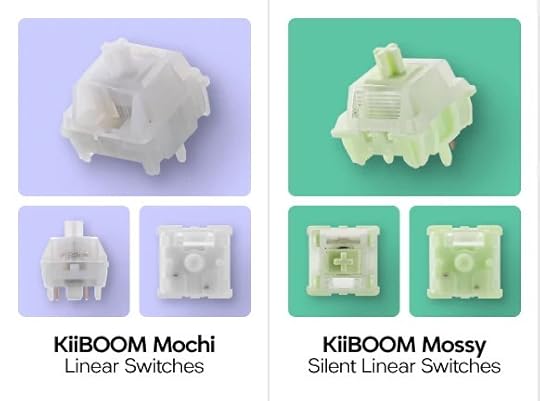
The Phantom98 comes with a choice of KiiBOOM’s own Mochi linears or Mossy silent linears. Again, I got the Mochi linears, which are lovely.
The Phantom98 is a gasket-mounted board with layers of latex sandwich foam, ixpe switch pads, PE transparent film, PCB Foam, and a bottom Silicone pad. This means that the Phantom98 has next to no sound transference onto the work surface.
Phantom98 Lite Clear is a great keyboard and, if I didn’t already know about the foggy edition, I would be raving about it a bit more, I think. As it is, I do still prefer the froggy version, but maybe you aren’t into whimsy and lily pads? Each to their own.
The Phamtom 98 Lite is available to order directly from KiiBOOM now for $109 USD
The post Review: KiiBOOM Phantom98 Lite keyboard – clear edition first appeared on moorereppion.April 21, 2026
Review: KiiBOOM Jade 75 shine-through keyboard
KiiBOOM have very kindly sent me one of their Jade 75 keyboards to try out, and it’s a beauty.
[image error]The Jade 75 is an 80-key / 75% Keyboard with an ANSI layout. It is Win/Mac/Linux compatible and connects via Bluetooth, 2.4GHz wireless, and USB-C (with a three-way switch at the back of the board to select the mode). It has a 3750mAh on-board battery.
[image error]The Jade 75 comes in two colourways: White and Clear. I got the White, which is actually more like a lovely milky pearl kind of colour. The shine-through (semi-transparent) keycaps have an MDA profile, with a lovely sculpted, ergonomic shape. Black characters throughout, sticking with the very clean and to-the-point aesthetic of the board. One thing I noticed is that, on the KiiBOOM website, the Jade 75 is sometimes shown with its characters on the front of the keys rather than the top. I can’t quite work out if this is a difference between the White and the Clear colourways or something else. The board I received has its characters on top of the keys, and I have to say that I much prefer that, anyway.
The Jade 75 features south-facing RGB lighting with all the usual on-board effects and adjustments you’d expect from a KiiBOOM board. The translucent base of the Jade 75 also has its own set of side-lights which can be adjusted separately. The board is also fully QMK and VIA compatible, so users can customise and adjust to their hearts’ content.
[image error]The body of the Jade 75 is made from CNC+UV moulded Resin. It’s this translucent body which really gives the Jade 75 its beautiful, sculpted look and feel. It is a pretty heavy board for its size, weighing in at 1.4 kg. It’s lovely and stable on the desktop, but it’s probably too weighty for most people to carry around with them. I’m pretty sure it weighs more than my laptop.
The hot-swappable switches on the Jade 75 are KiiBOOM’s own shine-through Crystal Switches, featuring durable clear polycarbonate housings that are perfect for showcasing RGB lighting. They’re linear switches, so they’re not noisy, but the size and design of the keycaps gives them a pleasing chonk.
The Jade 75 utilises a reinforced tray-mounted structure with damping components including sandwich foam, switch pads, PET acoustic film, switch socket foam, and bottom foam. In all honesty, there is no noise transference between the board and the desktop whatsoever.
As I always seem to say with KiiBOOM keyboards, you can really feel the quality of the Jade 75. Everything about it feels deluxe and high-end.
The Jade 75 is a keyboard that really comes to life with its backlights. These do not have to be frantic flashes or rainbow ripples of colour though. If you want a green keyboard, an orange keyboard, a blue or pink keyboard (you get the idea) then it’s very easy to adjust the Jade 75 to suit your exact preference.
The Jade 75 keyboard is available to order directly from KiiBOOM for $199 USD
The post Review: KiiBOOM Jade 75 shine-through keyboard first appeared on moorereppion.April 2, 2026
Review: LoFree Flow 2 – low-profile, high-end keyboard
The people at geekbuying.com have very kindly sent me a brand-new LoFree Flow 2 low-profile keyboard to try out. I will say right from the outset that this is a beautifully sleek, minimalist, classy-looking (and feeling) keyboard, and that I actually felt a little bit bad plugging it in on my very untidy desk.
[image error]The LoFree Flow 2 is an ANSI 84-key / 75% keyboard. 68-key and 100-key versions are also available. It is Windows, Android, macOS, iPadOS, and iOS compatible, and connects via USB-C, Bluetooth, and 2.4Ghz wireless. It comes with a lovely black corded USB wire, which seems very heavy-duty and high-end. Yes, all keyboards come with their own wires, but even this wire seems like it’s somehow extra high-quality. The LoFree Flow 2 has a pair of single-position flip-down feet at the back, which make the board a lot less flat and very comfortable to work on.
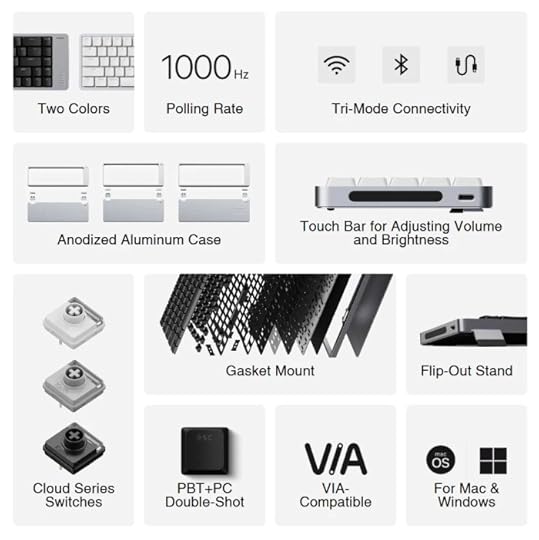
Does the LoFree Flow 2 have a vol knob? No, it does not. Does it have a touch-sensitive bar at the right side of the board that you can adjust the volume with just by gliding a finger up and down it? Yes, it absolutely does have that! I am a big fan.
The LoFree Flow 2 has a 2000mAh onboard battery, which will last up to 90 hours (without backlights) of use from a full charge. Backlights on, you’re looking at something closer to 13 hours, which is still not bad at all. The battery takes about 4 hours to fully charge from low, just FYI. The LoFree Flow 2 weighs about 635g, and measures 341.2 x 107 x 21.5mm, so it is very, very compact and portable.
Keycaps are ultra-thin, low-profile , double-shot molding, combining a durable PBT base with a translucent PC legend layer. They come in a choice of black or white, and I got the white. All the characters are transparent, allowing the backlights to shine through. The LoFree Flow 2‘s backlights are clean white, solid colour with no flashy rainbow effects. This isn’t that kind of keyboard. When it comes to customisation, however, tinkerers will be glad to learn that the LoFree Flow 2 is fully VIA compatible.
Switches on the LoFree Flow 2 are the brand new Cloud Series: a trio of low-profile mechanical switches designed for exceptional smoothness and control. They are almost completely silent, but feel great despite their very low profile. There’s plenty of bounce and energy to them, so I don’t feel like I’m typing on a piece of cardboard (which a low-profile keyboard sometimes can). Genuinely, they do not feel like low-profile keys or switches until you look down at them.
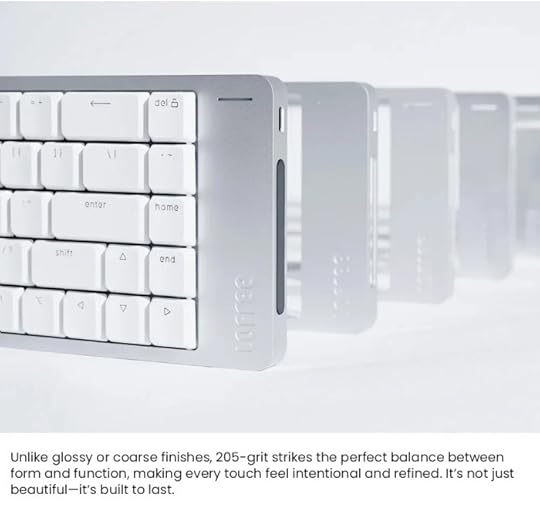
The body of the LoFree Flow 2 is crafted from a single block of aluminum. Milled with precision and finished with a refined matte texture. Its 205-grit anodized surface gives it a unique tactile quality. It looks and feels really, really nice and very high-end. It’s gasket-mounted with 5 layers of sound-dampening and cushioning.
[image error]The LoFree Flow 2 is a beautiful, minimal, powerful keyboard. There’s nothing overtly flashy about it, but the feel of it is just so high-quality that it instantly makes you think “this is a really, really good keyboard”. It’s like the difference between your shower at home and one in a fancy hotel; they’re both doing the same thing, but one makes you feel like you’re getting a luxurious experience. The LoFree Flow 2 feels like a luxury keyboard to me, but not in an over-priced, over-the-top way. You can just feel the quality of it in every key-stroke.
The LoFree Flow to is available to order now from geekbuying.com for £119.99 GBP
The post Review: LoFree Flow 2 – low-profile, high-end keyboard first appeared on moorereppion.March 26, 2026
Review: KiiBOOM Phantom98 Lite keyboard – even more foggy fun
Back in January, KiiBOOM sent me the Phantom81 Lite, which I absolutely loved and which has very recently become my own go-to keyboard at home. Why only very recently? Because they have sent me a Phantom98 Lite to review, and it has very quickly ended up on my wife’s desk in place of the Phantom81. Also, tragically, I managed to tip about a quarter of a bottle of ink into my trusty B21, and the Phantom81 is the perfect replacement.
[image error]If you were as enamoured of the cosydiaries collaboration with KiiBOOM as I was, then you’re going to be very excited about Phantom98 Lite because it has even more keys and therefore even more frogs.
[image error]The Phantom98 Lite is an ANSI 97-key, 76% layout mechanical keyboard. It has three modes of connectivity: USB-C, Bluetooth, and 2.4GHz (dongle stashed nearly under the board behind one of the two-position flip-down silicon-padded feet). It has an onboard 8000mAh Battery, and weighs about 1.2 kg.
The Phantom98 Lite comes in Green, which is the adorable cosydiaries rainy frog theme. As I said last time, the whole chunky, rainy froggy theme is absolutely delightful.
Keycaps are PBT MOA profile, which are lovely. They look as if someone made a cube out of plasticine and then squished the top of it down with their thumb to form a concave typing surface. The characters and the images on the keys all have the same whimsical hand-drawn look and feel to them. There are a few extra keycaps in the box too, so you can do a bit of cosy customisation.
[image error]South-facing RGB/ backlights enhance the look of the board. You can toggle through a whole lot of onboard presets and alter the speed, brightness, hue, and saturation of the lights via keyboard shortcuts. Again, I set them to gently rippling shades of green, because that is what you have to do!
Like the Phantom81, the Phantom98 is VIA compatible, enabling users to customise every key, macro, and RGB lighting effect.
The Phantom98 comes with a choice of KiiBOOM’s own Mochi linears or Mossy silent linears. Again, I got the Mochi linears, which are lovely.
The Phantom98 is a gasket-mounted board with layers of latex sandwich foam, ixpe switch pads, PE transparent film, PCB Foam, and a bottom Silicone pad. This means that the Phantom98 has next to no sound transference onto the work surface.
Essentially, if you liked the Phantom81 Lite, but felt the lack of a numpad, then you’re probably going to love the Phantom98 Lite. For me, the only thing that’s missing is a vol knob. I do like a vol knob. It could be shaped like a frog, couldn’t it? I think I need to drop KiiBOOM an email.
The Phamtom 98 Lite is available to order directly from KiiBOOM now for $109 USD
The post Review: KiiBOOM Phantom98 Lite keyboard – even more foggy fun first appeared on moorereppion.March 7, 2026
Review: KiiBOOM Cybrix 29 – a Hall Effect half keyboard
Over the years, KiiBOOM have very kindly sent me all kinds of amazing keyboards to try out, but I must admit that the Cybrix 29 has been one of the most unexpected.
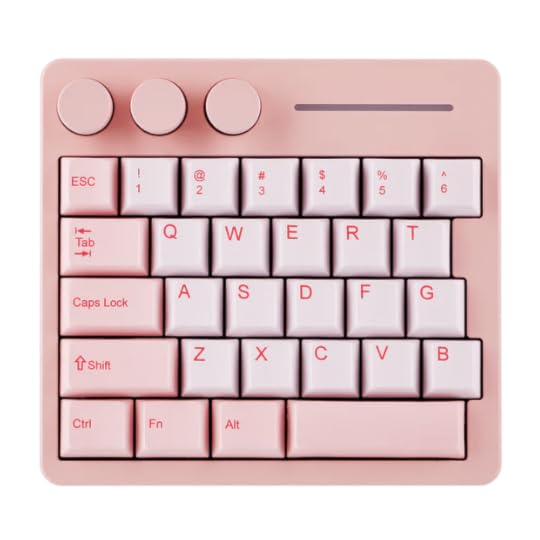
The Cybrix 29 is a 29-key half board, designed for use as a gaming pad. That is, a small, auxiliary keyboard designed specifically for WASD-type gaming. I am not a gamer by any stretch of the imagination. A little bit of Fortnite, Mario Kart, and Skyrim are about as far as I go, and I never play any games on my PC. So, reviewing the Cybrix 29 had me scratching my head a little bit.
The Cybrix 29 comes in three colourways: Pink, Silver, and Black. I got the Pink. It’s USB-C only, with no wireless connection options, and is Windows and Mac OS compatible. Cherry Profile dye-sub PBT keycaps complete the aesthetic.
The wired-only connection is due to the focus on speed and accuracy: the Cybrix 29 boasts an 8000Hz polling rate, transmitting inputs 8x faster than standard 1000Hz keyboards.
Hall Effect magnetic switches deliver adjustable actuation points down to 0.01mm accuracy. The sensitivity of the keys can be adjusted according to the user’s preferences and requirements. Keys can even be set to have two different functions, triggered by a tap or a long press, respectively.
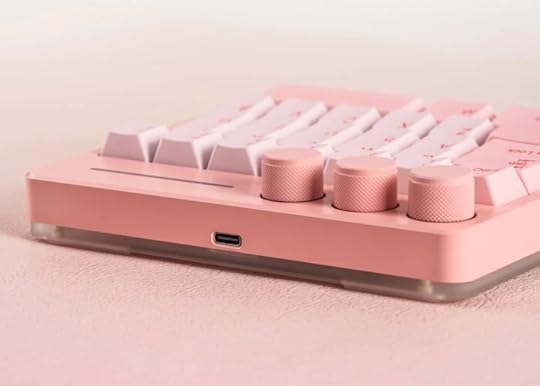
The Cybrix 29 has three aluminium control knobs, which are independently assignable and customisable. All of this customisation is available via KiiBOOM’s own free-to-use software.
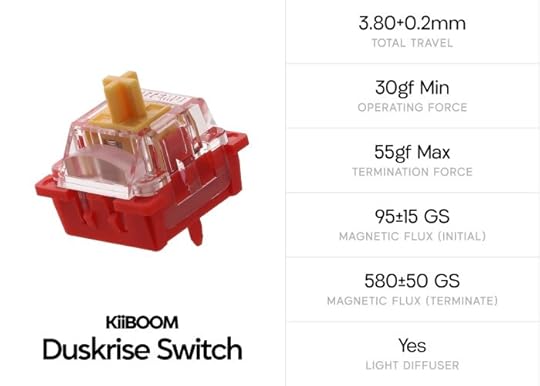
The switches on the Cybrix 29 are KiiBOOM’s own magnetic Duskrises, which are, of course, fully hotswappable. They do sound and feel lovely, and have very nice resistance to them.
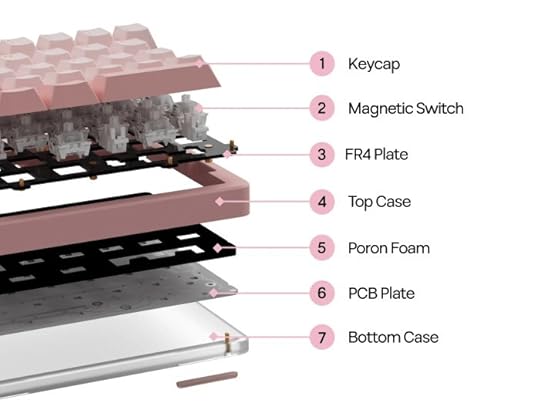
The upper part of the board is made of
CNC Aluminium, with its lower half of frosted acrylic. The acrylic base allows the Cybrix 29‘s fully customizable south-facing RGB lighting to shine through.
Given its size, it almost goes without saying that the Cybrix 29 is a very portable board. Thanks to the aluminium, it weighs around 0.42kg, so it’s still sturdy and stable on the desktop. A layer of Poron Foam adds an extra bit of sound-dampening to the board.
So, if you’re not a gamer, why might the Cybrix 29 be of interest? Artists, writers, musicians, photographers, streamers and lots and lots of other people use Macro Pads and Stream Decks to optimise their workflow. With its three knobs and huge range of customisation options, the Cybrix 29 offers an awful lot in the way of quick access, within a very small footprint. It can do a lot more than most of those other devices, look and feel fantastic while doing it, and it’s surprisingly affordable as well. Sometimes you have to think outside the box a little bit to make best use of things, and I feel as though the Cybrix 29 might surprise a few people if they give it a chance.
The Cybrix 29 is available to order directly from KiiBOOM for $89.99 USD
The post Review: KiiBOOM Cybrix 29 – a Hall Effect half keyboard first appeared on moorereppion.February 26, 2026
Review: the Wyvern LCD Pro keyboard from Redragon
12 months ago, I reviewed Redragon‘s Wyvern Pro keyboard. Now, they have very kindly sent me their newest Wyvern model to try out: the K761 Wyvern Pro, with LCD screen.
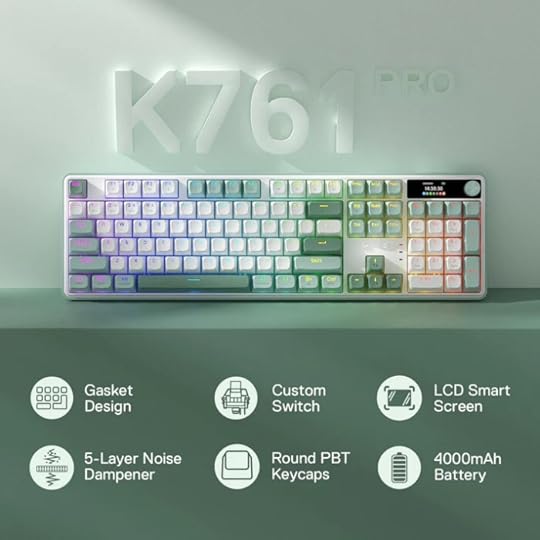
The K671 is a 104-key / 100% keyboard. It has an ANSI layout, is compatible with Windows and Mac (two-position mode switch). It connects wired via USB-C or wirelessly via Bluetooth or 2.4G wireless (a three-position switch and a dongle underneath the board). Up to three Bluetooth devices can be stored/switched between.
The backlights can be controlled via the multi-use knob on the upper right of the board. This functions as a volume control by default (which I always like), but clicking it allows you to scroll through options on the K761‘s 1.41″ TFT LCD screen. You can also set the on-screen time and date, and choose to display a GIF of your choice instead of the info screen.
The K761 is available in two colourways: White & Green, and White & Blue. I got the white and green, which reminds me of a classic Mint Aero. I’m not sure why I always seem to end up thinking of chocolate bars when I’m reviewing keyboards… for the record, I don’t have a sweet tooth, and I don’t really like chocolate. The keycaps are OEM profile PBT, just like the standard Wyvern Pro. Transparent “Shine Through” characters on all keys, with the Alts and extras in dark grey/black.

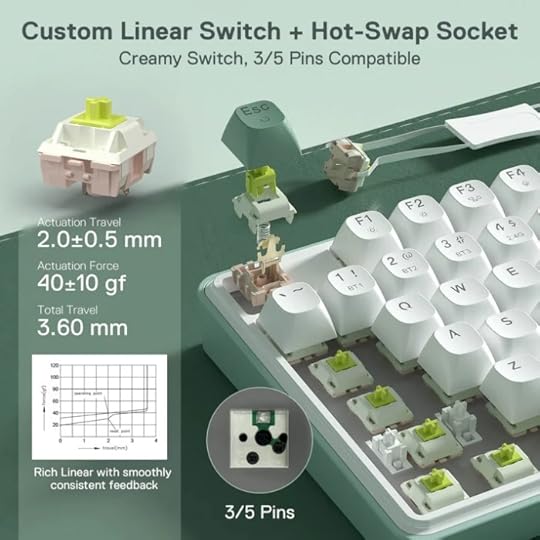
The K761 comes loaded with custom Linear Mint Mambo Switches. The switches are, of course, hot-swappable.
The K761 has a 4000 mAh onboard battery and weighs 1.45 kg. Two-position silicone-footed flip-down feet ensure that you can adjust the typing angle to suit your preference.
The K761 is gasket-mounted and has five layers of noise-dampening: 3.5mm PO foam, IXPE switch foam, PET sound pad, bottom socket foam, silicone bottom pad along with the silicone gasket. This, coupled with the linear switches, means that it is a neighbour-friendly keyboard. No one is going to complain about the noise.
The K761 has RGB backlights, with 16+ preset patterns and loads of on-board tweaks possible (adjusting the colour, speed, brightness, etc). Additional customisation is available via the free-to-use software, including Macro editing and key redefining.
Back when I reviewed the Wyvern Pro, I said it had eschewed a lot of the bells and whistles that many modern keyboards opt for. The K761 is essentially the same board, but with those extras added. The screen feels like it is a genuinely useful thing now, whereas one or two years ago it was just a kind of flashy add-on. A vol knob is always a welcome addition to any board for me, and the fact that it also controls the backlights and other on-screen options makes it very useful.
All in all, the K761 has everything you could possibly need. If you liked the look of the previous version but felt that it lacked some features, then the K761 definitely has you covered.
The post Review: the Wyvern LCD Pro keyboard from Redragon first appeared on moorereppion.February 19, 2026
Heavy Metal Magazine #4 out now

Heavy Metal Magazine #4 is available now.
This issue features the concluding part of our four-part story Taarna the Last Taarakian: Re-birth with art by the incredible Anna Morozova (some fantastic art from the story on her Instagram below) and lettering by Tom Napolitano.
You can pick up the issue at your local comic shop today, or order directly from Heavy Metal online.
View this post on InstagramThe post Heavy Metal Magazine #4 out now first appeared on moorereppion.A post shared by Anna Morozova (@annya.morozova)
February 13, 2026
John interviewed on the Tell Me Your Story Podcast
John was recently interviewed on award-winning storyteller Gav Cross’ Tell Me Your Story Podcast
John and Gav are currently working together on their Haunted Book Club podcast and live events, and they would love you to get involved. Click the link to find out more.
 The post John interviewed on the Tell Me Your Story Podcast first appeared on moorereppion.
January 31, 2026
Join the Haunted Book Club
A Book Club you don’t ‘have’ to do the reading for.
We’ll read it to you…
For enjoyers of eerie tales, curious to know more about the stories that make their skin crawl. Join Norton’s Narrator Gav Cross and author John Reppion as they delve into the stories behind some of your favourite spine-tingling tales. Whether you’re a seasoned ghost story expert or a newcomer to the realm of creepy fiction, Haunted Book Club welcomes all new members with open (and possibly skeletal) arms.
Join in the conversation or sit quietly in the dark. Whatever you choose. Keep glancing over your shoulder…
How does it work?Every other Tuesday, live here on Substack, we will host a book club focusing specifically on classic short supernatural tales.
https://gavcross.substack.com/s/haunted-book-club
We have made some choices of the first few. But of course, what we want is to know what we do next… We want you to be part of the choosing. We want to know what gives you the shivers and why…
What do you do?Obviously, we want you to join in. We want to chat with you as well. Don’t get me wrong, we love chatting to each other, and that’s basically what we’ve been doing for years now, but we want to include you in that as well.
We think it would be better if you know the story before coming to the book club.
Many of you will already know these stories very, very well. Obviously, the best way to enjoy them is with a candlelit armchair by the fire, reading a first edition. If you don’t have access to any of those things, we will do a reading for you over at Gav’s other strand of Substack. You can also find this & lots of other stories on his YouTube, Spotify and your usual Podcast Places:
https://gavcross.substack.com/s/phantastic-stories-with-gav-cross

What happens next?
Join in! Subscribe! Invote? Comment? Share? Buy some candles? Get to know us…
John is popping on to Gav’s other Live Podcast:
https://gavcross.substack.com/s/tell-me-your-story
Come along live, or listen back after. Let’s find out about how John gets his ideas for his own work and the collaborations with Leah Moore. (Link Below.)

We are over on Instagram & Facebook too. Links here:
https://linktr.ee/haunted_bookclub
That’s a LOT of stuff. Coffee? Tea? A tincture of something else…?
Gav & John
The post Join the Haunted Book Club first appeared on moorereppion.

