Ben Robertson's Blog
August 13, 2018
Review: What's Wrong with China
Paul Midler wrote a good book about China and I loved reading it. (Full disclosure - Paul is a friend since we first met in Taipei in the late 1990s and he sent me a copy of his book as a gift.) I was an East Asian Studies major in college and lived and worked in China and Taiwan for 6 years and was happily surprised by how much I learned from reading What's Wrong with China.
Paul is a great story teller and keeps getting better as a writer. I first read his work in 1997 sitting at the bar at O'Ginny's in Taipei. He shared with me an essay he wrote for graduate school about riding his scooter in Taipei. When he got into Wharton, and I did not, I attributed his success in part to that well-written and entertaining essay.
The laugh-out-loud funny parts of this book are Paul's stories about working with factories in China. There are also some hilarious stories about cab drivers. What makes these stories so funny is the cultural analysis that provides a Westerner's understanding of a Chinese perspective.
Factory owners flatter, emote, yell, bribe, cheat, lie, steal, and even cry to get to the equilibrium point of fair trade. While many foreigners have lost their shirts and thrown up their hands in exasperation, Paul suggests that success is possible for those willing to fight fire with fire.
What's Wrong with China is one of at least three previous works by the same name. Throughout the book we learn about many books written by past observers like Arthur Smith, Abbe Huc, and Lucian Pye and this depth of historical perspective was for me a revelation. I read Chinese history in school but none of these first hand accounts, perhaps because many of them are so unflattering.
Perhaps the biggest gap in my education was the Boxer Rebellion, described in my recollection of a history class called Modern China as a failed religious rebellion against British imperialism. The perspective taught in that class was consistent with the Chinese government view that colonialism was bad and China was a victim. While this may be true, I was grateful and saddened to learn that the Boxer Rebellion included the slaughter of 400 men, women, and children, mostly missionaries from the United States and England.
Through detailed accounts of his own experiences, references to the work of others, and historical context and analysis, Paul provides important insight for both business and foreign policy negotiations. Among the more disturbing foreign policy moves by China in recent years is the building of islands in the South China Sea to establish historical claims to territory. Based on Paul's analysis, and my own, this is a bluff but only in so far as the United States has the will to say no.
The other important insight is that not saying no will likely lead to worse conflict in the long run. The danger of China's cat's paw approach to foreign policy, that is using others as a proxy for its own ambitions, can be seen clearly with North Korea. As a puppet of the Chinese Communist Party, North Korea is threatening its neighbors with nuclear attack, and providing what some in Beijing might consider a happy distraction from the South China Sea.
It is odious to think that Beijing might be using North Korean nuclear capabilities as a bargaining chip to further its ambitions in the South China Sea but it is also not out of the question.
What's Wrong with China is an ambitious book that left me wanting to know more. The issues of Communism and brainwashing are mentioned but I would like to have known more about how Chinese culture might have changed since 1949. As much as I grieve for the missionaries killed in 1900, the murder of Christians, Falun Gong practitioners, political dissidents, and others in modern times is just as disturbing.
The book focuses a great deal on the American and British experience in China but China shares its borders with 14 countries and I think it would also be interesting to know more about these neighbors, especially Russia and India. For example, I found the discussions of Japan's relationship with China invaluable, like how Japan refuses to apologize for its actions in China during World War II but has done so in Korea.
What's Wrong with China is a good book and an excellent introduction to modern China.


Review: SJW's Always Lie
This is a well written analysis and tactical plan for how to fight Cultural Marxism, also known as political correctness.
Vox Day shares stories and insights gained from incidents publicized in the media to shed light on the destructive impact of political correctness. Along the way he provides specific strategies to help those who would rid our society of this modern day witch hunting and its many adherents.
The details of Gamer Gate are shared to give an example of how one group effectively did this in the science-fiction and gaming community. The inside ball was sometimes more than I cared to know but it was illustrative and I did enjoy learning about Game Gate.
Perhaps the most important point illustrated is the one contained in the title, which is that SJW's always lie. The attack on Western Civilization is not a quest for truth, but rather for power.
Mao said, power comes from the barrel of a gun.
Mao was wrong. The truth is the most powerful weapon human beings shall ever wield. We love the truth. Jesus said, the truth shall make you free.
We might have to use guns to fight for our freedom but power comes from the truth, not from the guns.
This is why we say that the pen is mightier than the sword and history confirms this is true.
When confronting tyrants, good people often make the mistake of assuming that the other side would agree with them if they only knew the truth. Vox Day makes clear that we must see the tyrannical tactics of the Cultural Marxists for what they are - tools of control used to force submission.
Cultural Marxists hate freedom of speech because it exposes their lies. Labelling free expression as hate is a tactic used to suppress debate and allow lies to remain unchallenged.
Free speech is the first line of defence and a much preferred to guns but in America we have the freedom to exercise freedom of religion, freedom of speech, and the right to bear arms in defense against threats foreign and domestic. These rights are guaranteed by the First and Second amendments of the United States Constitution.
Vox Day does a good job using his pen to help us win the battle for freedom with the First Amendment so we do not have to resort to the Second.
Review: Convict Conditioning
This book is about how to use calisthenics and bodyweight to develop strength and build muscle. The program requires no equipment, only the will to do the exercises and attention to detail. As one video blogger noted, pen and paper are the only tools you need to do convict conditioning, and that is exactly why I wanted to learn about this program of strength training.
Last year, I decided I wanted to gain weight so I started researching how to gain muscle mass. At the time, I was 47 years old and weighed 132 pounds. I am 5' 8.75" tall, so this put my BMI at 19.5, near the bottom of the healthy BMI range of 18.5 to 24.9.
When I was 20, I ran track and lifted weights and hit a peak weight of 143 pounds, putting my BMI at 21.1. Eleven years later, drinking beer pushed me to an all-time peak weight of 148 pounds, all in the gut, pushing my BMI to 21.9. I stopped drinking beer years ago, part of how I lost the weight, but figured exercise could at least get me back to 143 pounds.
One key finding in my research was that men lose muscle mass as they age due in part to declining levels of testosterone, so I decided that it was also important to do what I could to raise my testosterone. For me, this meant getting more and regular sleep, drinking less alcohol, drinking nettle tea, and finding ways to further avoid and ameliorate exposure to BPA, an estrogen-mimicking pthalate common the food supply.
Avoiding BPA is something that I was already doing by avoiding food that touched plastic. This means no plastic cups, straws, or packaging. But because it is impossible to completely avoid plastic, I also began taking activated carbon to absorb BPA and other toxins in my gut.
In the first 6 months, I only gained 2-3 pounds and was disappointed in my progress. Then I met an Army medical officer who told me that the key to gaining muscle is protein and if I wanted to gain weight I should consume more protein, a lot more protein. To do this, I began consuming more kefir, like 1/2 a gallon to a gallon a day, as well as other high protein foods like eggs, cheese, fish, tofu, tempeh, rice bran pasta, oatmeal, hemp nuts, and chia seeds.
You can see a list of my favorite super foods below, with links to Amazon.
As a result of increased protein intake, my weight increased another 6 pounds over the next 5 months. This was double the weight gain I experienced before and in less time. But at 141 pounds, BMI now at 20.8, I was hungry to gain more muscle.
This is when I started researching exercise equipment I could use in my home and thinking about adding exercises to my routine, without going to a gym and lifting weights. There is a ton of different equipment out there and I was especially intrigued by straps, like the ones from TRX. The only problem was that the more I learned about equipment, the more confused I got.
You see, I am a minimalist, so it was important to me that if I bought equipment, I buy only the right equipment, not too much and not too little. The struggle to do this is what lead me to then look at books on bodyweight training to see what the experts recommended.
The great thing about Convict Conditioning is that it requires no equipment. This means I can save money and avoid cluttering my life with more stuff.
April 18, 2017
Review: Antony and Cleopatra
Wonderful adaptation of Plutarch's Antony. I read Plutarch first and then read Shakespeare's adaptation and knowing how the story ended actually helped me enjoy the Shakespeare version more.
Given a choice, I have to say that Plutarch remains for me the more enjoyable of the two, perhaps because it tells the whole tale of Antony's life rather than just the end. In Plutarch we get a richer knowledge of Antony including his many victories and his popularity with his soldiers.
I recommend reading both to see how two masters handle the same material in different genres.
April 1, 2017
How to Use the Xero Budget Manager for Your Small Business
A friend who is senior director of strategic planning for a Japanese pharmaceuticals company recently said to me, "No serious company operates without a budget". At the time I did not have a budget for Menadena. Menadena's primary business is web design and business consulting but as a sole proprietor I had yet to see the need for a budget.
My friend's comment changed that. I decided it was time to develop a budget, and that is when I discovered the Budget Manager in Xero, my online accounting software.
Prior to using Xero Budget Manager, the financial key performance indicators (KPIs) in my strategic plan were all income goals. With little additional effort, Budget Manager allows me to not only track income forecasts, but also expenses and profit so that I can achieve my performance goals.

Create a Budget
Budgets are how businesses track income and expenses throughout the year. Budget Manager uses the chart of accounts for my company and I used these fields to make estimates for the Menadena budget.
IncomeMenadena has several sources of income that fall into three categories, Sales, Services, and Acting. The primary source of income, however, is Services. The financial KPIs in the Menadena strategic plan are income goals for web design and business consulting.
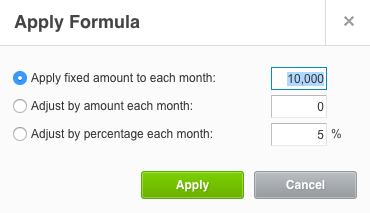
Budget Manager allows for forecasts of 3, 6, 12, and 24 months, and I chose to enter my monthly income goals for Services over the next 12 months. With Apply Formula, I was able to choose a fixed monthly amount or adjust the amount each month, like adding a 10% monthly increase.
Expenses
Menadena's operating expenses fall into several large categories like Rent, Insurance, Travel, Advertising, Office, Fees, and Taxes. One feature of budget manager that is helpful in forecasting expenses is that it makes it easy to see what expenses were in previous months. This allows me to make estimates based on actual numbers without having to refer to other reports.
The Apply Formula feature can also be used for expenses. This is helpful for expenses like advertising which I estimate as a percentage of income. So if I forecast a 10% increase in income, I can use a similar percent change for advertising expense.
Additional BudgetsOne feature that I am not using right now is additional budgets but I can see how these would be extremely useful for certain types of businesses. As the treasurer of a non-profit, for example, we had several fundraisers throughout the year and would track these expenses to determine how much the event cost versus the amount of money we raised. Additional budgets in Budget Manager would be a great way to do this.
Track Your BudgetOnce the budget is set up in Budget Manager, Xero provides several reports for budget tracking. These budget reports include:
Budget VarianceBudget Summary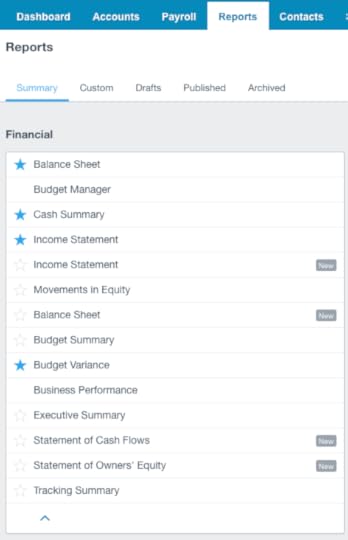
Budget Variance
The Budget Variance report allows me to see actual performance versus my budget over time. By looking at the current month and year-to-date, I am able to see how well I am doing against my goals and make adjustments as necessary.
Budget SummaryThe Budget Summary report is the budget displayed as a report. While I am not using this right now, again I can see how it would be super useful in a nonprofit organization. The Budget Summary report is an ideal way for an executive director or treasurer to present the annual budget to the board of directors.
Improve PerformanceMy friend's admonition inspired me to take action and develop a budget for Menadena. While focusing on income was a great place to start, the budget is the tool I need for financial management of my company.
The Budget Manager in Xero is a powerful, easy-to-use tool that allowed me to take the next step to build my business.

Disclosure: My company Menadena has affiliate relationships with many of our service providers including Xero. This means we may earn commissions or other benefits by promoting our affiliates and when readers click on affiliate links and purchase products or services.
March 2, 2017
Why Choose Squarespace for your Nonprofit Website
In working with non-profit organizations to help them achieve their web design goals, one of the key issues they’re struggling with is the high cost of relying on web design companies for hosting, updates, and site maintenance.
This past year we helped organizations build their sites with Squarespace, resulting in beautiful, easy-to-manage websites with 24/7/365 customer support that help them pursue their mission while reducing costs, sometimes by as much as 70%
Check out this recent blog post to learn more about how we did just that for Winchester Neighbors Club, a non-profit organization in Winchester, Massachusetts.
Choose the Right Web Applications to Make Your Nonprofit Work
When WNC came to me last year, co-president Holly Spring said what so many other website owners say, which is we have this website, it is out of date, we do not know how to make changes, and we need to make it work. WNC also had a special situation in that the organization changes co-presidents every two years, and needed a documented process for managing the organization's web activities.
You can read for yourself what Holly had to say about our experience working together in the review she wrote on Facebook.
"I had the pleasure of working with Ben on a heavy-lift, non-profit organization project. He helped me and the board do a complete overhaul of our core systems and change out all our in-place platforms to ones that are more modern, cost-efficient and simple to use. Ben is a pure expert and fun to work with. His demeanor is kind, informative, patient and professional. I would love to work with him again and would recommend him to anyone in search of a task-oriented and strategic partner who knows how to get stuff done. Thanks Ben”
We built a beautiful website for WNC, reduced overall costs by 70%, and the best part for me is that because Squarespace provides excellent support, WNC will never have the problem that they first came to me with, which was that they could not manage their own website.
January 31, 2017
Why I Chose Xero for Accounting Software
Last year I started using Xero accounting software to manage my business consulting and web design business. The reason I chose Xero over Quickbooks was user-interface and user-experience. After trying both, I liked Xero better because the user interface is more intuitive and the application is easier to use.
Prior to using Xero, I used a combination of Excel, Mint, and Freshbooks to do accounting. While it is more expensive to pay for accounting software, there are many benefits.
Invoicing with XeroAs a Freshbooks user, my first consideration was to find software that would provide an excellent invoicing experience for me and my clients. Freshbooks is a great invoicing platform but is limited on the accounting side.
Manage Cash FlowInvoicing may be the killer app for accounting software since I was willing to pay for that alone with Freshbooks. What makes online invoicing so great is being able to invoice by e-mail and get paid by credit card.
For my business, I get paid by the project, with deposits paid up front and the balance paid upon completion. With online invoices, it is easy for my clients to pay me, which means I can get cash in the bank within only a few days of sending out an invoice.
CustomizationOther features of a good online invoicing app include being able to upload a custom logo and remove 3rd party branding from the invoices.
One feature of Xero invoicing that was a pleasant surprise is that I can include the D-U-N-S number of my company on the invoice.
Why Pay for Accounting SoftwareAs a Freshbooks customer, I was already paying $15 a month for online invoicing. But going to $30 a month for real bookkeeping meant that there needed to be significant value in doing so. The way I thought about it was first, will Xero save me time and will the benefit be greater than the cost.
The biggest additional benefit of using Xero accounting software is that it allows me to measure the financial performance of my business. I use it to measure financial performance versus prior periods and versus my goals.
The goals that I track in Xero include:
RevenueExpensesIncomeThe chart of accounts allows me to categorize revenue and expenses so that I can see how different parts of the business are performing. Like am I making more money on web design or business consulting and where is the growth. And what expenses are growing the fastest, like software subscriptions, and are there ways I can save money.
My old system allowed me to do this but it was less convenient and more time consuming, and that is why I decided to subscribe to Xero.
Competitive PricingXero Standard costs the same as Quickbooks Online Standard for small business. Both are $30 per month.
I use Swipe for my credit card merchant account on Xero and pay merchant fees of 2.9% plus $0.30 per transaction. This is slightly more expensive than Quickbooks, which only charges $0.25 per transaction.
Xero is Easy to UseThe deciding factor for me to choose Xero is that it is easy to use. I have used Quickbooks in various capacities and versions for more than 10 years and I think it is a good program. But because Quickbooks was originally designed as a packaged software hosted on a local server, not in the cloud, the online version feels clunky.
Unlike Quickbooks, Xero was born in the cloud and it feels like a native online. The Xero interface is user-friendly. It is easy to download transactions and reconcile accounts. And it produces great looking documents, like reports and invoices.
Disclosure: My company Menadena has affiliate relationships with many of our service providers including Xero. This means we may earn commissions or other benefits by promoting our affiliates and when readers click on affiliate links and purchase products or services.
October 11, 2016
3 Best SEO Tools for Your Business
Marissa sets up her online jewelry store and is ready for business but how does she make sure customers can find her website? Search is how people find what they want online. For website owners this means getting discovered by search engines like Google, Bing, DuckDuckGo, and Yahoo.
The process of search is as simple as reading and writing, as it is based on words that describe the content on a web page. And yet the mystery surrounding search-engine optimization (SEO) can cause business owners to make bad decisions or do nothing to improve the discoverability of their website.
The process of search engine discovery begins with words, like does your URL describe what your site is about? Or do the site description, page content, headings, and image titles provide information with keywords that are relevant to your target market? Search engines use this information to put websites into indexes that are then used to pull up sites that match search queries, and just like good writing, simple, direct words are a good place to start.
But even with great website content, design, and structure, no one can promise your site will achieve a specific ranking in Google search, like top 10 or even top 100. This is why website owners are well advised to be careful when hiring experts to improve the discoverability of their site.
The good news is that while there are many strategies for improving website discoverability, three of the best tools for SEO are simple and free.
Search ToolsCan people find my business on Google? Google Search Console is a free tool that business owners can use to make sure Google can find their business and show it for the correct search queries. Microsoft provides a similar tool called Bing Webmaster Tools to help site owners get their site indexed and discovered on Bing.
Search Console provides a number of excellent tools that allow site owners to do things like:
Check errorsThis means you can see errors found by Google when reading the site. Then you can fix errors so all pages can be found in search.
See search termsWant to know which terms lead to Google search results pages on your website? Search Console has the data, which you can use to discover your site’s most successful pages and products. Focus on what is working to increase traffic.
Listings (and Reviews!)Back in the old days, businesses that wanted to get discovered would put their name in the yellow pages of their local phone book. Today online business listings help search engines and new customers find your business.
Listing on Google My Business is simple. Ditto for Bing Places for Business and many others.
Start your business listings by showing people you are open for business, with your business name, hours, phone number, and address. This will ensure your business shows up, whether people are searching on Google Search or Maps.
Other listings that businesses may want to consider, especially for local search, include:
AxciomBest of the WebCitySearchFacebookFactualFoursquareInfogroupInsiderPagesLinkedInLocalezeSuperpagesYahooYellowpagesYelpWhen making your listings, here are some things to consider that will impact your discoverability:
NAPName, address, and phone number (NAP) must be consistent across listings. If these identifiers are not consistent, it will confuse search engines and hurt the ranking and discoverability of your site.
Site rankingLink on sites that rank high in traffic for your target audience. According to Alexa, an Amazon company, Google ranks number one in the world, based on monthly traffic as of October 2016. You can use Alexa to look up the top business directories and sites for your category, including local directories.
ReviewsSearch results are based on a variety of factors, including the number of reviews and recency of reviews that a company receives on site listings.
While there are many sites where you can get reviews, Google and Yelp are where it is at for for local businesses. This is because the largest map apps, Google, Bing, and Mapquest, include Google and Yelp reviews in search results. Starred reviews on Google and Yelp show up in map listings for businesses in your category, and this will impact your site rankings as well as customer choice.
Social mediaSimilar to reviews, social media accounts and activity impact search results. Set up social media accounts that will help you reach your target audience, like YouTube, Facebook, Twitter, LinkedIn, Instagram, Pinterest, or other platforms.
AnalyticsHow do you track your search engine optimization efforts? By using metrics, like the value of customer activity on your website.
Google Analytics is a free tool that provides this kind of data and analysis to improve SEO strategy, boost sales, and increase visitors.
Website owners want to know not only how customers found their site, but also what they did, and if they took valuable action. By understanding how customers interact with your website, you can learn how to get them to stay, purchase from, or contact you.
Google Analytics helps website owners answer questions like
How many people visited my site?How much time did they spend on my site?How did they find my site?Where are they located?Did they purchase something or take another desirable action?Where did they leave the site?With high quality feedback like this, you can make improvements to capture more potential customers to your site.
Ranking and getting discovered through search results takes time. Use the SEO tools listed above to build a solid foundation to get discovered and grow your business.
September 19, 2016
Choose the Right Web Applications to Make Your Nonprofit Work
Winchester’s Neighbors Club (WNC), a nonprofit 501(c)3 organization devoted to social activities and philanthropy, had a problem. The new co-president said "our website is terrible and “we have too may platforms”. WNC needed an up-to-date, user-friendly website and they wanted to re-evaluate their web-services platforms for managing communications, events, and payments for nearly 200 members. And with leadership changing every two years, the new co-presidents wanted to help themselves and future co-presidents by developing a document for managing these systems.
Menadena was hired to design the website, streamline the processes required for the organization’s activities, and reduce costs. In the process, Menadena helped WNC replace more expensive, often clunky systems and poor user interfaces, with clean, efficient, well-supported systems, all while reducing annual costs by 70%.
The key to these improvements was choosing the right eco-system of service providers, understanding how integrations between these services could automate certain activities, and identifying opportunities for getting better pricing, by choosing the right plan for the service requirement or as a result of WNC’s nonprofit status.
Choosing an Eco-SystemPlease note: Ben Robertson's company Menadena participates in MailChimp MonkeyRewards and the Eventbrite Referral Program. This means Menadena may earn commissions and other benefits when readers click on the below links and purchase products or services. Like MailChimp MonkeyRewards may entitle Menadena, and referred customers, to $30 in MailChimp credit.
My web design and hosting platform of choice for certain types of sites is Squarespace, and Squarespace does a good job choosing partners. Squarespace templates have built in integrations with MailChimp and Google, as well as many others. What is immediately obvious when looking at the user interfaces of these providers, is that they are designed to serve the user first foremost, and this begins with providing great products at a good price.
Cost DownOld App
New App
Cost Down
BlueHost email
Google Apps
81%
BlueHost
Squarespace
see below
Total
70%
Squarespace replaced BlueHost for web hosting and Wix for the website template. MailChimp replaced Constant Contact for email marketing. Google Domains replaced register.com for domain registration. Google Apps for Work replaced Bluehost for hosted e-mail. And Eventbrite replaced Punchbowl for event management.
The one service provider WNC decided to keep was PayPal for collecting membership dues and ticket payments. This decision was based on PayPal's excellent service, ease of use, value pricing (especially with the nonprofit discount on transaction fees!), and easy integration with Squarespace.
Integrating ServicesFor WNC, MailChimp was a huge winner when it came to integrations. Like for event management, while Constant Contact Events provides an event management service, Eventbrite does it better with more attractive pricing, in our opinion. So WNC decided to use Eventbrite with the MailChimp integration that allows Eventbrite invitations to be sent to a list seamlessly in MailChimp, with only a few clicks of the mouse.
The other MailChimp integration that WNC loved was PayPal. Whereas in the past new members and sponsors had to be added to the Constant Contact mailing list manually, the MailChimp-PayPal integration automatically adds user information from PayPal to a MailChimp list, whenever payments are made.
Managing EventsThe MailChimp integration with Eventbrite helped WNC achieve big efficiency gains in event management.
Old Workflow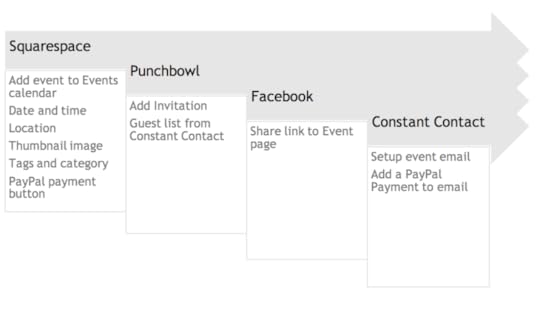
In the old workflow with Punchbowl, payments could not be integrated into the invitation, which meant that PayPal payment buttons had to be added to the website event and the newsletter e-mail, and there was no way to see in the Punchbowl event registration which guests had paid.
The old workflow required creating an event in Punchbowl, exporting the contacts list from Constant Contact and importing that list to Punchbowl for the guest list, then setting up an email in Constant Contact, and adding a PayPal button for the ticket price. Payments then had to be exported and manually compared with the Punchbowl guest list to make sure guests had paid for the tickets.
New Workflow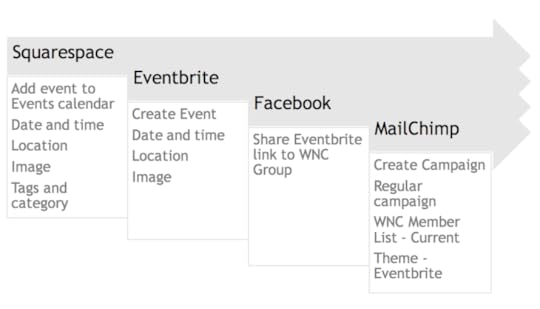
Payment information is handled in Eventbrite, either through Eventbrite payments or PayPal, eliminating the need for separate payment buttons, and allowing for easy tracking of guest registration and payment.
In the new workflow, the event is set up in Eventbrite, with ticket pricing and payment information included. MailChimp is then used to send the Eventbrite event to the WNC members list, and all information from Evenbrite is included in the MailChimp email, through a process of points and clicks, with no further inputs required. The Evenbrite app then allows WNC organizers to manage RSVPs, the guest list, and payments through a phone app, which can also be used to sell tickets at the door.
PricingThe other advantage we identified in using Eventbrite instead of Constant Contact is pricing. Eventbrite charges a service fee on a per ticket bases, costs that can be absorbed by WNC or passed on to members, and is free for free events. For WNC, this compared favorably to Constant Contact Events, which charges $45month, or $540 per year, (payment processing fees are separate on both services.)
Nonprofit PricingFor all of these service providers, Menadena inquired on behalf of WNC and secured, when possible, discounted pricing for nonprofits. As a result, WNC received discounted or free service from Eventbrite, Google Apps for Work, MailChimp, and PayPal.
Google for NonprofitsWNC replaced Bluehost hosted email with Gmail, provided through Google Apps for Work. Google generously provides a suite of free services and in-kind grants to all qualified 501(c)3 organizations in the United States, including Google Apps for Work, which usually costs $5/user/month, or $70/user/year. Google Drive is also super helpful as a central repository for the organization’s digital assets.
Read the Review on Facebook
I had the pleasure of working with Ben on a heavy-lift, non-profit organization project. He helped me and the board do a complete overhaul of our core systems and change out all our in-place platforms to ones that are more modern, cost efficient and simple to use. Ben is a pure expert and fun to work with. His demeanor is kind, informative, patient and professional. I would love to work with him again, and would recommend him to anyone in search of a task-oriented and strategic partner who knows how to get stuff done. Thanks Ben
— Holly S., Co-President, Winchester Neighbors Club
September 2, 2016
The Last Generation: Press and Reviews
What reviewers have to say about The Last Generation:
InterviewsKeene's Robertson a 'true Renaissance man'
Suzette Standring interviews Ben Robertson, author of 'The Last Generation'
Press ReleasesPublishers Weekly Reviews 'The Last Generation'
Suzette Standring interviews Ben Robertson, author of 'The Last Generation'
Ben Robertson Hits #1 On Amazon Best-Seller List With New Book, 'The Last Generation'
Author Ben Robertson Releases Young Adult Historical Novel 'The Last Generation'