Mobi Dick
So I have been trying to drum up some more reviews for Joshua, and following the advice I found here, I looked up a few book bloggers who might want to read my novel and, I hope, go and Amazon and Goodreads to tell people it doesn't suck.
It turns out there are a few bookworms out there who do indeed take a chance on self-published authors, although it seems like a lot of them do it just to make money. However they do it, though, a lot of them prefer to get manuscripts in mobi format so they can be easily read with a Kindle.
Mobi? I have to confess I never heard of it before I started my quest for reviews. I've heard of lots of file formats, but this one is unique to Kindle users. But no biggie, many have told me; all I need to do is go to my book details on my KDP page and download my manuscript in mobi form. There. Done! So I go there, and I get:
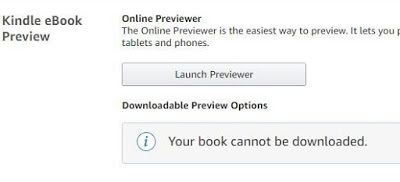 WTF?! did they lose my manuscript or something? No. The problem is that I uploaded my manuscript as a .kpf file, something spat out by Amazon's Kindle Creator app when you feed it your manuscript. In order to download your book in mobi format you have to have uploaded it in mobi format.
Anybody see the disconnect here? What kind of idiot would clobber their original mobi file, thus making this expedition necessary? Don't answer that.
But the problem here is that it leaves me without a coveted mobi file to send off to the legions of book bloggers who are clamoring to take a look at my novel. Well, I'm told once again, that needn't be a problem, either, because I can just snag a free, format conversion app called calibre that will do the job for me with just a few clicks of a mouse. So I snag it, click it, and I end up with a decently rendered copy of my book in mobi form. There. Done!
But there are a few problems. It substitutes my cover photo for the little picture of Robert Fishell I use in my About the author section of my book. That's not too big of a deal, since nobody wants to look at me anyway. The bigger deal is that calibre is not parsing my chapter headings in such a way as to create a table of contents.
I fiddled with the app and my manuscript for a few hours trying to fix this issue, but I didn't get anywhere with it. I surmise that the reason calibre is choking on my manuscript is that I produced it with something other than Microsoft Word. Now, I have a copy of Microsoft Word, but it's very old. It's too old to export a manuscript in .docx format, which is what calibre wants for conversion purposes.
Joshua began life as a couple of short stories about a boy who gets into all kinds of humorous predicaments. I wrote them in HTML. After I wrote a few more of them, I started to get more serious about the project so I abandoned the HTML and converted the text to a Google Doc. There are a number of advantages to working this way as you are developing your manuscript. Everything you write is saved in real time to your Google drive, which you can access from anywhere, on any device that supports it. When you're away from your PC and you have an idea for your story, you can just whip out your phone, open up the Google Docs app, and start writing. I wrote a significant portion of my manuscript for Joshua in this way.
Once I was done with it, however, I needed to format it for print, paying attention to paper size, margins, and text placement in order to conform to Amazon's standards. I could not do this in Google Docs and I didn't want to do it in my severely outdated copy of Word. What I really did not want to do was pay for Office 365, the latest bloated atrocity of an office suite from Microsoft. I did, however, have a copy of Apache Open Office that was up to the task. Sort of.
I tried exporting my manuscript in Open Office's preferred format, .odt, with some funky results. Things I had formatted within Google Docs went all wonky when I opened them in Open Office. Trying to fix them all piecemeal proved to be too much of a challenge. I finally went back to Docs and stripped the manuscript of all formatting, re-exported it to .odt, and painstakingly reformatted everything from the chapter headings to the italics. After several days' hard labor, I had a manuscript that was fit to publish as a paperback that met Amazon's standards. It was extremely quirky, however. It was very easy to mess up my page numbers. I had to input my TOC manually. When I finally had it ready to publish, I exported it as a PDF, and hooray, nothing got trashed in the process.
But it turns out that .odt is not an acceptable format for Kindle Creator. I went back to Open Office to export it as a .doc, and it trashed my page numbers again. This wasn't really a problem, however, since Kindle Creator strips out the page numbers anyway. So I imported it to Kindle Creator, went through it page by page to fix up things that didn't import in a way I liked, and finally, I had both a print-ready and Kindle-ready manuscript to upload to KDP. A couple of days later, both were live on Amazon. Yay.
But troubles still lurked unseen, surfacing when I tried to make a mobi. Calibre doesn't accept .doc files for conversion, and Open Office doesn't produce .docx files (no idea why). Calibre does (purportedly) convert .odt files, but thus began my problems trying to generate a mobi (or ePub) with a working TOC.
Most of the book bloggers will condescendingly accept PDF files, which is what they're getting. But since problems of this kind inevitably intrude on my thoughts when I awaken at first light to go to the bathroom, I'm going to have to find a way to produce a viable mobi file eventually. Without paying for Office 365. I'll keep you posted.
It turns out there are a few bookworms out there who do indeed take a chance on self-published authors, although it seems like a lot of them do it just to make money. However they do it, though, a lot of them prefer to get manuscripts in mobi format so they can be easily read with a Kindle.
Mobi? I have to confess I never heard of it before I started my quest for reviews. I've heard of lots of file formats, but this one is unique to Kindle users. But no biggie, many have told me; all I need to do is go to my book details on my KDP page and download my manuscript in mobi form. There. Done! So I go there, and I get:
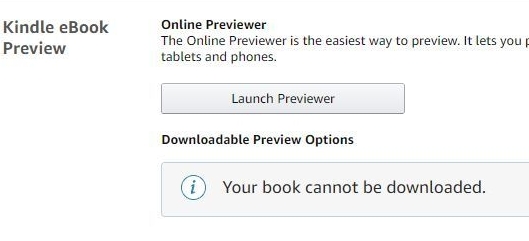 WTF?! did they lose my manuscript or something? No. The problem is that I uploaded my manuscript as a .kpf file, something spat out by Amazon's Kindle Creator app when you feed it your manuscript. In order to download your book in mobi format you have to have uploaded it in mobi format.
Anybody see the disconnect here? What kind of idiot would clobber their original mobi file, thus making this expedition necessary? Don't answer that.
But the problem here is that it leaves me without a coveted mobi file to send off to the legions of book bloggers who are clamoring to take a look at my novel. Well, I'm told once again, that needn't be a problem, either, because I can just snag a free, format conversion app called calibre that will do the job for me with just a few clicks of a mouse. So I snag it, click it, and I end up with a decently rendered copy of my book in mobi form. There. Done!
But there are a few problems. It substitutes my cover photo for the little picture of Robert Fishell I use in my About the author section of my book. That's not too big of a deal, since nobody wants to look at me anyway. The bigger deal is that calibre is not parsing my chapter headings in such a way as to create a table of contents.
I fiddled with the app and my manuscript for a few hours trying to fix this issue, but I didn't get anywhere with it. I surmise that the reason calibre is choking on my manuscript is that I produced it with something other than Microsoft Word. Now, I have a copy of Microsoft Word, but it's very old. It's too old to export a manuscript in .docx format, which is what calibre wants for conversion purposes.
Joshua began life as a couple of short stories about a boy who gets into all kinds of humorous predicaments. I wrote them in HTML. After I wrote a few more of them, I started to get more serious about the project so I abandoned the HTML and converted the text to a Google Doc. There are a number of advantages to working this way as you are developing your manuscript. Everything you write is saved in real time to your Google drive, which you can access from anywhere, on any device that supports it. When you're away from your PC and you have an idea for your story, you can just whip out your phone, open up the Google Docs app, and start writing. I wrote a significant portion of my manuscript for Joshua in this way.
Once I was done with it, however, I needed to format it for print, paying attention to paper size, margins, and text placement in order to conform to Amazon's standards. I could not do this in Google Docs and I didn't want to do it in my severely outdated copy of Word. What I really did not want to do was pay for Office 365, the latest bloated atrocity of an office suite from Microsoft. I did, however, have a copy of Apache Open Office that was up to the task. Sort of.
I tried exporting my manuscript in Open Office's preferred format, .odt, with some funky results. Things I had formatted within Google Docs went all wonky when I opened them in Open Office. Trying to fix them all piecemeal proved to be too much of a challenge. I finally went back to Docs and stripped the manuscript of all formatting, re-exported it to .odt, and painstakingly reformatted everything from the chapter headings to the italics. After several days' hard labor, I had a manuscript that was fit to publish as a paperback that met Amazon's standards. It was extremely quirky, however. It was very easy to mess up my page numbers. I had to input my TOC manually. When I finally had it ready to publish, I exported it as a PDF, and hooray, nothing got trashed in the process.
But it turns out that .odt is not an acceptable format for Kindle Creator. I went back to Open Office to export it as a .doc, and it trashed my page numbers again. This wasn't really a problem, however, since Kindle Creator strips out the page numbers anyway. So I imported it to Kindle Creator, went through it page by page to fix up things that didn't import in a way I liked, and finally, I had both a print-ready and Kindle-ready manuscript to upload to KDP. A couple of days later, both were live on Amazon. Yay.
But troubles still lurked unseen, surfacing when I tried to make a mobi. Calibre doesn't accept .doc files for conversion, and Open Office doesn't produce .docx files (no idea why). Calibre does (purportedly) convert .odt files, but thus began my problems trying to generate a mobi (or ePub) with a working TOC.
Most of the book bloggers will condescendingly accept PDF files, which is what they're getting. But since problems of this kind inevitably intrude on my thoughts when I awaken at first light to go to the bathroom, I'm going to have to find a way to produce a viable mobi file eventually. Without paying for Office 365. I'll keep you posted.


No comments have been added yet.