A Tour of Creative Software: What programs do I use for my projects?
I’ll be the first to tell you that you don’t need fancy software in order to create your art. It’s problematic to buy into the notion that the software maketh the artist—that a proper screenplay can’t be written without Final Draft, and a proper symphony can’t be written without Finale. Yes, it’s true that eventually the professional software becomes crucial for packaging a professional product, but you certainly do not need to start there. When the price point on some of these software programs is so high, it can be extremely discouraging.
So, on the whole, I declare that you should just create your art with whatever resources you have at your disposal. Don’t let a lack of “proper” software hold you back. After all, the creators of yester-year didn’t have these tools we have now, and they managed just fine.
Now that being said, some of these software programs are pretty nifty, and I thought it might be fun to take you on a little tour of the different programs I use, so you can get a sense of what goes on behind the scenes. I use several different programs for different types of projects: Novels, Musicals/Music, and Audiobooks.
NovelsI’ll briefly introduce three programs I use to write novels. But it’s worth noting that I didn’t use anything other than a basic word processor (Microsoft Word) when I drafted my first three novels.
PlottrThis is a relatively recent purchase and I’m very much on the fence about it. Plottr, is a plotting software, designed to help authors (or any writers) plot out their novels and keep all their planning together in a cohesive place. It has some cool features including novel structure templates with lots of information about how to pace different types of books, character attribute templates with prompts to design complex layered characters, and a timeline visualization tool, where you can drag and drop your chapters and important moments into a timeline to keep your planning organized.
In general, I’m enjoying using it, but it can be very overwhelming and…dare I say it? Distracting. I feel like distraction is the enemy of creative discipline, so I’m glad I didn’t try to use this program earlier. I think I could have used it to distract myself right out of writing my first three novels. Now, however, I feel more confident as a writer, I can use the tools I like and ignore the ones I don’t.
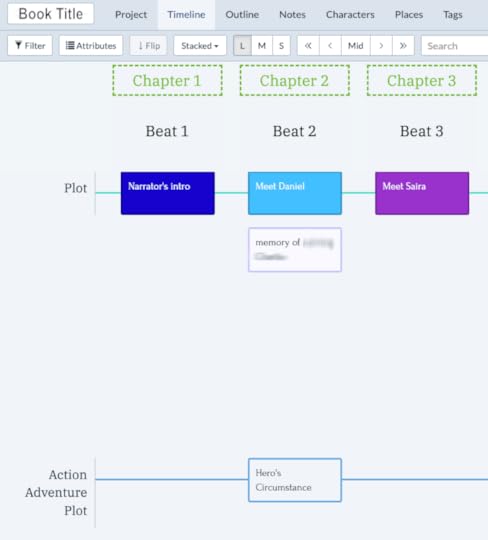 An inside look at my Plottr file for my work-in-progress fantasy romance bookProWritingAid
ProWritingAid is my author’s little helper. It is not a replacement for a professional editor, but it is a seriously helpful tool to edit your writing. I also learned so much about my bad habits with this. It has a lot of reports you can run, analyzing your writing to determine overused words, weak words, sticky sentences that are hard to read etc. I really love it and I use it for all of my creative writing.
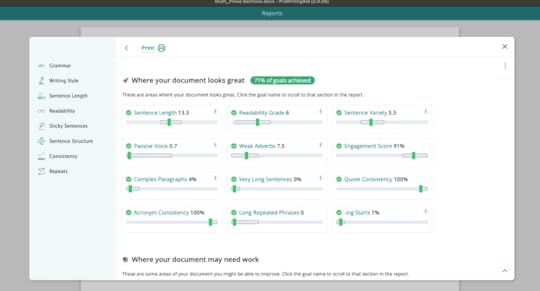 A Summary Report for one of my projects, analyzing my writing and areas for improvement.Vellum
I’ve said it before and I’ll say it again: if I could go back in time and buy Atticus instead, I would. But that aside, Vellum is still pretty cool. It is a typesetting software. It’s the tool you use to turn your word document into a properly formatted novel. It exports the pdf document you will use to create your physical copies, and it exports the epub, which is the proper eBook format with the reflow-able text (text that changes size and formatting to suit different e-readers). Vellum is a shortcut so you don’t have to individually format every single element of your novel using a professional design software. It saves an enormous amount of time.
Musicals and MusicYou may know that screenplays have a very specific formatting they need to follow, but did you know plays and musicals have their own specific requirements?
Final DraftThe newest addition to my software toolkit: Final Draft. This is the industry standard software used to format screenplays. I’m still learning my way around it, but the learning curve is not very steep at all. It has templates for different types of documents, including two different Musical Theatre templates (and lots of plays and movies etc. It even has graphic novel templates – cool!)
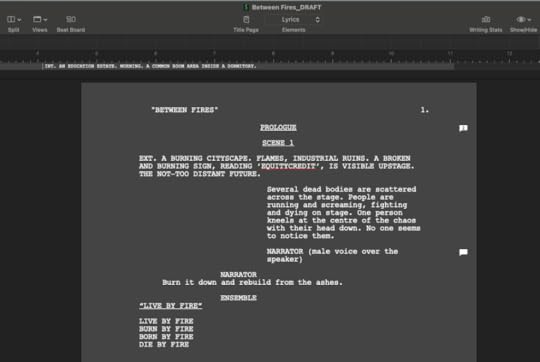 An early draft script for my musical Between Fires, co-written with Morgan-Paige Melbourne
I’ve heard rumours that industry pros can tell immediately if your script isn’t formatted with Final Draft and then they won’t take you seriously. I hope that’s not true, but honestly, it wouldn’t surprise me.
FinaleThis probably isn’t a software program your average author has on their computer. But as you may know, I’m also a professional composer. Finale is one of the main music notation software programs on the market. This is the program I use to professionally produce sheet music, everything from orchestra music to chamber music and musical theatre scores. I spend hours of my life on this program. I use it almost every day, sometimes just to quickly write out some duets for my students to play, other times to write out the vocal, instrumental, and choral parts for the musical numbers in my musicals. The learning curve to do basic music notation is not too bad, but to do advanced orchestration and contemporary composition, it’s a never-ending journey of learning, experimentation, and forced work-arounds to make the software comply with your vision. It’s getting better though.
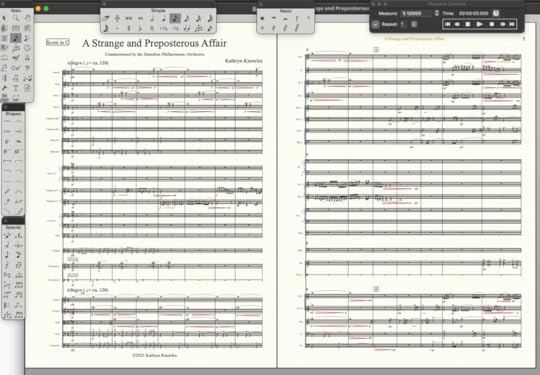 A finale file for an orchestra piece.Ableton
Ableton is a Digital Audio Worksation (DAW). You may hear people talking about Garageband or Pro Tools? Well, this is the same kind of program. It’s an audio engineering platform. I use this almost every day too. I use it to edit my own recordings or to create electronic tracks to accompany acoustic compositions. I also used it to audio master all the virtual performances I did with various musical groups during the pandemic. Taking dozens of gritty cellphone recordings of performances and wrestling the audio files together to create something resembling a live group performance. I’m also using this to audio master my audiobook recordings. However, I do not recommend it to anyone who is not a serious music professional. It’s expensive and very unnecessary for your average audiobook production.
AudiobooksAudacityAudacity is the software I recommend for audiobooks. I’m using it now to record my poetry book. Then I will transfer the files into Ableton for more detailed editing. But that’s only because I’m more familiar with Ableton and it will be faster for me. But Audacity is totally free and a great audio workstation with plugin capabilities that are specifically designed to help with creating audiobooks.
ConclusionThis is just a brief tour of some of the tools I use for my primary creative projects. I also use Affinity Photo a lot, to create images and marketing material. It’s like Photoshop, but way more affordable.
Like I said at the beginning of this article, I don’t think software, or the lack thereof, should determine the quality of your creativity. But as I move forward in my career, I’m realizing how useful some programs really can be. So if you’re on the fence about whether a program is worth the money, or what program to prioritize first, I hope this can help you make some of those decisions.
What software do you use in your creative practice? Are there any crucial ones you think I’m missing?