AI Clip Maker: 6 Best Tools for Video & Audio Editing in 2025
The AI clip maker market is absolutely exploding right now. Content creators are drowning in hours of footage, and they need smart tools to fish out the golden moments fast.
Here’s the thing: 78% of organizations are now using Gen AI according to McKinsey’s latest data. The shift is real, and if you’re still manually scrubbing through video timelines, you’re getting left behind.
This guide covers the 6 best AI clip maker and audio tools that actually work. Here’s what you need to know to turn your long-form content into viral clips without losing your mind.
AI Clip Maker Features: What Makes a Good Tool?Before we dive into the tools, let’s talk about what separates the winners from the wannabes. A solid AI clip maker should handle three things flawlessly:
Smart Content Detection: The AI needs to understand your content, not just randomly chop it up. The best tools understand visual, audio and sentiment cues throughout videos.
Platform Optimization: Your clips need to fit where they’re going. TikTok vertical, YouTube horizontal, Instagram square – good tools handle this automatically.
Audio Quality: Bad audio kills good content. The best AI clip maker tools include audio enhancement that actually works.
AI Clip Maker Tools: Top 6 Picks for 20251. HeyGen – The Digital Avatar Powerhouse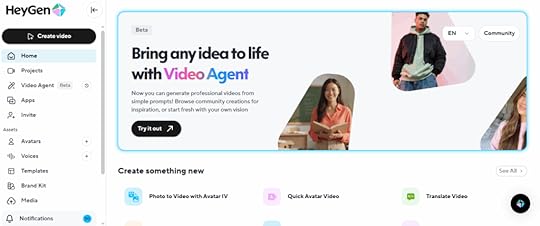
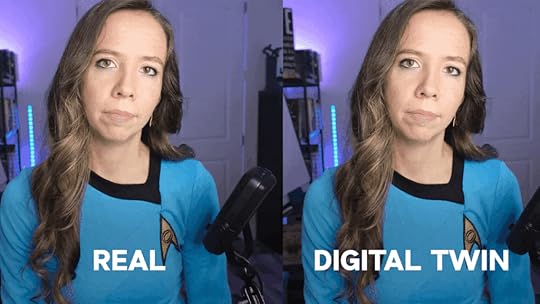
HeyGen feels like the future of video production. Create professional videos with realistic AI avatars speaking in dozens of languages without filming anything. I personally uses HeyGen to create my digital avatar, and the results are genuinely impressive.
Check this out:
What makes it special:
Create custom avatars from your own footageMultilingual speaking capabilities while maintaining facial expressionsProfessional video creation without filmingPerfect for training videos and marketing campaignsThe custom avatar feature is where things get really interesting. Upload videos of yourself, and HeyGen creates an AI version that can speak in any language while maintaining your facial expressions and mannerisms. Companies are using this for multilingual marketing campaigns and training videos.
Best for: Content creators and businesses needing professional video content at scale
2. ElevenLabs – The Voice Cloning Champion
ElevenLabs creates voices so realistic they’re actually a little unsettling. The voice cloning technology can replicate anyone’s voice from just a few minutes of audio samples. For my own work, I pair this with HeyGen to create super realistic videos you can’t tell apart from real footage.
What makes it special:
Voice cloning from minimal audio samplesEmotional range that adjusts based on contextReal-time voice conversion capabilitiesCommercial voice licensing optionsThe emotional range is what sets ElevenLabs apart from other voice tools. The AI doesn’t just read text—it understands context and adjusts tone accordingly. Sad scenes sound genuinely emotional, exciting moments have energy, and conversational content feels natural.
Watch this video and check out how authentic my digital twin’s voice is:
Best for: Audiobook creation, podcast production, YouTube videos, and any content needing consistent narration
3. Opus Clip – The Viral Content Generator
Opus Clip is the lazy content creator’s dream come true. Take one long video and watch it magically transform into dozens of short, viral-ready clips. Hour-long podcasts become 30 different TikTok videos in minutes, each with its own compelling hook and perfect pacing.
What makes it special:
Viral score predictions for each clipAutomatic caption generation with 97% accuracySmart storytelling understandingPlatform-specific optimizationThe viral score feature is genuinely helpful—it predicts which clips have the best chance of taking off on social media. The AI analyzes factors like engagement patterns, hook strength, and content structure to give each clip a score.
Best for: Podcasters, content creators, and anyone repurposing long-form content
4. Descript – The Text-Based Video Editor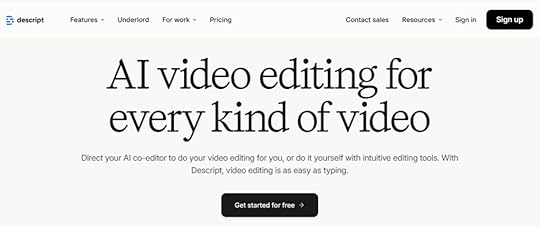
Descript changed everything by making video editing as simple as editing a Word document. Delete words from the transcript, and they disappear from the audio or video. It sounds too simple to work well, but it completely changes how you approach content editing.
What makes it special:
Edit video by editing text transcriptsOverdub feature generates missing words in your voiceScreen recording integrationAI handles filler word removal and background noiseThe Overdub feature borders on magical. Record yourself saying something wrong, and Descript can generate the correct words in your own voice. Need to add a sentence you forgot? Type it, and Overdub speaks it in your voice.
Best for: Tutorial creators, podcasters, and anyone who values efficiency in editing
Here’s a quick summary of the 4 best video tools out there: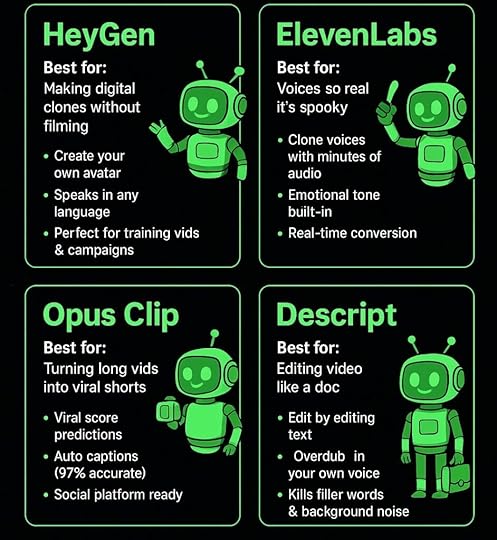 5. Suno – The AI Music Revolution

Want to add music to your video clips?
Suno makes it possible for anyone to generate full songs with vocals and instrumentation from simple text prompts. The platform raised $125 million in 2024, serving millions of users who create everything from viral social media tracks to professional-grade compositions.
What makes it special:
Generate 4-minute complete songs instantlyProfessional production tools in Version 4.5+Commercial usage rights for paid usersGrammy-winning producer Timbaland as strategic advisorThe recent v4 update brings game-changing features including “Remaster” for enhancing older tracks and significantly improved vocal quality that makes AI-generated songs increasingly difficult to distinguish from human performances.
Best for: Content creators needing original music, marketers, and musicians exploring AI composition
6. Udio – The Music Production Democratizer
Udio democratizes music production in ways that seemed impossible just a few years ago. Describe the mood, genre, or style you want, and Udio creates original songs complete with lyrics, melody, and instrumentation.
What makes it special:
Sophisticated lyric generation that makes senseMultiple genre capabilities from hip-hop to orchestralCommercial usage rights includedNatural rhyme schemes and song structureThe lyric generation feature is surprisingly sophisticated. Tell Udio you need a song about overcoming challenges for a motivational video, and it writes lyrics that actually make sense and flow naturally with the melody.
Best for: Content creators needing background music, video producers, and creative professionals
AI Clip Maker Selection: How to Choose the Right ToolStart with your content type: Need talking head videos? Opus Clip excels here. Want custom avatars? HeyGen dominates. Audio-focused content? Descript wins.
Consider your workflow: Do you edit primarily by text? Descript is perfect. Need multilingual content? HeyGen and ElevenLabs are your tools.
Budget matters: Most tools offer free tiers, but professional features usually start around $25/month. Calculate time saved versus cost.
Platform requirements: If you’re heavy on TikTok and Instagram, make sure your AI clip maker handles vertical video optimization well.
AI Clip Maker FAQ: Common Questions AnsweredWhat’s the difference between an AI clip maker and regular video editing?AI clip makers automatically identify interesting moments in your content and create finished clips with minimal input. Regular editing requires you to manually scrub through footage, make cuts, and format everything yourself. The AI approach saves hours but gives you less granular control over every detail.
Can AI clip makers handle different types of content?Most AI clip makers work best with talking-head content like podcasts and interviews. However, tools like Opus Clip are expanding to handle vlogs, gaming content, sports footage, and other video types. The key is matching the tool to your specific content format.
How accurate are AI-generated voices and captions?The technology has gotten scary accurate. ElevenLabs can clone voices from just minutes of audio, while Opus Clip claims over 97% accuracy on captions. You’ll still want to review the output, but the heavy lifting is done automatically.
Do I need technical skills to use these AI clip maker tools?Not at all. That’s the whole point. Most AI clip makers are designed for creators, not video professionals. Upload your content, pick a style, and let the AI handle the technical work. You can always fine-tune the results if needed.
AI CLip Makers: The Bottom LineThe AI clip maker space is moving fast, and these 6 tools represent the current leaders. HeyGen dominates avatar creation, ElevenLabs owns voice cloning, and Opus Clip leads content repurposing.
The key is matching the tool to your workflow. Try the free tiers, see what clicks with how you work, and don’t get stuck manually editing when AI can handle the grunt work.
Content creation is already time-consuming enough. Let AI handle the tedious parts so you can focus on what actually matters – creating stuff people want to watch.
Ready to dive deeper into AI tools that actually move the needle?
Want to know how to integrate them into your business?
Join First Movers R&D AI Labs and get early access to the tools and strategies that are reshaping content creation. We test everything so you don’t have to, and we share what’s working right now.
No fluff, no hype – just real insights from creators who are using AI to build their audiences and businesses.
Join First Movers R&D AI Labs →
Because the future belongs to the creators who adapt first.