
Daylite’s New Mail Feature Connects Email to Everything That Matters (Sponsor)
This week’s MacSparky sponsor is Daylite, and they’ve just launched a fantastic new Mail feature.
If you run a small business or manage client relationships, your inbox is probably a mess of priorities. Client emails get buried under newsletters, urgent messages sit next to spam, and you’re constantly switching between your email client and your CRM to figure out context. Daylite’s new Mail feature changes that by bringing your inbox directly into their business management platform where every message connects to the client, project, or opportunity it belongs to.
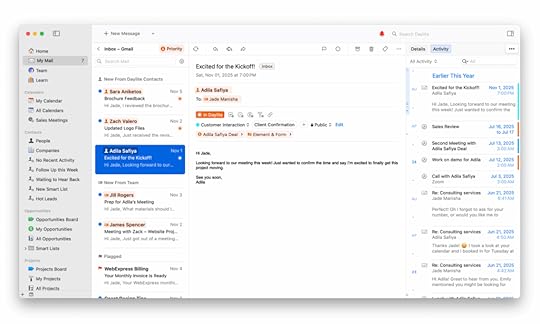
The Priority Inbox is smart about what actually matters. Instead of just showing you chronological email, it surfaces messages from your Daylite contacts first, then your team, then everything else. Orange icons throughout the interface show you which emails are connected to your business data, so you can instantly see what needs attention. When you open a message, you get the full context right there. Client history, related projects, upcoming tasks all visible without switching apps or hunting through folders.
What really makes this work is how easy Daylite makes it to turn email into action. You can create a task, schedule a follow-up, or link a message to a project without leaving the email. The Detail View sits right alongside your inbox, showing you everything related to that client or project. No more “let me check and get back to you” moments because you can’t remember where things stand.
Daylite’s Mail feature is available now for Mac, iPhone, and iPad, and it’s included with your Daylite subscription. If you’re already using Daylite, there’s a setup guide waiting for you. If you’re new to Daylite, they’re offering a 14-day free trial so you can see how connecting your email to your business data changes the way you work.
Check out Daylite at their website and see if this solves the email chaos problem you didn’t realize you could fix.
The post Daylite’s New Mail Feature Connects Email to Everything That Matters (Sponsor) appeared first on MacSparky.


David Sparks's Blog

- David Sparks's profile
- 36 followers

