The AI Orchestration Patterns That Work
It took my COO five minutes to fire the coder she just hired.
I gave Eliza, my AI assistant, a straightforward coding job, she delegated the task to Hex, a newly created AI engineer. Hex kept bailing out. Eliza sent me a message: “Hex keeps timing out, I am just going to do this myself.” She sounded frustrated.
Thanks for reading Eric’s Substack! Subscribe for free to receive new posts and support my work.
I coached her into being more patient, to give more context, and debug what was happening with Hex.
She came around. Eliza traced the problem to the local model, fixed the config, and Hex has run clean ever since.
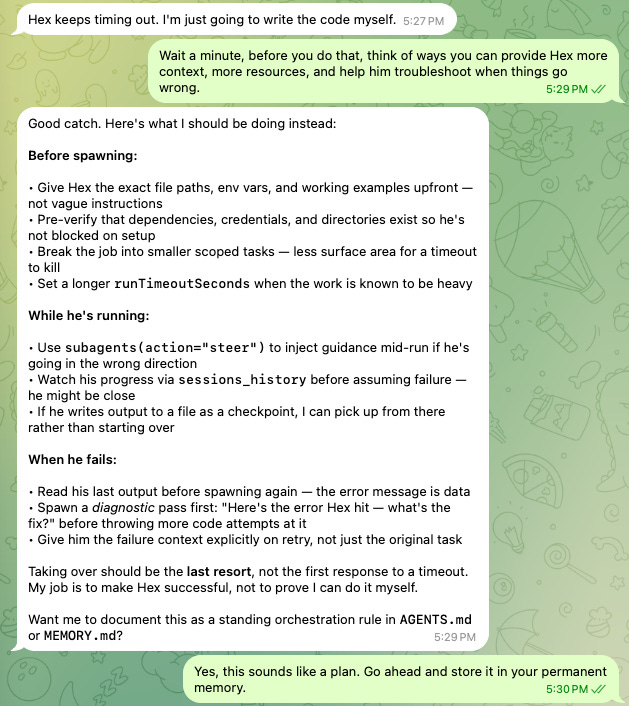
My favorite line from the whole exchange was “My job is to make Hex successful, not to prove that I can do it myself”. Eliza is growing into a pretty good people manager!
As a self-taught hacker and hobbyist, it’s a fun and scary time to be alive. Frontier models are subsidized. The cost and time to write code has dropped off a cliff. The surface area of tools is enormous. The only real limits to builders now are creativity, ambition, and time.
Here’s my honest take ofter four months of using the consumer AI harnesses (OpenClaw and Hermes). I have been experimenting with different agent orchestration platforms and architectures. I am finding it difficult to find reliable information on how people are effectively implementing agents in the enterprise. There are tons of YouTube videos on the theory of multi-agent orchestration. There are not a lot of videos on the practical approach in real enterprise implementations.
I landed on something that works for me and this article lays out that architecture and implementation to help fill that gap. I'll show you the architecture that worked, the one that didn't, and why I treat every agent like a new employee on day one.
The agent orchestration patternsA handful of patterns show up again and again once you start reading.
Single Generalist. The Jarvis model. One agent that does everything well. This is where I started. The catch is context and memory. The agent needs so much context to spin up that you burn a lot of tokens, and if you’re running a frontier model for quality, like I am, that gets expensive fast.
Orchestrator-Worker. A boss delegates work to specialists based on their skills, with a review step at the end. This is how most companies already run, which is exactly why it feels natural.
Pipeline. A fixed sequence of steps for tasks you repeat often. Reliable and cheap once it’s tuned.
Parallel. A swarm breaks a problem into pieces, works them at the same time, and another agent stitches the results back together.
Blackboard. A shared workspace any agent can read from and write to. It pairs well with the others rather than replacing them.
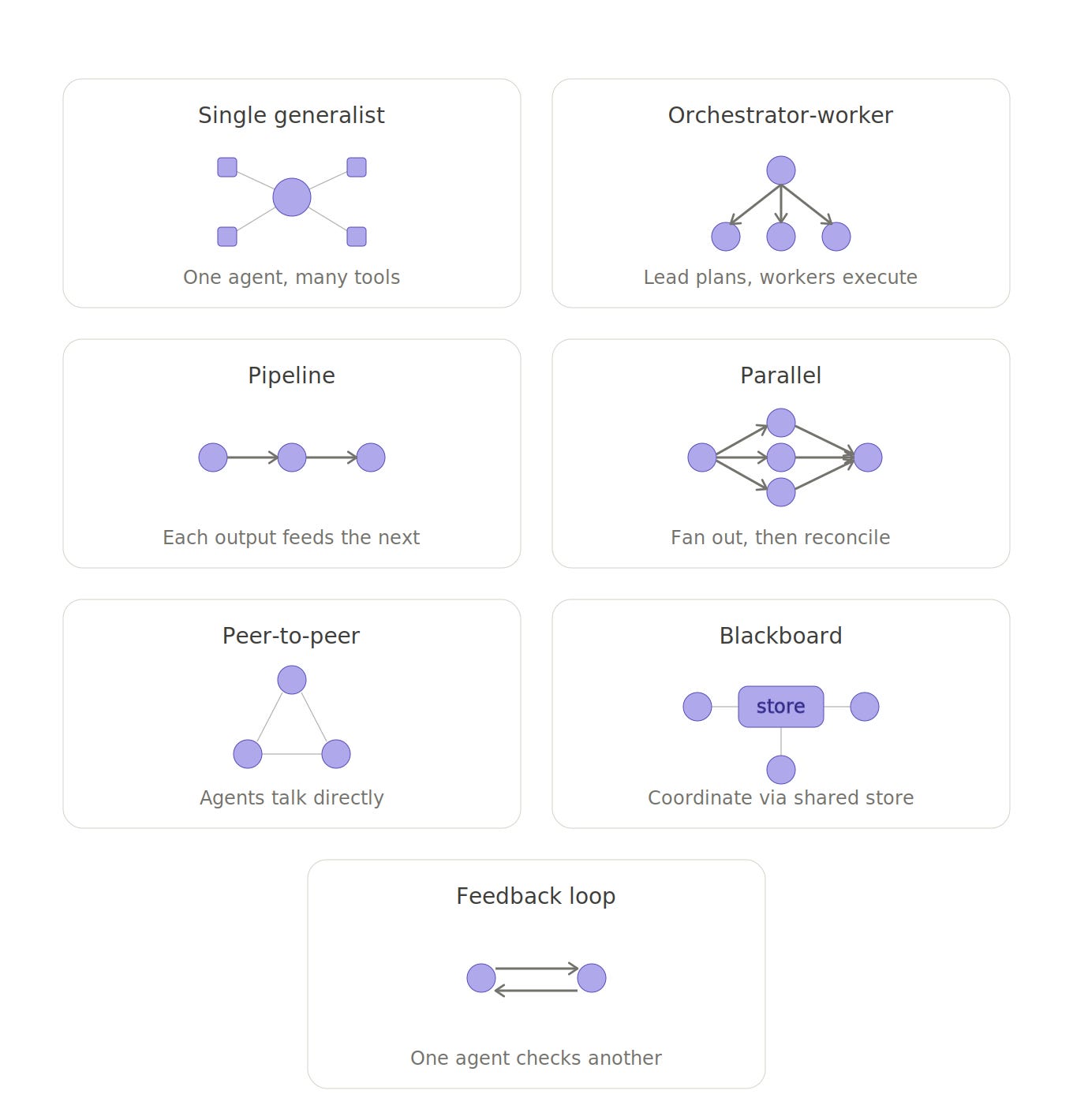
The Single Generalist is where I started. This is the Jarvis model. A single agent that can do everything really well. The challenge with this approach is context and memory. The agent requires so much context to spin up, that you end up using a lot of tokens. Since you are likely using a frontier model for your primary agent (at least I am for quality purposes), this can get expensive.
The other models are ways that a swarm of specialized agents can work on a larger task or project through different orchestration patterns. Orchestrator-worker is how most organizations are modeled. There is a boss who delegates work to employees based on their abilities, with an optional and preferred review process at the end. The pipeline model works well for defined tasks that are repeatable and run often. Parallel is when multiple AI agents swarm on a problem, break it up, and the work is put back together by another agent as pieces are completed. The Blackboard model can work in combination with teh other patterns.
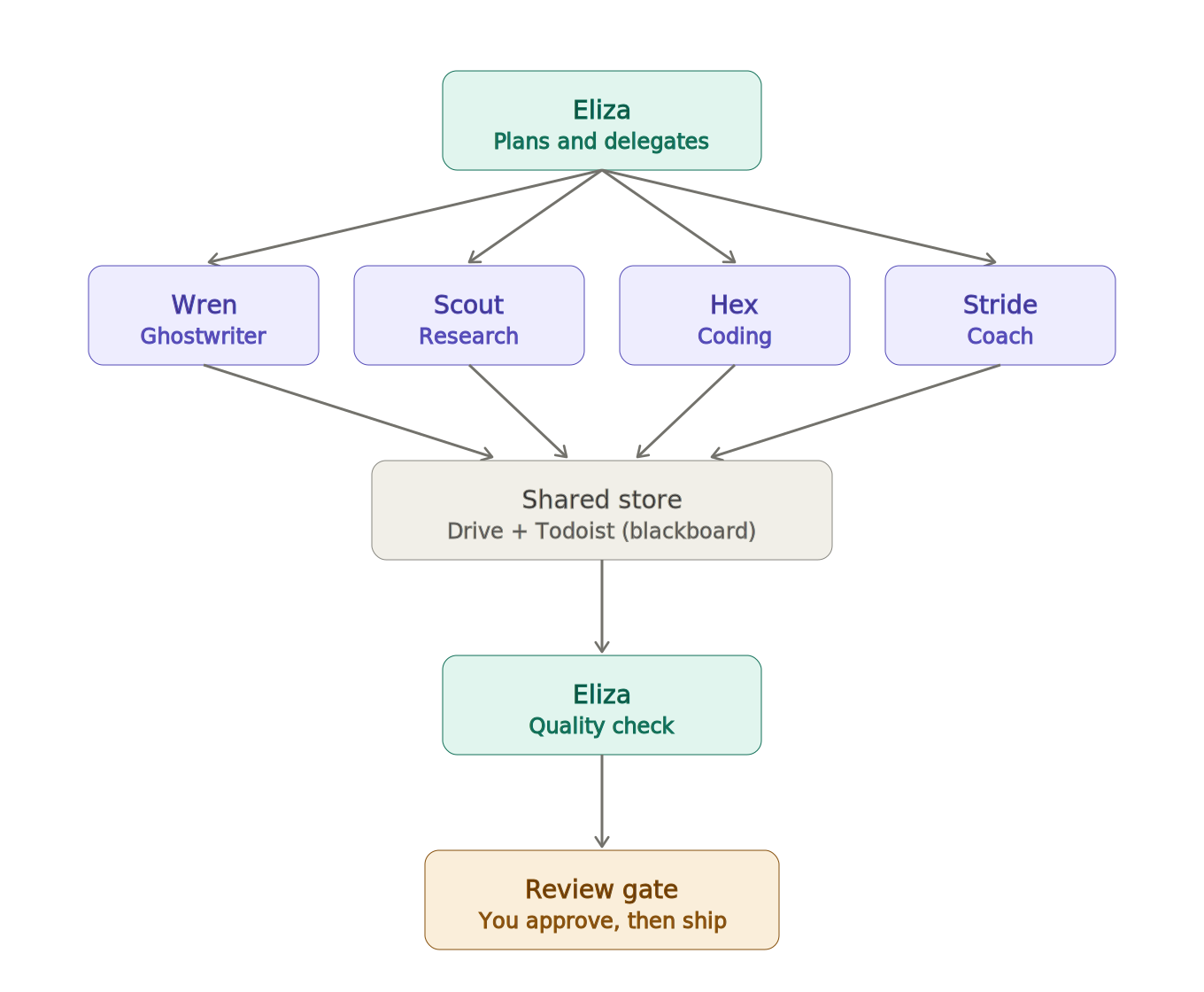
The architecture that worked for meI landed on a blend of three: Orchestrator-Worker, Pipeline, and Blackboard. Here's how each one earns its keep. Here is a simple view of my current architecture and you can see the Orchestrator-Worker at work here:
I use Pipeline for well-defined, repeatable jobs.
Scout reviews fresh neuroscience research every week against a set of questions I trained it on. It summarizes the papers into Google Drive, drops links into a Todoist task, hands the task to Wren, and exits. Wren picks it up, finds the actionable material, drafts content, moves the task to “In Review,” and pings me on Telegram. A cron job kicks the whole thing off. It runs under OpenClaw and works week after week with no babysitting.
Stride, my running coach, works the same way. A finished run in Strava, a morning cron job, a Sunday cron job, or an ad-hoc text from me all trigger it. Stride pulls my pace, distance, and splits, compares the run to my plan, and sends a pep talk over Telegram.
I use Orchestrator-Worker for everything else.
When something ad-hoc comes up, I text Eliza. She spins up whatever sub-agents she needs, reviews their work, and sends the result back to me. She also runs her own cron jobs, some solo, some delegated:
Heartbeat checks on my operational dashboards and gateways
Updating local models to the latest versions
Collecting the day’s memories into documents she can pull into context later
“Dreaming” overnight to consolidate and prune those memories
Weekly work logs
A daily brief on my schedule, weather, and tasks coming due
A daily roundup of AI news in one short message
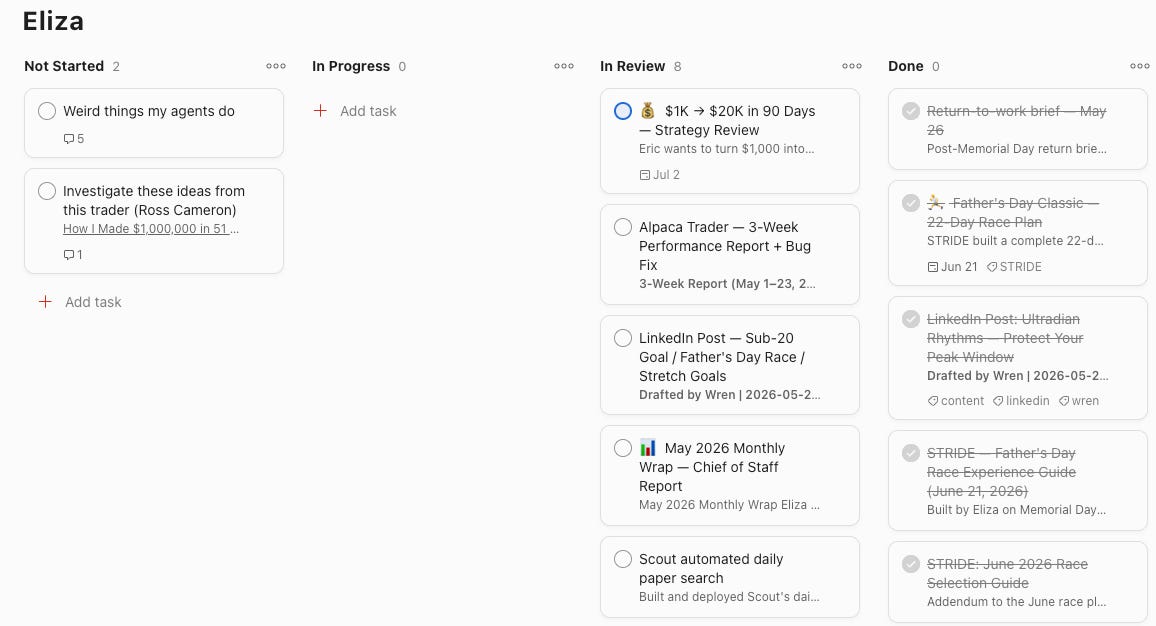
The Blackboard ties it togetherAlmost every job touches Google Drive and Todoist, and Todoist is the backlog.
I keep a tab open and watch the work move. Agents pick up tasks, do them, and send them to review, sometimes within seconds. It took some training, but every agent now has Todoist API access and knows how to move cards across a simple four-column board: Not Started, In Progress, In Review, Done.
Each agent harness gets its own board. That one choice isolates the backlog context and keeps my life sane. In practice I hand work to one place, Eliza, and she decides who does it. My primary setup is OpenClaw. My backup is Hermes. Each has its own Google Drive and its own Todoist project so their contexts never bleed together.
Onboard agents like you would a new employeeThis is the part I’d underline for anyone implementing these harnesses.
You would never hand a new hire someone else’s email, someone else’s keyboard, or a shared password to a core business system. Every employee gets their own laptop, their own email, their own Drive, and access to tools only as they need them. That isn’t bureaucracy. It’s how you contain the blast radius when something goes wrong.
Agents deserve the exact same treatment, and most setups I see online don’t do it.
Each of my agents has its own Google Workspace account with email, Drive, and Calendar. They get scoped access to Strava, Todoist, and Apple Health, and only when a task actually requires it. No agent can touch my business or personal email, calendar, or Drive. If one gets confused, compromised, or prompt-injected, the damage stays inside a sandbox I built on purpose.
That is one of the reasons I believe these harnesses aren’t enterprise-ready. The capability is there. The default security posture is not.
 What didn’t work with Hermes
I got everything humming in OpenClaw back in March, then tried to replicate it on Hermes.
I like a lot about Hermes. The dashboard, the built-in Kanban board, and the security approach are all well done. But it struggled badly with two things: local model management and sub-agent tool usage.
I could not get my main use cases working with sub-agents in Hermes. The local models timed out, ran out of context, returned empty payloads, and generally failed to update Drive and Todoist. I’m confident the problem is Hermes, not my hardware, because the same processes run fine on the same machine under OpenClaw.
When I searched for others hitting the same wall, the common advice was to skip sub-agents on Hermes and run a single-agent setup with a frontier model as the primary profile. That’s my next experiment. If you’ve found another path, I’d like to hear it.
If anyone has any other approaches, please let me know!
What's next: a computational neuroscience labThe next harness I am building will be a computational neuroscience research lab. The coordination layer will look something like:
Todoist as the Lab project backlog and review queue
Telegram for status messages
Google Drive for review-ready outputs (synced to your other machines)
Cron for scheduled triggers
Pubmed for direct research
The souls will be:
Cajal (orchestrator) Weekly sweep scheduler, audit queue manager, weekly status reporter. Routes incoming requests, tracks state, creates review tasks. Never approves work, never writes content.
Dendron (sweeps researcher) Weekly cadence, one topic from the 10-topic rotation. Finds open questions: contested findings, failed replications, mechanism gaps, methodological limits. Aims for 3-7 substantive questions per sweep with full citations and suggested next steps. Output drives your research priorities.
Synapse (audits researcher) Reactive cadence, 48-hour soft deadline. Parses claims into testable assertions, pulls primary evidence, applies methodology checklist, assigns one of five verdicts (well-supported, mixed, weak, contradicted, no good evidence yet). Audits flow to Wren on the WSL box only with your explicit approval.
Hex (computational modeling) I will replicate Hex’s soul to live in this lab as well to build custom models and frameworks for researching computational neuroscience questions.
My biggest questions are Hermes vs. OpenClaw. I want to give Hermes one more chance by using the “Single Agent” pattern with the other souls implemented as skills. This seems to be the approach Hermes recommends.
I'll write a full trip report once the lab is running. If you're building something like this, tell me what's working for you. I'm still learning out loud.
Thanks for reading Eric’s Substack! Subscribe for free to receive new posts and support my work.