
Support for Indie Authors discussion
Archived Author Help
>
General Goodreads Site Questions

 From what I can see, no. Goodreads wants to keep our pages uniform and doesn't allow us access to the layout. Sorry. :(
 Christina wrote: "From what I can see, no. Goodreads wants to keep our pages uniform and doesn't allow us access to the layout. Sorry. :("
I was afraid of that, but hoped someone might know something I didn't. I'll remove the questions then. Not as beneficial as having a blog first.
Thanks!
If anyone has other profile questions, fire away!

 Helen wrote: "What is a Goodreads librarian?"
They are people who are allowed to edit book and author pages if they have incorrect information on them. There's another level called a Super Librarian who can do a bunch of other stuff. Basically they're editors that are allowed to make sure that the correct information is on an author's page or a book listing.
I believe they can also add new cover art to a book listing from publisher's sites, amazon, etc.
 Mod
Mod
Hi Amanda,
Hey, I have a question. Some time ago I rated one of my stories "The Asphalt Carpet" five stars. A few days later I decided that was tacky and have tried to remove it, but it won't go away. How can I take my own rating off that book? I can see where it says I'm "unrating" it, but then the rating keeps coming back.
 Hello----Can anyone direct me to the General Goodreads Newsletter and its editors? I found the page once but can't locate it now.
many thanks!
Dwayne wrote: "Amanda wrote: "This thread can be for general Goodreads help..."Hi Amanda,
Hey, I have a question. Some time ago I rated one of my stories "The Asphalt Carpet" five stars. A few days later I dec..."
That's odd, I didn't have that trouble myself. I did the same thing once - had rated my own and then realized that was a bit taboo and removed it. I think something what worked for me was actually clicking unread on the book as well, and then you can either leave it as unread, since people will know you obviously read your own work, or move it back to 'read' but don't add a new rating. Let me know if that works!
Steve wrote: "Hello----Can anyone direct me to the General Goodreads Newsletter and its editors? I found the page once but can't locate it now.many thanks!"
Do you mean this: https://www.goodreads.com/newsletters...
Hey Amanda, would you be cool with us changing the name of your thread "Goodreads Site Questions"? I waa thinking Ask a Librarian, but I didn't want you to end up flooded with things folks should be using the librarian group for. With site questions, anyone can chime in and answer if they know.
Mod
That worked. Thank you!
Amanda wrote: "Steve wrote: "Hello----Can anyone direct me to the General Goodreads Newsletter and its editors? I found the page once but can't locate it now.many thanks!"
Do you mean this: https://www.goodre..."
Thank you so much Amanda!!! :)
Christina wrote: "Hey Amanda, would you be cool with us changing the name of your thread "Goodreads Site Questions"? I waa thinking Ask a Librarian, but I didn't want you to end up flooded with things folks should b..."By all means!
And happy to help with some things so far!
I actually opened a ticket to ask about my initial question, and they're open to maybe making it so we can alter our order of things on our Author Pages, we'll see. For now, I can't delete that questions section myself, but plan to ask them to.
Is there a way to turn off updates for individual discussions for a group you receive updates from? If there is and it's obvious I'm not seeing it.
 Igzy wrote: "Is there a way to turn off updates for individual discussions for a group you receive updates from? If there is and it's obvious I'm not seeing it."
At the bottom of the thread's page, there is this:
You are following this discussion (instant) edit
Click "edit" and select "none" at the bottom. : )
Owen wrote: "Igzy wrote: "Is there a way to turn off updates for individual discussions for a group you receive updates from? If there is and it's obvious I'm not seeing it."At the bottom of the thread's page..."
Thank you again! You're just full of good advice, buddy. :)
 If you really get stuck with a site question, consider support@goodreads.com. I have found their responses to be quick and helpful.
 I thought we should all be Librarians on Goodreads. I made sure I became a Librarian so I could add and edit my own books. Doesn't everyone do this?
Nick wrote: "I thought we should all be Librarians on Goodreads. I made sure I became a Librarian so I could add and edit my own books. Doesn't everyone do this?"
I thought we should all be Librarians on Goodreads. I made sure I became a Librarian so I could add and edit my own books. Doesn't everyone do this?
Nick wrote: "I thought we should all be Librarians on Goodreads. I made sure I became a Librarian so I could add and edit my own books. Doesn't everyone do this?"With great power comes a whole bunch of responsibility that some of us don't have time for. :)
 I'm looking for help on how to attach a photo to a blog post. Can anyone help?
Bryan wrote: "I'm looking for help on how to attach a photo to a blog post. Can anyone help?"
I'm looking for help on how to attach a photo to a blog post. Can anyone help?
Bryan wrote: "I'm looking for help on how to attach a photo to a blog post. Can anyone help?"Hello Bryan---the link to the photo or the photo itself?
Bryan wrote: "I'm looking for help on how to attach a photo to a blog post. Can anyone help?"Whether just a link to the image or to have the image show up in the post, on the side when preparing any blog post, Goodreads has a ton of helpful tips for how to do that...but I can't post the example here in text, I just realized, without it turning into examples links or blank images, haha, so here's a screenshot:
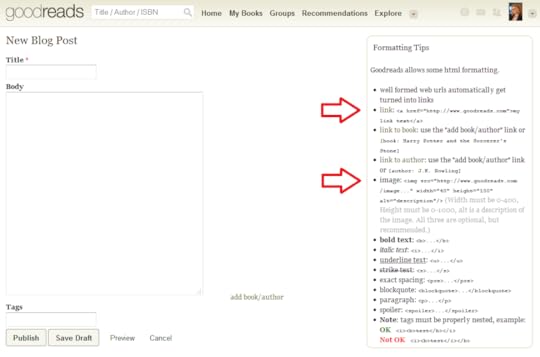
You just need to change out the link, sizing, and description to what yours actually is.
Of course that means the picture needs to be hosted somewhere so it HAS a link, there's no way to upload a picture directly to Goodreads for a blog post. I often have it uploaded to my Facebook or other site/blog and take the site URL from there.
If you're talking about a blog post for a site other than Goodreads, it would be different depending on what you use.
Does that help?
Amanda wrote: "Bryan wrote: "I'm looking for help on how to attach a photo to a blog post. Can anyone help?"Whether just a link to the image or to have the image show up in the post, on the side when preparing ..."
Thanks for your help I will add a link to my facebook page which shows the picture of the tiny library I refer to in the blog.
 Does anyone know how long it takes(typically) for Goodreads to approve an author profile?
Mod
Does anyone know how long it takes(typically) for Goodreads to approve an author profile?
Mod
It took a few days for them to approve mine, I think. Maybe... five days? I can't remember for sure.
 How long does it take to get a giveaway approved? It's my first time and I set up the giveaway Thursday, hoping to start it on Friday. Once I realized it had to be approved, I changed the dates for it to start this coming Friday. But it's now Tuesday and it's still pending approval and I haven't heard anything. Thanks.
 Wendi wrote: "How long does it take to get a giveaway approved? It's my first time and I set up the giveaway Thursday, hoping to start it on Friday. Once I realized it had to be approved, I changed the dates for..."
Yeah mine took almost a week before it went live. Five days I think it was.
Matt wrote: "Wendi wrote: "How long does it take to get a giveaway approved? It's my first time and I set up the giveaway Thursday, hoping to start it on Friday. Once I realized it had to be approved, I changed..."Ok thanks!
 Hi Amanda,
Is it possible to resubmit a synopsis of one's book? Rarity from the Hollow is Social Science Fiction within the genre classification term coined by Ursula K. Le Guinn in the '70s. As currently described, it sounds like traditional YA mainstream science fiction when it is not close to that subgenre. I don't want potential readers to purchase one thing and get another. I also don't want potential reviews to receive a lower rating because my novel did not fit expectations based on its description. Rarity from the Hollow was written for adults who are not prudish or fainthearted.
Thanks for your consideration.
Robert Eggleton
 Hi Robert, as the author, if you click on "edit details" for your book, you can change the blurb. Your best bet would be to have the same one you set up for retail outlets.
 For one of my giveaways, I got a nasty review. This is a book that has earned me good reviews on Amazon. As an author, I am sure you understand how bad one might feel. How do you handle such situations?
Armineh Helen Ohanian
 Mod
Mod
Mod
Mod
Here is the most recent thread dealing with this topic, Armineh, which Riley mentioned.
https://www.goodreads.com/topic/show/...
Hi guys, as Riley and Dwayne mentioned, there are threads discussing this. Please keep this thread clear for issues related to the site in general, such as the types of questions you would ask a Goodreads Librarian (which Amanda, the one who started the thread, is).
 I have a question about the site. Is there an easy way to keep track of threads you've made comments on?
I think so, Cynthia. Under the comment box, you see a check box for notifications. If you want a notification every time someone comments, you can check that box. Otherwise, you can see your most recent posts on your own profile page.
I have a question about the site. Is there an easy way to keep track of threads you've made comments on?
I think so, Cynthia. Under the comment box, you see a check box for notifications. If you want a notification every time someone comments, you can check that box. Otherwise, you can see your most recent posts on your own profile page.
 Blog question: Is there any way to indent the paragraphs on a goodreads blog?
 Andrew I believe if you hit space to separate them from being so close together it will work. If it's linked to a site and then goes onto Goodreads you may need to do it from the site.
 Does anyone know if there is a way to follow all threads in a particular folder without following all group discussions in all folders? I know you can follow individual discussions but when you do that you don't get notifications when a new discussion has been added.
 I've been trying to figure out how to add my blog to my page. Can anyone help me out and give me some instructions? Thanks so much! I read the above blog info and didn't really understand it...
Justin - Thanks
I've been trying to figure out how to add my blog to my page. Can anyone help me out and give me some instructions? Thanks so much! I read the above blog info and didn't really understand it...
Justin - ThanksI've tried working with html p code for paragraphs with variations, text-indent, 16px, it won't indent. Goodreads does show allowable html code on the right side of the page. I was just wondering if there were any tricks.
I can separate paragraph with a space, but I can't indent with a space.
I'll try an outside link.
 Andrew wrote: "Justin - Thanks
I've tried working with html p code for paragraphs with variations, text-indent, 16px, it won't indent. Goodreads does show allowable html code on the right side of the page. I was..."
What do you mean? Are you talking like indentation for the paragraph?
This is indented three spaces via paragraph tags, but Goodreads strips the white spaces.
This is done the same way, but with different terminology in place of white space.
To indent with html for Goodreads, type: &enbsp;
This will give you one white space. For two white spaces you would type: &enbsp; &enbsp;
REMOVE the e after the ampersand symbol. I couldn't type it as is without Goodreads counting it as HTML.
One white space = &enbsp;
Without the 'e'
This is typed without any html tags. I used &enbsp; three times without the e.
Diamante wrote: "I've been trying to figure out how to add my blog to my page. Can anyone help me out and give me some instructions? Thanks so much! I read the above blog info and didn't really understand it..."Are you attempting to add a RSS feed to an outside site, or start your blog on Goodreads?
 Hello group. I have a bit of a prob.that I needed help with. I posted a novel, then rewrote/reworked it for 3 months, came back and reposted on Amazon with a new cover. The first edition only went onto 2 shelves, but GR won't let me do away with that edition. I really want to do away with that edition, ensure that no more copies go out, and am considering cancelling my membership b/c of this. What to do?
Kevin wrote: "Hello group. I have a bit of a prob.that I needed help with. I posted a novel, then rewrote/reworked it for 3 months, came back and reposted on Amazon with a new cover. The first edition only went ..."
Hello group. I have a bit of a prob.that I needed help with. I posted a novel, then rewrote/reworked it for 3 months, came back and reposted on Amazon with a new cover. The first edition only went onto 2 shelves, but GR won't let me do away with that edition. I really want to do away with that edition, ensure that no more copies go out, and am considering cancelling my membership b/c of this. What to do?
Kevin wrote: "Hello group. I have a bit of a prob.that I needed help with. I posted a novel, then rewrote/reworked it for 3 months, came back and reposted on Amazon with a new cover. The first edition only went ..."There's nothing you can do. If a book was available, even for a short period of time, Goodreads catalogs it so that people who have that edition can easily find the book. Cancelling your Goodreads membership will not remove a book either. Your best bet is to request that the latest edition be the default edition that shows up.
Kevin wrote: "Hello group. I have a bit of a prob.that I needed help with. I posted a novel, then rewrote/reworked it for 3 months, came back and reposted on Amazon with a new cover. The first edition only went ..."If you overwrote the original files with Amazon, the old files will not be available for download. The only people with access to them are the ones who have shelved the prior version or downloaded it before your overwrite. Well, this is my understanding of the process. I believe Kindle users can always update if they so choose.
Tony and Christina: Thanks for the help. That was what I needed to hear, Tony. I wans't quite sure how it worked. I thought maybe the old file was kept by GR. Cheers.

Support for Indie Authors
Books mentioned in this topic
Rarity from the Hollow (other topics)Rarity from the Hollow (other topics)

Anyone know how to rearrange the order of things on your author page here? For example, my blog was always at the top, but ever since I added in a questions section, THAT is at the top, then my books, THEN my blog, and I'd like to swap that around. Is there a way without just deleting the questions section? Seems silly to not be able to move things.