
Art Lovers discussion
>>>How to post a picture using HTML (instructions)<<<
date newest »
newest »
 [image error]
This is what keeps happening. Can you tell me what I'm doing wrong?
[image error]
This is what keeps happening. Can you tell me what I'm doing wrong?I fully admit I'm technologically challenged, apologies ahead of time. 🤓
BTW, I'm copy and pasting the above, then pasting in link, and yes I fixed the space after the parentheses..
 Jai wrote: ""
Hi Jai, I know it took me some time too to figure it out ;-)
Below is a screenshot of the line you need to have for this image:
Check carefully if you have all symbols in the correct spot, maybe you missed a " ?
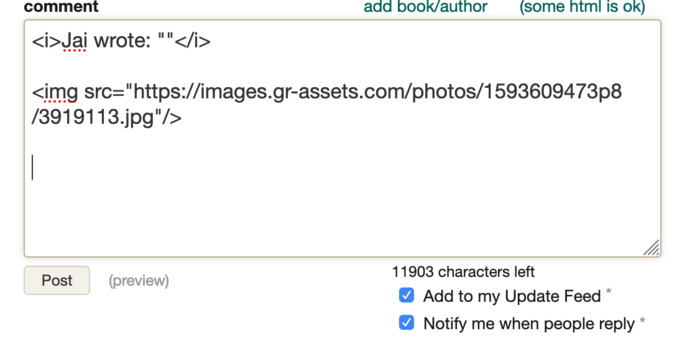
 Dirk wrote: "Jai wrote: ""
Hi Jai, I know it took me some time too to figure it out ;-)
Below is a screenshot of the line you need to have for this image:
Check carefully if you have all symbols in the correc..."
Brilliant!
I copied your instructions, worked!So, added my own link instead, didn't...
Obviously, it's something to do with the links I'm using?
It's okay, I'll come back to it another day, too frustrating 🤓
I’ve made a couple more screenshots to show how to upload a pic to the group.In the menu on the right go to link Photos and click on "add more photos":
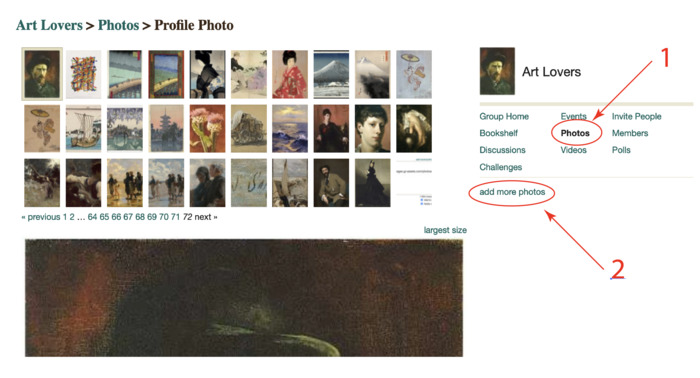
Then you get this:
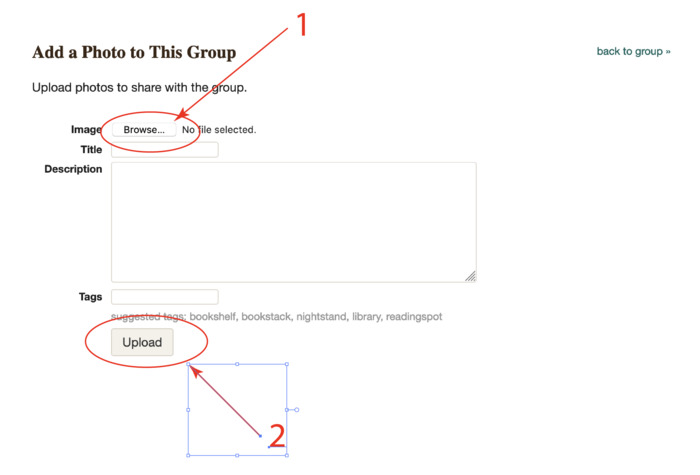
You can browse for a pic on your harddrive or on the web and upload it to the group.
Once this is done it will be the last in the list, select the picture and right click, then you get the menu where you can select and copy the image location.
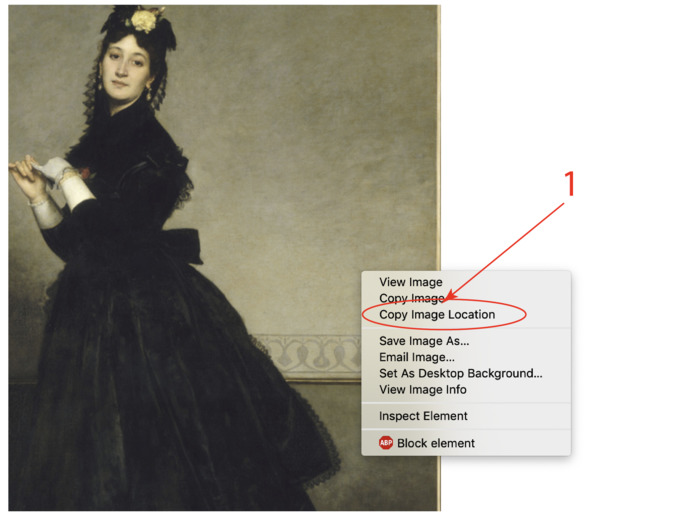
If you paste the link you get something like this:
https://images.gr-assets.com/photos/1...
And if you then add the xml in front and at the end as shown in the previous comment than your photo should appear if you check in preview.
 So it's definitely to do with my image choices.. Some work, some just don't??
At least I can do some 😬
Thank you so much for your patience and help!!
 You shouldn’t have trouble with jpgs. Some other formats can be iffy.
Figuring that out 🤪
You shouldn’t have trouble with jpgs. Some other formats can be iffy.
Figuring that out 🤪Turns out, if you save those to your photo's, can be gotten around from there.
I get to play with the other kids now!
Thank you.



Otherwise, above this comment box to the upper right in green lettering in parentheses it says "some html is ok" and it gives instructions, also.
Enter the following EXACTLY the way it is written below:
img src="your link here" />
Put a < in front of 'img'. Keep the parentheses on both sides of your image link, and do everything else exactly as it is above. (I didn't put the < in front of image or it would have thought I was trying to post a picture without a link and it would have come up as a red X!)
To get your image link, right click on the image and there should be an option to select 'copy image link'. Paste that whole thing inside the parentheses. When you post it, the image should come up. If it doesn't or you have questions, please let me know.