
Sarah Jane Avory's Blog
February 4, 2026
The Mistress and the Three Little Pigs.
Here’s a short story I wrote ages ago while working at my previous company. It did get me into a bit of trouble at the time, but oh well…
Here’s another of my crazy little stories about The Mistress.
“Children (and grown-ups), are we all sitting comfortably? Good, then let us begin our story…”
The Mistress and the Three Little Pigs.
Once upon a time there was a Mistress of the Minions, an AI programmer still working on that spaceship game that wasn’t easier, and was in fact getting harder all the time. Some players struggled and called it dangerous, but others found it easy.
Then there the three little pigs. Okay, so they weren’t little, the pizza-eating, beer guzzling sons of bitches… Er, sorry, children’s story? Says who? Anyway, the fat bastards loved nothing more than to fly around in their little fleet, causing misery for noobs, picking on any harmless – or even mostly harmless – player they could find. They laughed at players who they taunted and destroyed, just for the lolz (or so they said), flying around calling themselves the “Gank Squad”.
Well, the Mistress was outraged! What could she do? Her Minions were supposed to be the ones going around blowing up ships, not these three wannabe tough guys!
“Huh!” she cried. “Like to play FA-Off, do you? Well, you can FU-Off if ya think I’m gonna let you get away with that!”
So she did what any sane, wicked little Mistress would do. She sent a few Minions their way… in a sneaky diabolical way…
The first little pig (Ha! Little… I dunno…) Er, the first one liked to fly around in a smallish ship and loved nothing better than to pick on larger ships, getting behind them and blasting them into pieces. Well, one day he found a nice juicy target, a lone player who had just managed to scrimp and save for their pride and joy. Well, pig #1 laughed and decided to pick on the noob player.
“Oh, no you don’t!” the Mistress cried, calling forth her minions. Well, she dropped a few authority ships upon the pig, very big… very scary… with lots and lots of guns and missiles. Oh, all slightly tricked out I may add. The Minions shot the hell out of the first pig, obliterating his weak, pathetic little ship in a matter of seconds.
“Huh?” the pig said, staring at the screen as the wreckage of his little ship floated across the screen. “What the fuck just happened? I just died! That’s not fair! Bloody AI is cheating!”
The Mistress chuckled to herself (because she often talked to herself). “Oh yes, for you I’ll cheat a little… Hehehehe…”
The second “little” pig loved to fly around in a medium sized ship, loaded with lots of guns. He thought he was safe, invulnerable, especially when picking on newer players in their starter ships.
“What to do about you?” the Mistress mused. Then she had an idea…
The second pig was having fun, flying through an asteroid belt, hiding behind the large rocks and attacking harmless miners for no reason other than to cause misery.
“Oh,” the Mistress said with a big smile, “you like hiding, eh? Well, let me give YOU a hiding… Hehehe…”
The second pig was cruising past an asteroid when… Well, he almost fell off his chair as from behind every asteroid came an AI ship! They were all small and fast, loaded with juicy big guns (because The Mistress likes big guns), and racks and racks of missiles (because The Mistress loves missiles)!
“What the fuck?” the second pig squealed, staring wide eyed at the now cluttered radar screen.
Lasers flashed past his screen as the Minions tore his shields to pieces. He panicked, turning his ship around and making a run for it.
“That’s not gonna happen,” the Mistress laughed, watching the unfolding scene.
And she was right. The second pig’s ship couldn’t outrun the swarm chasing him, and he couldn’t engage his hyper-drive due to being mass-locked by the asteroid field. So the sweaty fat bastard cried in dismay and horror as a swarm of missiles descended upon his ship. Oh, he had defenses against missiles, but not the hundred or more that slammed into his ship. It kinda went boom very quickly, lots of pretty colours. And all the pretty little sparks, like fireflies floating through the air…
The second pig slammed a fist into his keyboard. “Fucking game! That’s not fair!”
From far away the Mistress chuckled wickedly. “Yes, you’re right, you stinking little shit-head. It’s not fair. And if you keep on going around attacking new players just for kicks, I’m going to keep on doing this, night after night…”
“And now for the last little pig,” the Mistress said to herself (again).
But the third pig flew around in a large ship, one loaded with extra shielding, boosted to the max and engineered to the hilt. Now he was a bastard, loving nothing more than to fly around ramming anyone and everything to death while typing horrible messages at his victims.
One day, the third pig was up to his usual tricks, ramming new players and the like and having a jolly good time! Until a message flashed up on his coms. “I’m coming to get you…”
At first he stared at the message. And then he laughed, typing a reply. “Come and get me if you think you’re hard enough.”
“Right!” the Mistress cried. “Challenge accepted!”
The third pig met a small group of large warships, ones who attacked on sight. But his shields were just too strong!
“That’s right,” he jeered, “let’s see you get through that, yer fuckers! You can huff and you can puff, but you can’t blow my shields down!”
What was the Mistress to do?
“Oh, no,” she cried, “I can’t be beat by him! What shall I do? What will all the new, innocent players do! They’re counting on me to make the game good and fair!”
Then she had an idea.
The third pig met a small AI fighter. Of course he killed it, no problem, his ship’s guns being too powerful. But all his guns were forward facing. He was so sure of himself, he didn’t have any turrets.
Big mistake.
The Mistress sent a group of fighters to attack the third pig’s ship, all of them fast enough to out-manoeuvre him and sit on his tail. Well, he squirmed and he wriggled, tried every trick he knew, but he couldn’t get the fighters off his tail. All this time the fighters were happily shooting away, chipping away at that big, powerful shield.
Now one fighter can’t do much damage, but when there’s twenty or more… Well, you can imagine…
“Shields Down!” the computer screamed at the third pig. He was dumbstruck, his big mouth gaping as he digested the news.
“That’s okay,” he gloated. “I still got all me armour! Yer pathetic little ships won’t get through that!”
But he was wrong. Missiles at point-blank range can do a lot of damage. And when the fighters broke formation to swarm him, they all took great pleasure in peppering the hull with their missiles, destroying everything on the ship. Drives, shield generators, weapons, all of it reduced to scrap.
Until only the hull remained, stuck at 1%.
The Mistress smiled, before a hard grimace swept across her face. “You son of a bitch,” she roared. “You fly around picking on new players, ruining their game! Well, no more! Try that shit with me again, and I’ll do this to you again and again and again…”
The third pig nodded, not understanding where the messages on his coms were coming from. But he had survived, the AI fighters all peeling away and leaving him alone. He thought he was safe.
He was, right?
Wrong.
His ship, without any drives, coasted straight into a patrolling police ship. It wasn’t too happy about being rammed, so it gained some distance, turned around, and blew the third pig’s ship to smithereens!
“Fuck this shit!” the third pig said, pounding a fist into his keyboard. “This game’s no fun! I’m gonna go play me something else…”
And so all the three pigs left the game, peace returning to the game world once more…
The End


Mistress Goldilocks and the Three Player Groups.
Here’s a short story I wrote ages ago while working at my previous company. It did get me into a bit of trouble at the time, but oh well…
NB: the following is just a bit of fun.
“Children (and grown-ups), are we all sitting comfortably? Good, then let us begin our story…”
Mistress Goldilocks and the Three Player Groups.
Once upon a time there was a Mistress of the Minions named Goldilocks. Now, she didn’t really have golden locks, but she had a heart of gold… Er… Hey, no laughing back there! Ahem, where was I? Oh yes… Okay, so what if Mistress Goldilocks liked to wear tight black leather and carry a whip? Nothing wrong with that, is there?
So, Mistress Goldilocks worked on the AI for a spaceship computer game that wasn’t easy, (well, wasn’t supposed to be) and wasn’t too hard. In fact, some folk said it was supposed to be dangerous! Well, she toiled and she slaved, worked hard day after day until her work was complete.
“I hope they like this,” she whispered to herself. Because being a bit mad and bonkers, she, er, liked talking to, er, herself… “I hope they notice the difference. They will, won’t they?” Her wicked side said, “Bah! You’ve not gone far enough!” Her good side (yes, she did have one) said, “Oh no, we’ve made it a good spread of AI abilities. They will all like it! There’s something for everyone, isn’t there?”
Then the big day came, and the build went out to the waiting masses. Would they like it? Would they hate it?
Well, shall we find out?
The following day Mistress Goldilocks checked the forums for any comments. But she was horrified to see a player group say, “This AI is rubbish! It’s way too easy!”
Mistress Goldilocks stared at the screen. For quite a long time I have to say. Then she checked and double-checked, even triple-checked, but the words didn’t change. So, nothing wrong with her eyesight.
“I don’t know,” she said with an exasperated tone. “I thought I’d done good! Am I losing my touch? Am I just not wicked enough?”
She almost cried, right there and then.
Then the afternoon came.
More comments.
Another group proclaimed, “This AI is way too hard! How are we supposed to win now? They won’t sit still and let me kill them easy! It’s not fair! Cheat! Cheat! Cheat!”
Mistress Goldilocks was horrified… For about a nanosecond. Then she chuckled with an evil grin. “That’s more like it!” she cried. But not too loud. She didn’t want to upset anyone nearby.
But a third group replied, “Oh, this AI is juuuust right! Don’t change a thing! It’s perfect now!”
Mistress Goldilocks scratched her head, riddled by indecision. How could she bear it?
“Oh, what shall I do now?” she cried. “Some people love it, others hate it, and more think it’s just right! How can I make it good?” She stopped. “Hang on a minute, did I just say, good? For the love of everything that should die in a fiery ball of flames and twisted metal, that just won’t do, not on my watch!”
So she did the only sensible thing (sensible to her at least) she could. She turned the AI dial to maximum and added the biggest guns and armour and shields to all the AI ships. And sat back and grinned, somewhat wickedly I must add!
Soon after, every player met a gruesome end at the hands of a tricked out AI. Forums exploded into chaos.
“Well,” Mistress Goldilocks said with an evil, self-satisfied grin, “at least I’m happy…”
The End.
October 21, 2024
New RPG update – 21/10/2024
Been making some good progress on my new RPG, so here’s what’s been done so far…
Codebases and Code ReuseFor starters, I’ve been able to utilise some of my existing codebases to give me a good foundation; I decided to take the codebase from another WIP as that has plenty of support for hires bitmap screens (which is what I needed). Input code, file loading (including decompression), bitmap unpacking, hires character plotting were all there, along with cartridge boot code for an EasyFlash cartridge image.
The code from my latest music player I took from Briley 2, as well as the scripting system (well, actually all my games use a version of it as it’s so flexible), experience and character progression system. Also took the window system too, but had to modify it a bit to work with hires screens; turned out not to be as bad as I feared, so most of it is now working.
I have a new proportional font output system that turned out to be way faster than I was expecting, given that it has to plot every character not on a nice 8 pixel boundary, but any pixel position; this means it has to shift every character it outputs, but I added some code to deal with each pixel position (for example, a pixel shift of 0 doesn’t need shifting at all), so it’s fast enough (for me at least). The new code also handles word wrapping, and can wrap text in any sized window (which I’m sure will come in handy later).
Since I have and use my own custom build system, building a cartridge image is beyond easy; I have a “Make All” button as part of my SJStudio program, and it does exactly what it says: assembles all code, builds any data that’s needed, auto-packs files it into 8K banks for the cartridge image, creates a cart directory and auto-outputs a header file for the code, and writes it all out into a binary file ready to be converted to a .crt cartridge image file by the cartconv.exe utility that comes with VICE.
Party CreationI’ve started work on the party creation screen, inspired by the one on Final Fantasy 1. Mine currently looks like this:
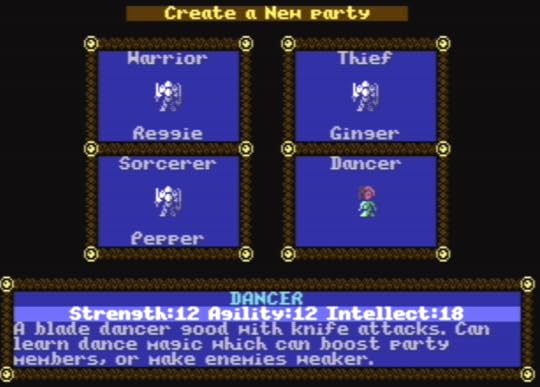
At the moment I’m planning on having a party of 4 characters, but there is space for 5 if I decide to try that.
World View OutputAs for the game, I do have the basic view output system working, complete with terrain vision blocking. At the moment I don’t have any animating blocks, but I have an idea how to do that without hurting draw performance; just need to write a bit more code… Anyway, the world currently looks like this:
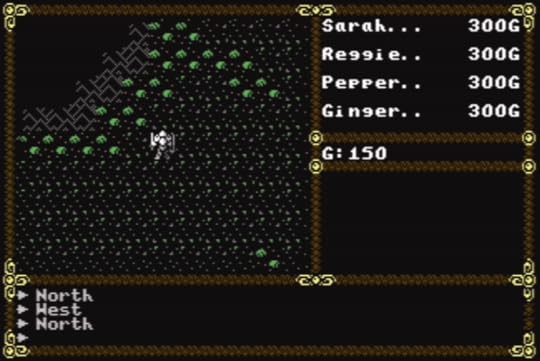
For towns, dungeons, and other places to visit, I’m using a 4K buffer in RAM (which gives me a maximum map size of 64×64 blocks). Maps are loaded into the buffer so the output code can use them; locations (like dungeons) that need multiple levels will just use a map per level.
For the world map, I now have a 256×256 image that’s stored on the cartridge as a 64K block of data; the beauty of cartridges is that the ROM is instant access, so to output where the party is standing, I just need to bank in a section of the world map, then copy it to the aforementioned map buffer. If memory becomes a problem later, I will investigate ways of compressing the world map (and I have a few simple ideas), but for now simple is best, and fastest.
View BlockingTo output the view, first a section of the map is copied from the map buffer to a view buffer; for my game this is 11×9 blocks. The next step is to do a scan of the view buffer to see what obstructions are there to block the view; it’s the same idea Ultima III used to block areas, but I didn’t look at the U3 code; back in the 80s after playing Ultima III quite a bit, I did want to code my own RPG and did work out a method of replicating the Ultima III system, but my game never progressed much beyond a tech demo…
My algorithm is quite simple and goes like this: start at one block above the centre and scan up towards the top; if the current block is a view blocking block, set the one above it to be blank (which is considered view blocking). Keep going until the top is reached. Repeat this for scanning downwards, then left and right.
For the rest of the buffer, scan the four corners using the following method: for the top-right corner, start at a position to the right of the centre, scanning across to the edge before moving up a block and repeating the scan; this time, whenever a view blocking block is found, set the block above and to the right to be blank. Repeat this for the other 3 corners to fully update the view buffer.
So, What’s Next?So next steps? Well, need to add code to load towns etc. so that the player can walk around them, plus add people to talk to, shops to purchase items from. For talking to people, my Briley games use a keyword system, so I’ll probably drag that code across and see how it works, as well as expanding the system; I want to have NPCs react to different player classes, so that a dancer in town will be excited to talk to a dancer in your party (and might even help you). I can also take the portrait system I used for Briley too, so talking to people will show you what they look like.
Once I have most of the technical aspects working, I’ll sit down and work out the storyline plus all the other parts that need designing, like what spells to use, what weapons and armour the game will have (including all those special magical items), what special abilities the various character classes have…
Oh, I do have a working title for the new game, but I’ll keep that to myself for the time being…
October 15, 2024
Back To Retro Coding… New Game
Well, due to a few changes in my life (new job), I took a bit of a break from coding retro games. But now I’m back!
So I’m starting a new project, and this time it’s something I’ve wanted to do for a long time, since the 80s when I first got a C64 and played Ultima III. The new project is going to be a bit of an Ultima-style RPG, but with my own twist on things.
Fortunately, I have a bit of a head start with my existing C64 tools, as well as several of my own codebases to choose from. To make an Ultima style game, I’ll need to make some changes to my C64 character/map editor so that it can cope with hires bitmap characters. Currently it does not, as it was primarily designed to do typical C64 games that use a multi-colour charset, with hires chars used for text etc.
I decided to use hires bitmap mode, as that’s what Ultima III used. Hires bitmaps on the C64 can use any two colours per 8×8, so I won’t be restricted to using one colour per 16×16 block like Ultima III, so I should be able to have some pretty decent graphics.
The game will have a party of 4 characters that can be specified and named by the player, much like Final Fantasy 1. I’m going to not use character levels, but use the system from Briley where stats progress as experience rises as I liked that system.
The game will use an EasyFlash cartridge format as that’s what I’ve been using and it allows me to have a 64k save area, with up to 960k for the game.
I’m looking at a world map that’s 256×256 blocks, but with the option of possibly having another like sized continent across the sea…
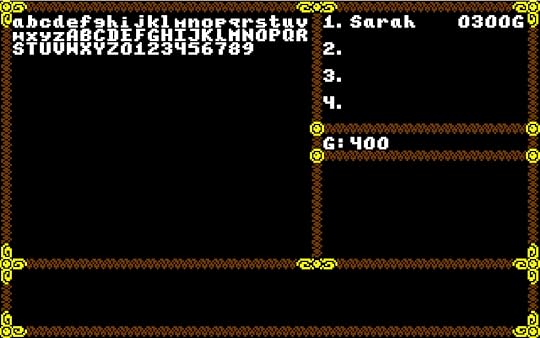
Anyway, here’s a quick panel and font:
January 26, 2022
Briley Witch 2 RPG Diary – 26/01/2022
So how are thing going on Briley 2? Well, quite well I would say.
It helped to have all the novels written, as I can pull most of the dialogue from them. On the first game I stripped back the dialogue quite a bit due to worries about cartridge space; the game was originally planned to fit on a 512K cartridge, but I switched to using 1Mb EasyFlash format so I could add in all that I wanted, extra portraits, more sprites etc. Since the new game is designed for EasyFlash from the start, right now space worries are not a problem. The other point to note is that due to changes to the original text, some typos crept in that weren’t in the original books. I’m hoping to rectify that on the new game by double-checking all the text as is goes in, and triple-checking any text that gets added; better to take time and fix it now, than to get some player to spot it after release.
3 Books, 3 PartsThe new game will be in 3 distinct parts, following the 3 novels it is based upon, those being The Fallen Witch, Grey Waters, and Grimoire Citadel.
I’m currently working on the first part, and already I’ve added a new location (The Maepole Cemetery) and reworked the East End of Maepole village. You see, a festival is coming, so that will involve adding stalls the player can interact with, some containing shops, others containing new mini-games.
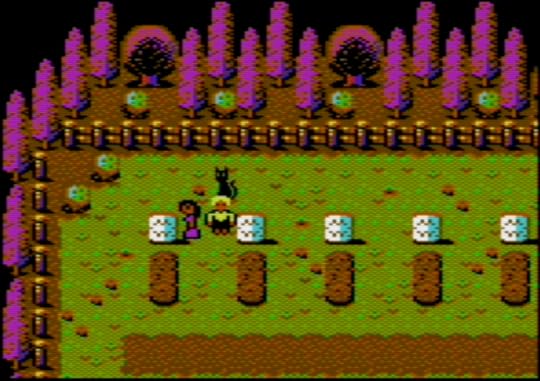 Maepole cemetery, a new location in Briley 2
Some locations from the first game will be altered a little, while others will be dropped completely as they won’t be needed. Briley 2 has a larger world map, so there will be plenty of new locations to visit and explore, including new towns and villages, and various ruins.
Balance is The KeyI’ve decided to not try to load saved games from the first game, as that would cause too many issues in terms of items and general progression; instead, I’ll be setting all the characters EXP to a set default so I can control and balance game progression better.
As with the first game, I will be adding new locations and minor quests that are not in the books, just to add more gameplay. That way I can balance out the whole game as I did with Briley 1; there needs to be a balance between story telling, combat, exploration and problem solving. Part 1 is a challenge to make a good enough game as Briley Witch book 5 takes place in just the village of Maepole. For the game, I’ll be adding outside locations nearby to give the player a chance to do a bit of exploring.
Partying!One difference between this game and the first will be the way parties are handled. The first game focused on Briley, but the new game will switch between different groups as the story unfolds. At one point Smokey will be the lead character, another time Alyssa or Branwen. This will mean I’ll have to keep track on what group owns what items, so that should be interesting…
So that’s all for now! My current plan is to complete part 1 before giving it a playthrough to see how it feels. Right now most of the dialogue has been copied straight from the novels, so I’ll take a look at that and see if it needs trimming down a bit.
November 8, 2021
Briley Witch 2 RPG Diary – 08/11/2021
So I finally completed and released Briley Witch Chronicles, the game! You can get it here.
The game has been well received so far, exceeding my expectations and hopes, so it only feels right to go ahead with my plans and make the sequel.
Since the 1st game followed the plot of my first four Briley Witch novels, it won’t come as a surprise when I state that the next game will also follow my novels, this time covering books 5-7. The books are: The Fallen Witch, Grey Waters, and Grimoire Citadel. This works out really well as those 3 books comprise a story arch. That still leaves 3 more novels, so I’m planning a Briley 3.
A sequel shouldn’t take as long to create as the 1st game; that one took roughly 2 and a half years, but that time did include build all the tools I needed, including coding a build system with a built-in 6502 macro assembler, character/map editor, sprite editor, bitmap editor, and a music/SFX editor. At the start I had planned the game to work from disk, but upon discovering large 512K cartridges existed and could work on practically any C64, it made sense to drop disk and opt for cart only.
So how to start coding the sequel? Well, by taking the first game and stripping out most of the data, specifically all the quests, and quite a few locations as well. I’m keeping the village of Maepole as that’s the central location in all the novels, the place Briley calls home.
Now, I could just reuse a lot of graphics as is, but my plan is to go over everything and see what can be improved. For one thing, the village itself will get a bit of a graphics makeover, as I can use extra character sets for different parts of the village, giving each area its own look. The first game was designed to fit on a 512K cartridge, but upon discovering the EasyFlash format, I switched over to that as that allows cartridges of up to 1Mb in size! For Briley, I reserved 256K for the save game area (I have my reasons, trust me), giving me an extra 256K over any other cartridge format (including gmod2). The larger EasyFlash cartridge also meant I didn’t need to compromise the game, which I had done for the 512K cartridge, so I created more sprites, and my friend Paolo added even more glorious portraits.
Briley 2 is being designed with a 768K EasyFlash cartridge image in mind, so I can start by boosting the village graphics. Here’s a quick example, old vs WIP new:
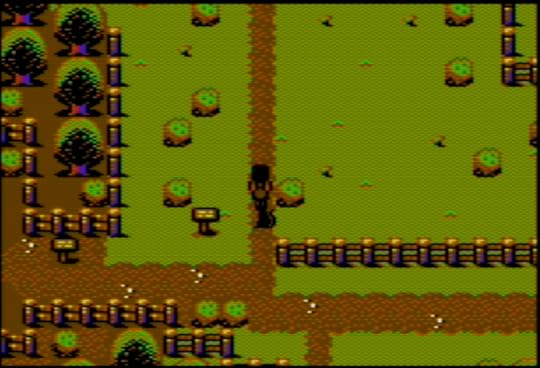
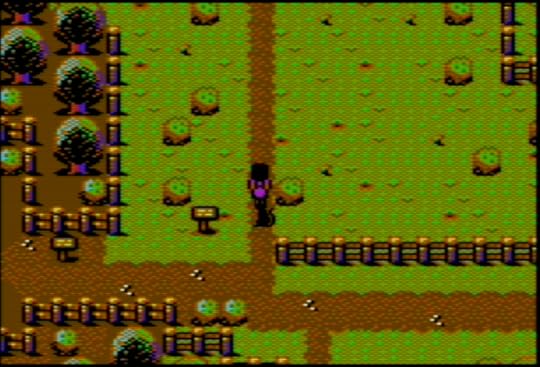
The idea is the village will still use the same layout, so players of the first game will feel right at home with the sequel.
Other changes to the game include a larger world map. As the sequel covers more area, there will be 3 world maps, the original, one covering the north, and one for the south. I won’t say what might lie there because… Spoilers!
I’m also listening to people’s comments from the first game, so expect some tweaks here and there to the menus etc, as well as more sub-games. Anything else, you can add to the comments below; I’ll consider all ideas, but can’t promise I’ll implement them all!
But this should be fun and exciting to work on! I’ve worked out the rough story flow for the whole game, and like the first one it will be story-driven, with lots of twists and turns, and with Briley landing in dire trouble… There will also be party switching at key moments, as there will be several story threads all running at the same time.
October 26, 2021
Briley Witch Chronicles is released!
Yes, finally released the game to the world.
October 18, 2021
Adventures in Amiga land part 1
A long time ago I owned a C64 and made lots of programs for it. And then the Amiga was released, but was far too expensive at first. Until Commodore released the A500; I bought one of those and had lots of happy moments coding for it…
Now the Amiga used a 68000 CPU, a 16/32bit beast compared to the 8bit 6510 CPU in a C64. I can still remember purchasing a 68000 book and the excitement of discovering not only a multiply instruction, but also a divide! And like most coders at the time, used those to produce a 3D starfield…
So I learned all about bit-planes and Blitters and Copper lists, and a host of other new things the Amiga had. I got into 3D graphics, and had a 3D engine running before I started working at Core Design.
My first Amiga game for Core was a 3D helicopter flight-sim called Thunderhawk. That was followed by Jaguar XJ-220, a sprite based racing game. Now, not a lot of people know that Jaguar started out as a polygon-based game, but I wasn’t happy with it; instead, a sprite-based game was pitched, and the rest is now history.
When the Mega-CD came along, I switched from the Amiga to Mega-CD, never to return…
…until now. Now I have the freedom to do whatever I want, to work on whatever I want, so I think I might give the Amiga another go.
Going Back To the Amiga.Okay, so I’ve been thinking about doing this for a while, and I think I might just create a few Amiga games.
It sure felt a bit daunting at first; after all, it’s been a long time since I touched an Amiga, and I’m really rusty! First thing needed was a 68000 assembler, but that wasn’t a problem; my build system has a 68000 assembler built in, one I coded to investigate creating some Megadrive games.
How To Run Some CodeBut the Amiga is disk based, so I needed a way to get some code running on it. The Amiga uses an ADF file, which is simply an image of a disk. The Amiga used double-sided 80 track 3.5″ disks, each track having 11x512K sectors. That gives a total capacity of 880K. My current emulator of choice is WinUAE, and that seems pretty good. Using disk images is easy, so no problem there.
Only problem is getting code into an ADF file to run on the emulator. I did look up the Amiga EXE file format, with a view to updating my build system to generate those. Amiga EXE files are relocatable, so writing that format involves constructing a specially formatted file. Not ideal, but workable.
Still had the problem of getting the EXE into an ADF file. Well, there are tools available for updating ADF files, but it all seemed tedious to be honest. Besides, I love to go straight to the hardware, and remembered back in the day my Amiga games did just that.
Boot-Blocks For The Win!The trick (if it can be called that) is to use the boot-block. The Amiga boot-block occupies the first 1K of a disk, and if formatted correctly, contains code that can auto-boot the disk. Booting a game this way gives you full control over the machine, much to my liking.
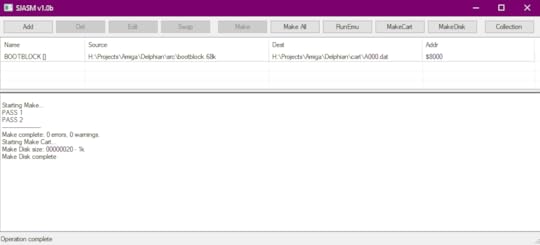
So I’ve updated my build system to assemble a boot-block file, check sum it, and generate an ADF file that can be run on the emulator. Didn’t forget that to generate the checksum, had to consider that the 68000 is big-endian, whereas an Intel based CPU is little-endian.
For example, on the 68000, the 4 byte longword $11223344 is stored like this:
11 22 33 44
But an Intel CPU stores it this way:
44 33 22 11
So right now, I just have the ability to assemble a boot-block and create an ADF file:
Next step is to code a disk loading system. That shouldn’t be too hard as I’ve already done it once, although a long time ago; I’ve gathered up all the information I need to create this.
I Did It Once…One thing I have done is take Thunderhawk and run that on the emulator, breaking into the debug monitor so I could examine memory and disassemble the code. I can reverse engineer quite a lot, which will help me. The Thunderhawk code has disk loading code, keyboard reader, mouse reader, as well as some other bits and pieces, so I can take what I need; after all, I did write the code in the first place!
So that’s it for part 1. Hopefully next time I’ll have a disk loader working.
September 25, 2020
Zeta Wing has been Released!
Yes, I’ve released Zeta Wing, my latest C64 vertical SHMUP, to the world!
It’s available for download here: https://sarahjaneavory.itch.io/zeta-wing
September 20, 2020
Briley Witch RPG Diary – 20/09/2020
Been a while since I did a diary update, so it’s about time for one.
SHMUPS
Recently, I’ve been coding a few SHMUPs for a little break. First came Neutron, a 16k cartridge entry for a competition.
Then came Soul Force, a side scrolling SHMUP very much inspired by ThunderForce IV, a game I used to love to play. Soul Force did kind of grow into a monster of a game, featuring 20 different stages each with bosses and loads of enemies, plus tons of music to compose. Took far longer that I first thought, but the end result is something I’m really proud of.
And next came Zeta Wing, a vertical SHMUP inspired by the old arcade game Gemini Wing. Zeta Wing is all finished and will be released on September 25th, 2020.
Back To Briley!
But now I’m back to working on Briley! Latest changes have been to the player movement code. You see, when I started this project, the player could move anywhere by a pixel amount, which did cause me quite a few issues with background collision detection; I had some cases where there were narrow enough gaps for the player to get stuck, plus collision detection against sprite objects was a bit of a pain and had been largely ignored.
Plus, I had some character wobble when passing through narrow passageways 1 block high due to the way the background detection worked. To get around sharp corners, I had a system where if Briley walked left/right, any obstacles would “nudge” Briley either up or down to steer her around the corner. This works fine for avoiding bushes and posts, but not narrow passages, inducing a character wobble as the character is nudged up and down on alternating frames.
So I had a look at a few other of my favourite JRPGs on the Megadrive and noticed one thing they shared in common: all character movements were block based. What this means is when the player initiates a movement, the character will walk a full block width (16 pixels) before stopping.
Well, upon seeing this, I knew mine had to do the same. There are many advantages of this:
Background collision detection becomes block based so is not just easier, but way more efficient as the code only needs to check if a block is clear once a block move has completed (which is once every 16 pixels moved).It makes it much easier to interact with objects and people as the player is always lined up with the interaction target.There’s no “wobble” when traversing narrow passages.Player can’t get stuck by parts of the background.
As a result of this, it became trivial to add collision detection with people; before moving, the code just has to check if a person is standing in the destination block, and if so, block the movement.
The only downside to the new code is that most of the cutscenes will now need adjusting (and I have loads) as some of them leave the player at a non-block aligned position. Oh well, a small price to pay for a change that makes life so much easier…
Cartridge Space Issues
In the past I was concerned about remaining cartridge space as that was disappearing fast! After a little investigation, I discovered a problem with my ROM file packer. You see, ROM banks on a C64 cartridge are 8K in size, so all my files have to be packed into 8K chunks.
But there was a problem where if all the files in an 8K bank added up to exactly 8K, an extra empty 8K bank was added to the cartridge, thus wasting precious space. After fixing that, I can now report 399K space used out of a maximum of 512K.
According to my game flow I’m currently working on day 19 of 25 (the game is divided up into “days”), so there should be enough space for the rest of the game. I still have more maps and sub-quests to add, so I still need to keep an eye on space, but I’m confident it will all fit. Besides, I can always do another text pass and cut down some of the longer cutscenes to something a little bit more concise.
Okay, back to the game…


