
New RPG update – 21/10/2024
Been making some good progress on my new RPG, so here’s what’s been done so far…
Codebases and Code ReuseFor starters, I’ve been able to utilise some of my existing codebases to give me a good foundation; I decided to take the codebase from another WIP as that has plenty of support for hires bitmap screens (which is what I needed). Input code, file loading (including decompression), bitmap unpacking, hires character plotting were all there, along with cartridge boot code for an EasyFlash cartridge image.
The code from my latest music player I took from Briley 2, as well as the scripting system (well, actually all my games use a version of it as it’s so flexible), experience and character progression system. Also took the window system too, but had to modify it a bit to work with hires screens; turned out not to be as bad as I feared, so most of it is now working.
I have a new proportional font output system that turned out to be way faster than I was expecting, given that it has to plot every character not on a nice 8 pixel boundary, but any pixel position; this means it has to shift every character it outputs, but I added some code to deal with each pixel position (for example, a pixel shift of 0 doesn’t need shifting at all), so it’s fast enough (for me at least). The new code also handles word wrapping, and can wrap text in any sized window (which I’m sure will come in handy later).
Since I have and use my own custom build system, building a cartridge image is beyond easy; I have a “Make All” button as part of my SJStudio program, and it does exactly what it says: assembles all code, builds any data that’s needed, auto-packs files it into 8K banks for the cartridge image, creates a cart directory and auto-outputs a header file for the code, and writes it all out into a binary file ready to be converted to a .crt cartridge image file by the cartconv.exe utility that comes with VICE.
Party CreationI’ve started work on the party creation screen, inspired by the one on Final Fantasy 1. Mine currently looks like this:
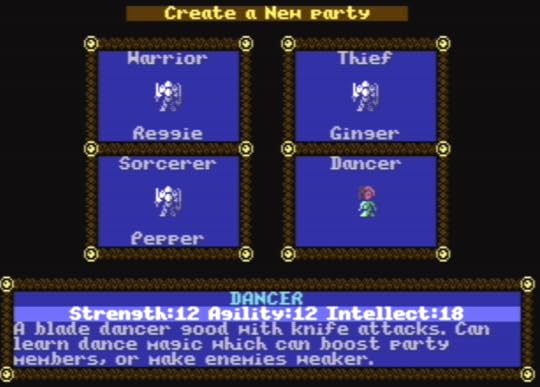
At the moment I’m planning on having a party of 4 characters, but there is space for 5 if I decide to try that.
World View OutputAs for the game, I do have the basic view output system working, complete with terrain vision blocking. At the moment I don’t have any animating blocks, but I have an idea how to do that without hurting draw performance; just need to write a bit more code… Anyway, the world currently looks like this:
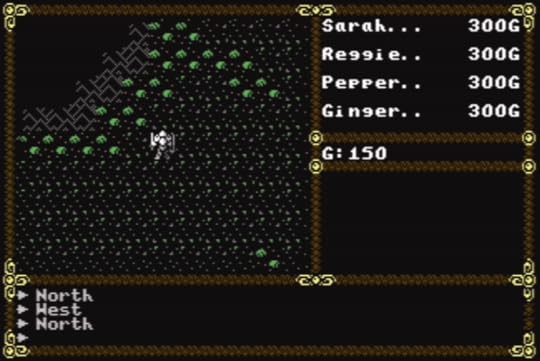
For towns, dungeons, and other places to visit, I’m using a 4K buffer in RAM (which gives me a maximum map size of 64×64 blocks). Maps are loaded into the buffer so the output code can use them; locations (like dungeons) that need multiple levels will just use a map per level.
For the world map, I now have a 256×256 image that’s stored on the cartridge as a 64K block of data; the beauty of cartridges is that the ROM is instant access, so to output where the party is standing, I just need to bank in a section of the world map, then copy it to the aforementioned map buffer. If memory becomes a problem later, I will investigate ways of compressing the world map (and I have a few simple ideas), but for now simple is best, and fastest.
View BlockingTo output the view, first a section of the map is copied from the map buffer to a view buffer; for my game this is 11×9 blocks. The next step is to do a scan of the view buffer to see what obstructions are there to block the view; it’s the same idea Ultima III used to block areas, but I didn’t look at the U3 code; back in the 80s after playing Ultima III quite a bit, I did want to code my own RPG and did work out a method of replicating the Ultima III system, but my game never progressed much beyond a tech demo…
My algorithm is quite simple and goes like this: start at one block above the centre and scan up towards the top; if the current block is a view blocking block, set the one above it to be blank (which is considered view blocking). Keep going until the top is reached. Repeat this for scanning downwards, then left and right.
For the rest of the buffer, scan the four corners using the following method: for the top-right corner, start at a position to the right of the centre, scanning across to the edge before moving up a block and repeating the scan; this time, whenever a view blocking block is found, set the block above and to the right to be blank. Repeat this for the other 3 corners to fully update the view buffer.
So, What’s Next?So next steps? Well, need to add code to load towns etc. so that the player can walk around them, plus add people to talk to, shops to purchase items from. For talking to people, my Briley games use a keyword system, so I’ll probably drag that code across and see how it works, as well as expanding the system; I want to have NPCs react to different player classes, so that a dancer in town will be excited to talk to a dancer in your party (and might even help you). I can also take the portrait system I used for Briley too, so talking to people will show you what they look like.
Once I have most of the technical aspects working, I’ll sit down and work out the storyline plus all the other parts that need designing, like what spells to use, what weapons and armour the game will have (including all those special magical items), what special abilities the various character classes have…
Oh, I do have a working title for the new game, but I’ll keep that to myself for the time being…


