
Windows 10 enable Hyper-V hypervisor option grayed out. Tool tip says the processor does not meet requirements.
So I paved WOPR1 tonight, and applied a preview build of 10 from MSDN and couldn’t enable Hyper-V. I had been running it on the previous install and had not changed any BIOS settings so I knew something was afoot…it looked like the image below.
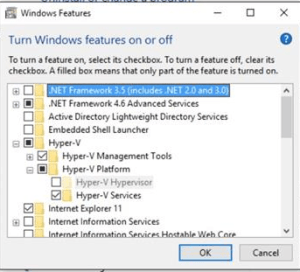
No Hyper-V for U!
Systeminfo reported that my system was already running a hyper-visor and therefore Hyper-v couldn’t be installed…

Which wasn’t true. It was grayed out. And I don’t run VMware. Or anything else. So malware, what?!
Searching the internet did not help much, lots of people trying to run a hyper-visor in a hyper-visor…ok…
So, I turned to PowerShell and this page,
Enable-WindowsOptionalFeature -Online -FeatureName Microsoft-Hyper-V -All
Now I’m good. Restarted my system, and when it booted it started the preparing feature % count and rebooted a couple more times and then I had Hyper-V enabled.
Yay. Hope it helps,
jeff


