
Jeff Stokes's Blog
July 28, 2016
Get hands-on with IoT technologies at the Microsoft Data Science Summit!
There’s a new opportunity for IoT specialists, data scientists, and big data engineers happening right alongside Microsoft Ignite in Atlanta this fall.
When and what?
On September 26–27, the Microsoft Data Science Summit will host an interactive event on the disruptive technologies and innovative solutions in big data, machine learning, and the Internet of Things.
It’s an intensive two days with:
• IoT-related classes including Unlocking Real-Time Predictive Insights from the Internet of Things and Creating a Predictive Maintenance Solution
• Hands-on labs with Cortana Intelligence Suite, Microsoft R Server, and open-source technologies
• Real code, real products, and real-world examples
• Keynotes and talks from industry visionaries and top Microsoft experts
• Incredible demos
• Relaxed opportunities to connect with peers and Microsoft product experts
See what’s possible in big data, analytics, and AI now.
So if you’re an IoT specialist, data scientist, big data engineer, or IT pro who wants insights into the latest big data, machine learning, and open-source technologies, join us. We’ll have three in-depth tracks so you can get the knowledge and hands-on experience you want for your business: Advanced Analytics, Big Data, and Solutions. Take a look at all three tracks to find the best match for your needs.
Register soon. September 26–27 is approaching fast. We look forward to talking data with you in Atlanta!



May 4, 2016
Windows 10 enable Hyper-V hypervisor option grayed out. Tool tip says the processor does not meet requirements.
So I paved WOPR1 tonight, and applied a preview build of 10 from MSDN and couldn’t enable Hyper-V. I had been running it on the previous install and had not changed any BIOS settings so I knew something was afoot…it looked like the image below.
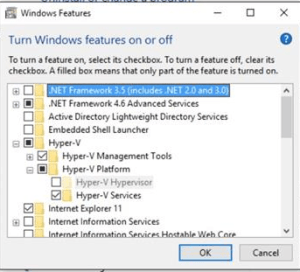
No Hyper-V for U!
Systeminfo reported that my system was already running a hyper-visor and therefore Hyper-v couldn’t be installed…

Which wasn’t true. It was grayed out. And I don’t run VMware. Or anything else. So malware, what?!
Searching the internet did not help much, lots of people trying to run a hyper-visor in a hyper-visor…ok…
So, I turned to PowerShell and this page,
Enable-WindowsOptionalFeature -Online -FeatureName Microsoft-Hyper-V -All
Now I’m good. Restarted my system, and when it booted it started the preparing feature % count and rebooted a couple more times and then I had Hyper-V enabled.
Yay. Hope it helps,
jeff
April 29, 2016
How music fixed my head injury, cont’d
Previously I discussed how music fixed my head injury, after it posted and I re-read it, I realized I could have done something really cool with it that I didn’t take advantage of properly. I could have shared, things like, say, a playlist in Youtube of what I listened to, on a loop…
I can’t emphasize enough, I played the first track (Gorillaz – Don’t get lost in heaven + Demon Days) the most times looped. I have YouTube red so I can loop and do without ads in all my viewing. Your mileage may vary. The key for me seemed to be tracks that were hard for my mind to concentrate on. That I could get lost in, when I tried to pay attention to what they meant, or what the writer was trying to get across.
This might be influenced by personal taste? I don’t know.
Also, I am not a doctor. Nor a lawyer. Nor a doctors lawyer. So take my advice as friendly good advice and not legal/medical consultation.
April 11, 2016
Recovering from a concussion (TBI) with music
This has little to do with Big Data (or anything IT related for that matter) but I’m writing it anyway in the hopes it helps someone somewhere recover.
History
I slipped and fell backwards on ice last February in Connecticut early one morning. I woke up on the pavement outside my apartment in teen degree weather a while later with a cracked skull. Ended up being taken to the hospital where I spent the night. Some internal bleeding and damage to Broca’s area (stuttering and some aphasia) were the diagnosis. In addition, I lost most of my sense of smell and taste. This was interesting; sometimes I’d eat food while on trips that turned out to be a lot more spicy than I could normally tolerate. I recall once eating some Indian dish that I didn’t know was spicy until I started sweating while eating it.
Friends I skyped regularly with (mainly people in technology, smart folks with solid careers, smart folks) kept in touch with me after I went dark mentally. One told me later “I was worried about you. After you fell you stopped completing sentences and were pretty incoherent.” Personally, looking back I feel like my IQ dropped about 50 points or so after the fall. I had no ideas, no original thoughts, I stuttered a lot when anxious or upset and I used to tell people, “Words feel slippery in my head. I can know them but not say them sometimes.” It was like part of me was in a jail cell inside my head. I used to forget things. Not like “where are my keys?” but more like taking the kids to school in the morning and saying “Hey kids, where are we going again?”
Fast forward a year later, I’m different. I’m better, functional in society, etc. BUT, I am different than I used to be. Some of my technical skills I relied on in my IT career are either a) gone or b) trapped somewhere in my head waiting on a neuron path to be wired to them.
How do I know this scientifically? I don’t. But I can feel it. Like tiny islands in my head, missing spots where ideas and thoughts and paths of information used to be, but aren’t anymore. At first the left side of my head was ‘quiet’. I used to tell my neurologist that my left side was silent. Like a void. My internal voice wasn’t in there anymore. Now it is to some degree. Better than nothing yay!
I used to meditate a LOT when I was young and have a fairly self-aware mind (I like to think anyway).
What does this have to do with music and brain injury?
Anyway my brain seemed to be flailing around trying to rewire and eventually I fell into a pattern of listening to tracks of music in a loop. I think I listened to some of them several hundred times. The music I centered on all had some interesting criteria in common.
1) I typically hadn’t heard of the artist or track before my injury
2) It was repetitive, predictable melodies and somewhat nonsensical lyrics. Tracks like World at Large, or Don’t get lost in Heaven as examples.
3) It made my left side of my head feel funny. Like there was fuzz in it. A cotton ball or something. A tickle. It still happens when I listen to these tracks weirdly. Dunno.
This seems, more than any other therapy or exercises, to be the root cause of improvement.
I mentioned this to a good friend, a long time friend of mine, and she made a couple comments to me that seem to back this concept up:
Things like Gabrielle Gifford using music to rewire or this book called Musicophilia, to name a few. A simple search also showed a pretty interesting Psychcentral article on the topic.
So how are you different, exactly?
For people who don’t know me this is probably a question worth answering, so here goes.
Before:
Public speaker on Technology (performance, reliability, deployment of Windows)
Top-shelf technical engineer
Smart/creative do-er person
After:
Technical writer on cloud technologies
Slower to jump the gun
More a ‘how to guide someone’ than a ‘lead the way’ person now
If this still doesn’t summarize it well for you, Google or Bing can show you what I was like. What I do now vs what I did then is nearly a polar opposite from my perspective.
Also, my interests have changed some. My wife may disagree, but I’m more likely to think of the impact of things I say now. Before I had no problem saying it how I saw it and letting the dice roll from there. Now it’s more a ‘what is the impact of me saying or doing this’ before I jump the gun.
So maybe more introspective. Some might say, a little more slow. A little less likely to be bold. Different, you see?
So why did you write this?
To help others. There’s hope if you have a brain injury. Or know someone who has one. Try music, even if it’s ‘not their thing’. It might save their mind. Never know.
Peace. (continued)
January 25, 2016
Parenting in the digital age, lessons learned – part 1

Internet Street – Is it like walking down Bourbon Street and all library aisles at the same time?
What could go wrong?
So being a bit of a data head/IT pro-ish guy here, I naively looked forward to the time when my children would become digital citizens and join the online community of the world. I figured “Hey, it’s the internet, nearly all the combined knowledge of humanity is there for them to learn and question and grow from. What could go wrong.”
Well, turns out, quite a bit. Try filtering inappropriate videos on YouTube from a 9 year old’s eyes while still making sure he can get access to everything he wants to access. But then only things that are appropriate for his age…Or try making sure extreme vulgarity doesn’t get shared with your 11 year old daughter on a Mine Craft server.
Now one can say “Hey this is a helicopter parenting problem, not a technical one” and you might be right. That is a legitimate argument. However, it doesn’t absolve my responsibility as a parent to try to provide a good, nurturing, but non-claustrophobic learning environment for my child either. So naturally I turned to the internet to find answers…
To find what I wanted though, I had to have a concise problem statement. If I didn’t, I’d never get a good answer to my problem. So what’s the problem?
The problem is, in essence, to control what information reaches the nodes on my network. So I need a web proxy filter agent. With reporting. And preventing malware from executing, and greyware/ransomware as well. And if something does happen, I need backups so I can restore school work. And auditing would be nice, reporting. And some help educating my users, er, children, to have better browser habits is in order too.
So I need something like say, BlueCoat + Applocker + AntiVirus + System Restore/Enterprise grade backup/restore. Did I mention I wanted it for free? Because #children, I guess.
So now that we’ve named the demon, so to speak, how do we get what we need here?
Note this article assumes you are running Windows 10 for your operating system. It is the first part of a series I am doing on parenting IT style.
The primary and perhaps most complex issue is safe browsing.
The ‘thing’ itself is ambiguous. What is good to some is not good to others as we all know. So how do we ‘lock it down’ to protect the children from the world at large? The short answer is, we don’t. We can try, don’t get me wrong. We can make an honest effort to filter some obnoxious and static content sure.
Microsoft Family Safety is a good starting point

Microsoft Family Safety is a good first step in the multi-layered defense we need to build for our user base. It actually solves a few of the issues we’ve named, but safe browsing, reporting, control of screen time, and what they can launch by ESRB is all handled to some extent. And unlike Windows 8, Family Safety is tightly integrated into Windows 10. Mixing this with a locked down non-administrative rights account and you have a pretty good starting point.
Notice one thing with Microsoft Family Safety though, the web filtering only works on Microsoft Edge or Internet Explorer. Users of Firefox or Google Chrome can circumvent some of the native controls here. So…queue the next line of defense!
OpenDNS is our next step at filtering web traffic
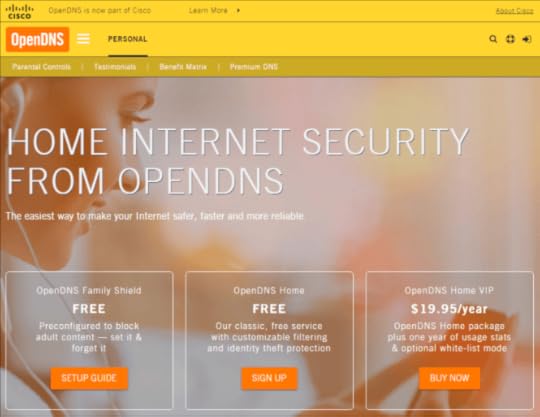
Instructions on how to configure your router and/or machine configuration to query all your name to address lookup queries with OpenDNS are pretty easy to follow. Once your system(s) are using OpenDNS services you’ve gone a long long way towards protecting/filtering content. The handy part here is it also helps protect our devices not running Windows 10. Lastly, it meets our pricing bar of ‘free’ for some pretty comprehensive functionality.
In addition to this. Some IOT devices (doorbells, baby monitors, smoke detectors, etc) are smart now. This poses a lot of security problems. It *may* make sense to block these from leaving your network via your firewall/router for the time being. It used to be as simple as configuring them with a static IP address and then not giving them a default gateway. Maybe that makes sense. Or just putting them on a different network. Something other than just fire and forget perhaps.
Mobile network filtering
For home browsing these solutions all work in tandem to protect the user from themselves. But what about when the user is on a tablet outside your zone of control?
A browser dedicated to security and filtering is probably needed. Mobicip and Dashlane both provide their own browsers (Dashlane is for password sync/storage/generation, Mobicip straight out filtering). Investigating a ‘right for you’ product in this space is really key. Every time the user is on a device outside your network and connected to the internet, issues can occur. So nip it in the bud with this strategy. Also once the devices have cellular service they are always on and browsing may not be using your network’s configuration at all.
The real solution
Not surprisingly, after having the snapchat talk with my 11yo this weekend, my wife and I discussed for some time over Skype and I came to the realization that the real fix is to train the user (my kids). If I cannot trust them to use the devices responsibly and have good ethics, make good choices, then take the device(s) away. The fix is to empower them down the path of being confident, understanding the technical/social aspects of their decisions and helping them. Not caging them in, which is the first reaction I had. I wanted to protect my kids from the web (and the world). But what I really want to protect them from, it seems, is the short and long term consequences of their own actions.
:/
Next post coming
The next post is going to cover some aspects of data recovery, OneDrive, why Office365 is a huge win for a family. I might even get into how I stood up a Minecraft server for the kids. And then had to make one for each because #siblingrivalry.
Till next time,
Jeff
January 1, 2016
#DataWest16 Big Data Innovation Summit
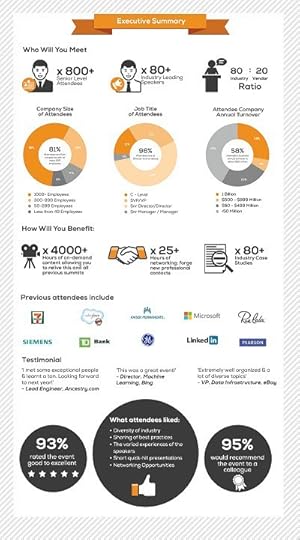
The Big Data Innovation Summit is returning to San Francisco on April 21 & 22, at the exclusive Marriot Marquis Hotel!
The schedule is starting to finalize now, day one is announced now.
Some pretty distinguished speakers are listed as well so should be a good use of time/money.
Check out their infographic they put together.
Cheers!
Jeff
July 14, 2015
January 12, 2015
WMI Unleashed!
My buddy Carl wrote a simple, but amazing powershell script to make WMI more Enterprise-friendly. What does that mean? It means that WMI may not start soon enough for some Enterprise engines such as SCCM or GPO or other tools that query WMI. Especially as we consider the logon/boot experience.
So Carl engineered this little script:
1
2
3
4
5
6
7
$oWMI=get-wmiobject -Namespace root -Class __ProviderHostQuotaConfiguration
$oWMI.MemoryPerHost=768*1024*1024
$oWMI.MemoryAllHosts=2048*1024*1024
$oWMI.put()
Set-ItemProperty -Path HKLM:\SYSTEM\CurrentControlSet\Services\Winmgmt -Name 'Group' -Value 'COM Infrastructure'
winmgmt /standalonehost
This script increases the memory allocated for the WMI engine and breaks WMI into its own SVCHOST (something support has often recommended for some time) as well as change the ordering so WMI starts a bit early.
Read all about it here!
And for more primer information on why the settings do what they do, you might want to check out this post.
December 9, 2014
Enterprise SMB Performance Reg tweak
Edit: Fixed DL link for 2012 R2 doc. Also repaired missing image.
In today’s blog post, I highlight some registry settings that, in my opinion, should probably be the default configuration when Windows Enterprise Edition is installed
(along with power plan changes, and other things). Because in most managed enterprise environments, client endpoints can benefit from them.
But I suppose that’s a provocative stance for some. But the settings are all taken from the Windows Performance Tuning Guide for 2008R2 and 2012 and 2012 R2, however most folks are too busy and/or understaffed to read and properly tweak their settings. It works ‘ok’ out of the box, so leave it that way right?
Wrong! Tweak, optimize, make that OS purr like a kitten, rumble like a muscle car!
The key settings are as follows (and apply to Windows 7 and above)
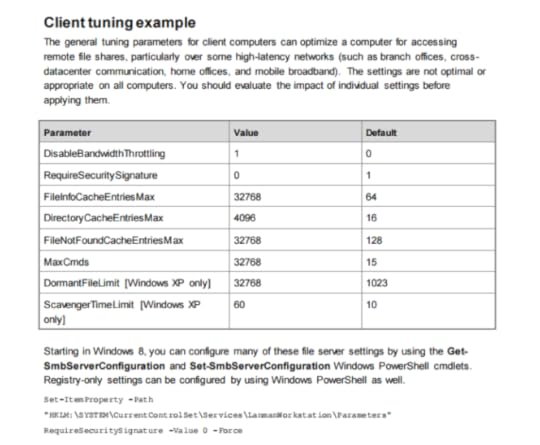
These settings have been documented as far back as the Windows Server 2008 R2 Performance Tuning Guide. So again, why they aren’t set as defaults for Enterprise Edition installs out of box is probably worth asking. But lets make them a default with the following reg keys. (select the following text and save it as a .reg, then apply as you like (reboot needed to take effect of course).
Windows Registry Editor Version 5.00
[HKEY_LOCAL_MACHINESYSTEMCurrentControlSetServicesLanmanWorkstationParameters]
“DisableBandwidthThrottling”=dword:00000001
“DisableLargeMtu”=dword:00000000
“FileInfoCacheEntriesMax”=dword:00008000
“DirectoryCacheEntriesMax”=dword:00001000
“FileNotFoundcacheEntriesMax”=dword:00008000
“MaxCmds”=dword:00008000
[HKEY_LOCAL_MACHINESYSTEMCurrentControlSetServicesTcpipParameters]
“EnableWsd”=dword:00000000
So what do these do? Glad you asked! All these are direct quotes from the tuning guides linked above:
DisableBandwidthThrottling The default is 0. By default, the SMB redirector throttles throughput across high-latency network connections, in some cases to avoid network-related timeouts. Setting this registry value to 1 disables this throttling, enabling higher file transfer throughput over high-latency network connections.
DisableLargeMtu The default is 0 for Windows 8 only. In Windows 8, the SMB redirector transfers payloads as large as 1 MB per request, which can improve file transfer speed. Setting this registry value to 1 limits the request size to 64 KB. You should evaluate the impact of this setting before applying it.
FileInfoCacheEntriesMax The default is 64, with a valid range of 1 to 65536. This value is used to determine the amount of file metadata that can be cached by the client. Increasing the value can reduce network traffic and increase performance when a large number of files are accessed.
DirectoryCacheEntriesMax The default is 16, with a valid range of 1 to 4096. This value is used to determine the amount of directory information that can be cached by the client. Increasing the value can reduce network traffic and increase performance when large directories are accessed.
FileNotFoundCacheEntriesMax The default is 128, with a valid range of 1 to 65536. This value is used to determine the amount of file name information that can be cached by the client. Increasing the value can reduce network traffic and increase performance when a large number of file names are accessed.
MaxCmds The default is 15. This parameter limits the number of outstanding requests on a session. Increasing the value can use more memory, but it can improve performance by enabling a deeper request pipeline. Increasing the value in conjunction with MaxMpxCt can also eliminate errors that are encountered due to large numbers of outstanding long-term file requests, such as FindFirstChangeNotification calls. This parameter does not affect connections with SMB 2.0 servers.
Did you apply these? Did you do some testing before and after? What are your thoughts? Leave a comment, I’d love to hear from you here or on twitter.
June 26, 2014
How to use PAL to properly collect and analyze Performance Data
Perhaps you’ve heard of PAL (Performance Analysis of Logs) by Clint Huffman. Or maybe not? Or maybe you have used parts of it but are unsure of how to fully utilize this awesome tool? Look no further, the Dude is here to set things right…
First, download PAL and install it. (http://pal.codeplex.com/). Once that is sorted, proceed…
Now we’re in the fun stuff. Lets say, for example, you have a server that gets cranky on you the longer its online. One time you had to skip a patch Tuesday by a week and that ended with a SEV-A for your company because the server crashed even. To properly collect data and find root cause, you would do the following (we’ll use the example of a SQL 2005 Server here for fun):
Open PAL and go to the “Threshold File” tab. Chances are you run SCOM 2007 or newer or even a third party tool to monitor, but are you collecting what you really need for root cause here? Do you know? If you had the data in a database with this monitoring tool, do you know how to pull it out in a format that is productive to finding root cause? Maybe not, PAL to the rescue.
We’re going to change our drop down for “Threshold file title” to SQL 2005:
[image error]
So instead, it looks like this:
[image error]
And then, we’re going to Export this, using the button directly below the drop down. Depending on Operating System we are on, we need the export in either HTM or XML format. I’ll pick XML here since most of us are on 2008 Server or higher, but same concepts apply to 2003 SP2 and XP.
[image error]
And then, we move this XML file to our Server, and import it as a Data Collector Set template.
[image error]
From here it is a simple process of browsing (by clicking Browse on the next screen) and picking your template XML file and then clicking Next a bit and setting timings (I’d generally recommend 5 second intervals, but 1 second would be more appropriate for disk latency, and maybe 15 seconds for just memory leaks).
[image error]
Now we have a Data Collector Set in the User Defined Area, but we don’t have it running yet:
[image error]
Double Click the Data Collector Set and change the Sample Interval to what you like. Do not be lead into temptation and change the format off BLG. CSV is smaller, yes, but it does not record new PIDs in its collection once it starts, so if a process stops and restarts for example, you won’t see the new PID.
[image error]
Then right click and select properties on the Data Collector of Doom on the left pane, and do yourself a favor. Click on Stop Condition and change it to a maximum file size of 200 MB. Then check the box “Restart the data collector set at limits.” so it will create rolling 200 MB files. Perfmon isn’t made to open large (over 250 or so MB) files, so this aids in manual analysis. It also helps pinpoint outages to specific time frames in the BLG file.
[image error]
Then we can click OK to close out this window and right click “start” our Data Collector Set. Now we reproduce the problem and we have data to analyze. I’ll cover that in the next blog post, including some ideas on how to use PAL to populate web farms or SQL backends with appropriate data sets.


