
Enterprise SMB Performance Reg tweak
Edit: Fixed DL link for 2012 R2 doc. Also repaired missing image.
In today’s blog post, I highlight some registry settings that, in my opinion, should probably be the default configuration when Windows Enterprise Edition is installed
(along with power plan changes, and other things). Because in most managed enterprise environments, client endpoints can benefit from them.
But I suppose that’s a provocative stance for some. But the settings are all taken from the Windows Performance Tuning Guide for 2008R2 and 2012 and 2012 R2, however most folks are too busy and/or understaffed to read and properly tweak their settings. It works ‘ok’ out of the box, so leave it that way right?
Wrong! Tweak, optimize, make that OS purr like a kitten, rumble like a muscle car!
The key settings are as follows (and apply to Windows 7 and above)
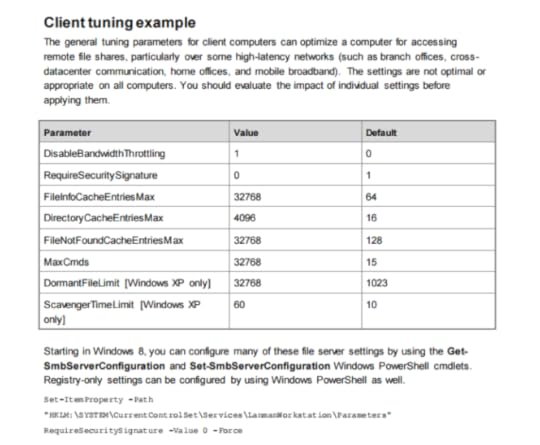
These settings have been documented as far back as the Windows Server 2008 R2 Performance Tuning Guide. So again, why they aren’t set as defaults for Enterprise Edition installs out of box is probably worth asking. But lets make them a default with the following reg keys. (select the following text and save it as a .reg, then apply as you like (reboot needed to take effect of course).
Windows Registry Editor Version 5.00
[HKEY_LOCAL_MACHINESYSTEMCurrentControlSetServicesLanmanWorkstationParameters]
“DisableBandwidthThrottling”=dword:00000001
“DisableLargeMtu”=dword:00000000
“FileInfoCacheEntriesMax”=dword:00008000
“DirectoryCacheEntriesMax”=dword:00001000
“FileNotFoundcacheEntriesMax”=dword:00008000
“MaxCmds”=dword:00008000
[HKEY_LOCAL_MACHINESYSTEMCurrentControlSetServicesTcpipParameters]
“EnableWsd”=dword:00000000
So what do these do? Glad you asked! All these are direct quotes from the tuning guides linked above:
DisableBandwidthThrottling The default is 0. By default, the SMB redirector throttles throughput across high-latency network connections, in some cases to avoid network-related timeouts. Setting this registry value to 1 disables this throttling, enabling higher file transfer throughput over high-latency network connections.
DisableLargeMtu The default is 0 for Windows 8 only. In Windows 8, the SMB redirector transfers payloads as large as 1 MB per request, which can improve file transfer speed. Setting this registry value to 1 limits the request size to 64 KB. You should evaluate the impact of this setting before applying it.
FileInfoCacheEntriesMax The default is 64, with a valid range of 1 to 65536. This value is used to determine the amount of file metadata that can be cached by the client. Increasing the value can reduce network traffic and increase performance when a large number of files are accessed.
DirectoryCacheEntriesMax The default is 16, with a valid range of 1 to 4096. This value is used to determine the amount of directory information that can be cached by the client. Increasing the value can reduce network traffic and increase performance when large directories are accessed.
FileNotFoundCacheEntriesMax The default is 128, with a valid range of 1 to 65536. This value is used to determine the amount of file name information that can be cached by the client. Increasing the value can reduce network traffic and increase performance when a large number of file names are accessed.
MaxCmds The default is 15. This parameter limits the number of outstanding requests on a session. Increasing the value can use more memory, but it can improve performance by enabling a deeper request pipeline. Increasing the value in conjunction with MaxMpxCt can also eliminate errors that are encountered due to large numbers of outstanding long-term file requests, such as FindFirstChangeNotification calls. This parameter does not affect connections with SMB 2.0 servers.
Did you apply these? Did you do some testing before and after? What are your thoughts? Leave a comment, I’d love to hear from you here or on twitter.


