
Adventures with AI
It’s been a while since I posted anything, but that’s because I’ve been working on a story.
I finally got it done! Well, not done, done, but I know how it ends…maybe.
Now comes the hard part – book cover design. So far, designing a great book cover has not been my strength. I think of scenes and ideas I want to portray on my covers but quickly run into limitations based on models and lack of costumes and how much effort I’m willing to put into a book cover I’m likely to hate in a month.
Which leads us to my great idea for this month, and the purpose of this article…AI. Recently I’ve been seeing beautiful pictures of characters on Facebook book ads which are generally not what’s actually on the cover. They could be though. That’s why, despite my artistic teenage daughter’s protest, I decided to give AI a try. This article is a quick summary of my adventure.
Finding an AI GeneratorFirst, I googled “AI art Generator” and played with some of the things that popped up like Crayion and Imagine AI Art Generator. They say they’re free, but only for a few images.
After playing with Img2Go for a while, I looked up more about AI art descriptors and making images. There are many articles out there, but the one I read [https://www.fiverr.com/resources/guides/graphic-design/5-ai-art-ideas] had a lot of useful tips and pictures and lists of different styles, color schemes, etc. The article listed some AI generators but I wasn’t completely clear on how to use of them, for example, I think DreamWeaver was the one who told me to get a Distiller account, but once I was there, I wasn’t sure what to do. Yuck. I just wanted a browser with a place to type in my descriptor.
After more searching, I found OpenArt and eventually Playground. Img2Go, OpenArt, and Playground all have a place to type in a prompt and choose how many images to create and what filters to use. I decided to try a bunch of different things using basically the same prompt and compare them. I liked Playground best, not only because the images were better (it automatically adds helpful descriptions to the prompt!), but you get 100 images free every 24 hours. Below are my prompts and some AI-generated pictures. If you see something you like, I might still have a copy and I can send it to you. Overall, AI got the sex, clothing, and hair-color/texture correct. It wasn’t great on emotion or poses. For some reason it decided I wanted close, close-ups of faces, but in the end, that’s okay, because I found 7 images I could use for my upcoming books.
My story is a Young Adult, contemporary fantasy that starts with the main character, who is 14, running for her life – thus my prompt.
Img2GoI started with Img2Go using the prompts below: The prompt #’s match the Try#s in the first figure.
Prompt 1: Close-up girl with curly brown hair, looking over her shoulder, scared, running. City background. Colorful. Results: it is a girl with brown curly hair and it’s definitely colorful and in the city, but she is not looking over her shoulder and not really scared.
Prompt 2: close-up girl with curly brown hair, big green eyes, 14, looking over her shoulder, scared, running away. Jeans, T-shirt, backpack. Colorful City background. Results: Girl looks younger and is dressed appropriately. Still facing forward and those eyes!!!
Prompt3: I changed green eyes to dark green eyes. Results: FINALLY, she’s looking over her shoulder in one picture. The other just gives me her back. This really wasn’t the style I was going for though.
Prompt 4: I added ‘Close-up’. RESULT: Running toward me again and this one has 3 legs! My daughter knowingly nodded when I pointed that out. Apparently it’s a common AI problem.
Prompt 5: I hit ‘Surprise Me’ and it made this prompt: “photorealistic an oriental female humanoid with freckle cheeks, cyber neon lightings, futurism, cyberpunk high fashion, elegant profile pose, intricate details, crispy quality, digital photography, trending in artstation, trending in pinterest, no watermark signature, cinematic, 4 k ultra hd, art by artgerm, art by greg rutkowski, art by pascal blanch”
That’s when I realized how lacking my prompts were and looked up the article I mentioned above.
Prompt 6: removed ‘Close-up’ and added ‘Hyperrealistic, ultrarealistic, photorealistic’. RESULT: pose achieved except for the emotion. Dull though.
Prompt 7: removed ‘Hyperrealistic, ultrarealistic, photorealistic’ and tried watercolor painting. RESULT: pretty, but more styles to play with.
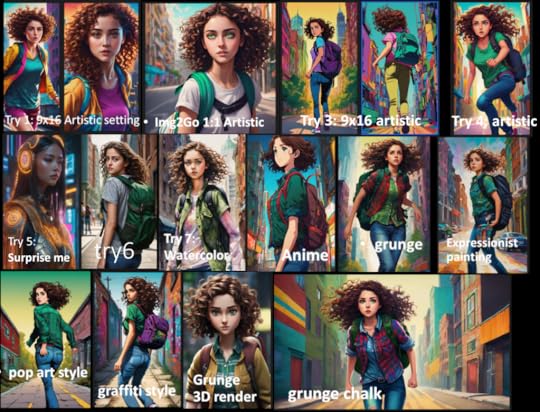
Figure 1: results from prompts above plus some of the styles I tried out, which I’ve noted on the image. All of the later pictures use pretty much the same prompt.
OpenArtThe pictures weren’t doing it for me, so I tried a different AI program called OpenArt. Using the same prompt, I tried different filters in OpenArt and put them together in Figure 2.
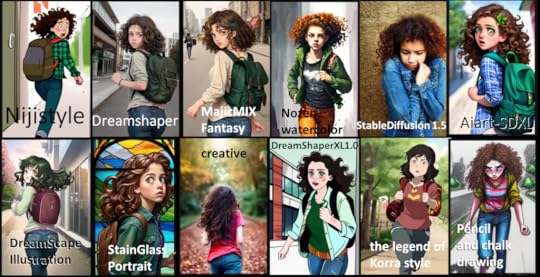
Figure 2: openArt Images. Again, not really what I was looking for.
PlaygroundThe third AI software I tried was Playground. Playground has lots of videos to follow and you get 100 free images every 24 hours and if you go over that (believe it or not, I did), you just have to wait 35 seconds to do another image. There were a few times on Thursday night when I couldn’t get in because the queue was so long, but I only had to wait a few minutes. Playground also has a Canvas tab which allows you to extend your pictures as I learned in one of the videos.
I plugged in my simple prompt and the results were suddenly a lot better. Playground helpfully added stuff to my prompt that happened to be just what I was missing.
The new stuff went something like this: “Unreal engine, greg Rutkowski, loish, rhads, beeple, makoto shinkai and lois van baarle, ilya kuvshinov, rossdraws, tom Bagshaw, alphonse mucha, global illumination, detailed and intricate environment.”
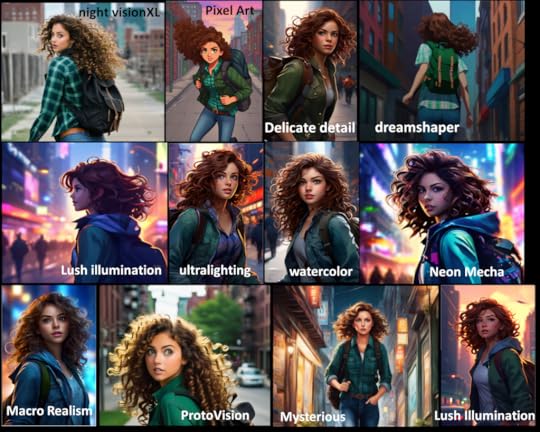
Figure 3: results from Playground on day 1. I think Playground must change the prompts a little with every attempt, although after over 100 tries, I don’t think they have very many models since most of my brown-haired girls look similar.
The next day, I sat down, ready to try and make similar covers for all the books in the series using Playground and Playground started spitting out closeups of faces on the filters I liked. Even when I put ‘Head shots’ in things to avoid, it still did it. I ended up mainly using two filters – Macro realism and Neon Mecha but I still tried some others, because, why not?
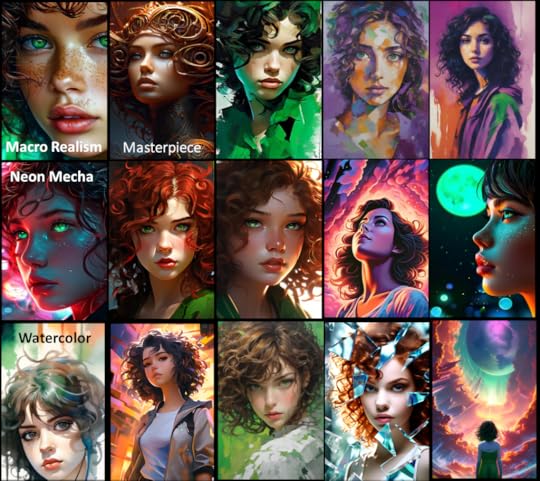
Figure 4: Day 2 attempts in Playground. I didn’t keep track of all my filters or prompts this time. I did try adding color words like ‘purple’ and ‘green’ and noting that my character is Italian and also included ‘impressionistic’ in some descriptions. If you’d like any of these for your own use, let me know. I didn’t post the ones I plan to use except for below.
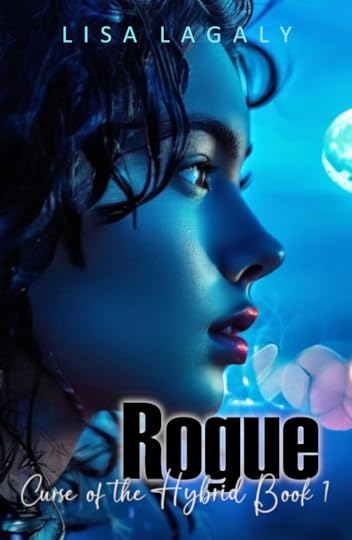
Figure 5: Cover reveal! One of my AI creations came out blue and I loved it! My sister, on the other hand said it made her think of Avatar and Botox. Sigh. I asked my daughter what genre and targeted age this cover portrayed and she got it right, but then she’s been hearing about this story for a while. What do you think? Good or not?
ConclusionI was able to make over 150 images in about 3 evenings. After all my previous failed attempts at making covers I like, with each attempt taking several days, it was wonderful. AI was not good at following drama cues, and had issues with limbs. Some of the images I made had smeared noses and ears, but in general, the faces were nice. AI was also not good at more than one person at a time. As a test I tried using Playground to make a cover with five friends and described each friend (height, sex, hair and eye color). It ended up give me 2 friends with a combination of the descriptors I input. In other words, my African-American character was suddenly wearing glasses. It’s really amazing that AI can make such beautiful images. Even if the images are not perfect, AI is an excellent tool to brainstorm and provide starting images to create the perfect cover.


